Woocommerce Elements not working

My previous support ticket MAY have resolved itself???? Not sure on that one; however, now it appears that Woocommerce elements are not working correctly. At this point I have notified ALL clients NOT to make any changes to their sites until further notice. It is becoming cumbersome trying to fix all of the individual issues that arise when things like this happen.
The most notable issue is with https://shinesautodetailing.com/product/basic-detailing-package/
This site is on a multi site network and for whatever reason, ever since I started to customize the CSS (advanced options - custom css (e.g., .class { element; value; } )) for the Woocommerce checkout button, the plugin has really acted in an unpredictable manner.
-

Hi Francesco,
There are two console errors on your product page. https://jmp.sh/aCCIoZq Your theme style.css file is not loading. There are few other errors related to non-unique id which is affecting your woocommerce functions.
These errors could be the cause behind the issues you are facing with woocommerce elements on your Product template.
To resolve the issue with the theme style.css file, can you try changing your theme from Twenty Seventeen child theme to Blocksy? Blocksy may have a better support for woocommerce.
Unique ID issues could possibly be related to your custom CSS. Some investigation will be required to get to the root of these errors. If you are not able to troubleshoot these erros, please get back to us. We will try to help you
0 -
I will look into that theme. Everything was working until I needed to use custom css for the checkout button element. If you guys want to take a crack at it, let me know.
0 -
Installed the free version and the issue persists. Do I need to purchase the full version?
0 -
That is the issue… ever since I had the issue with the previous ticket things haven’t been the same and I am unable to remove the CSS; it’s like it disappeared? I am unable to remove it and I am not sure if it is saved somewhere in the DB.
as far as the CSS. It was more to set the width of the add to cart button, set the margin-right to 50px on the deposit message, and to margin-left the additional options 50px. The code was the usual and customary
.class { property: value; }
0 -
Hi Francesco
Once you add a comment to your forum post, until one of us approve your comment, it does not show in the public forum. In your login, it will show as "Pending approval"
If you need help with troubleshooting, please add me as a user to your WordPress Dashboard. My email: kc.george@brizy.io. Please enable the option "Send the new user an email about their account" as in this screenshot https://jmp.sh/tSRznJX
Once you have sent me an invitation, please let me know here.
0 -
This has been done, if you need network access let me know
0 -
Hi Francesco,
I have received an invitation as a subscriber. I won't have access to your Multisite Dashboard with this role.
Since plugins are administered at the Network admin level, I would need access to the Network admin to help troubleshoot the issue.
0 -
Ok, let me fix that. I gave you access to the problematic site. One sec
0 -
I did this on the main site. Let me know if this is what you need.
0 -
I granted you SA rights on the network.
0 -
Thanks. I am able to login to both the Network admin and shinesautodetailing.com dashboard
0 -
Hi Francesco,
I have looked at the shinesautodetailing.com Dashboard. Please watch this video for my assessment of why the "Add To Cart" button is not displaying appropriately. https://jmp.sh/tNBo1I7
Since Extra Product Options plugin appears to have some incompatibility issue with Brizy, you need to look at possible solutions.
- Consider alternate placement options for the "Extra Options" and "Total Box". See this screenshot https://jmp.sh/529mlQo If Extra Options and Total Box are not placed along with the Add To Cart, the button can display well
- Consider disabling Extra Product Options if that is a possibility
- Recreate the woocommerce pages using the theme: Your theme may not have incompatibility issue with the plugin. This may involve a lot of reworking.
0 -
Hello, There were no issues with this plugin combination until I started to use the custom css functionality. These plugins are required for this client. You guys are really pushing me to elementor. It’s always brizy not compatible with ANYTHING woocommerce related. It’s always an issue.
0 -
I deactivated the extra options and deposit plugin and the site still doesn't work. I really think the CSS code that was saved has caused some DB issues that are causing this noin-unique ID. It's issues like this that cause me to lose clients because we either need to delete the entire site and start from scratch or I lose the customer and all the time I spent on the site. Really need to recover this site,.
0 -
Hi Francesco,
I looked at the product page now. https://shinesautodetailing.com/product/basic-detailing-package/
The "Add to Cart" button is displaying correctly and when clicking on the button, the product gets added to the Cart as well. Here is the screenshot of how the product page appears now https://jmp.sh/in3K9XC
0 -
Sir, the Gallery images are still not showing. All of the plugins i disabled seem to hook into the add cart portion of the form.
Here's a second product that is also impacted (recently created).
https://shinesautodetailing.com/product/moderate-detailing-package/
Can i use brizy templates for products or do i need to create these individually for each product?
Here is another site that has the same issue with the add to cart button, and it doesn't utilize the extra options or deposit plugin:
https://stancedevolution.com/product/t-shirt/
This site uses Woocommerce and an event plugin that is REQUIRED for their business model; do they need to deactivate their event plugin and remove their product variations?
0 -
Hi Francesco,
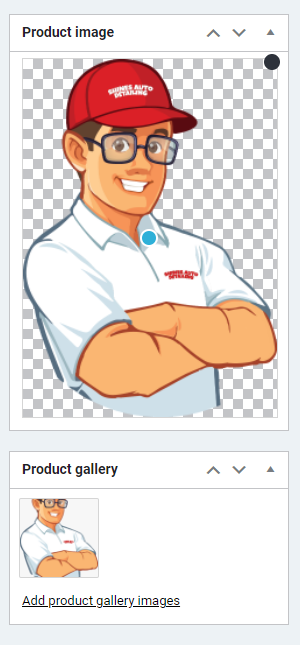
The primary product images were missing. I have now uploaded sample images. Please see both your product pages now
0 -
Hi sir, Now this is confusing… if you look at the previous auto save versions, the picture is in the product gallery. Did you remove the previous photo and reupload or reselect the picture?
0 -
Hi Francesco,
You are right; you had added one or two images to the "Product Gallery". However you had no image under "Product Image". When I added Product Image for both the products, the gallery started working in the front end.
 0
0
Please sign in to leave a comment.
Comments
19 comments