Text backgrounud color after pasting | Brizy Cloud

Hello Brizy Support Team,
After the last Brizy major update, there appeared a difficulty with the text element.
Now a text copied from another source is pasted with a background color too. And I can't get rid of it from the settings.
Sometimes it happens when I'm copying text with a white color bg in Brizy Cloud, and pasting also in Brizy Cloud but the pasted text would be with a color, like in the screenshot.
Is there something I am missing?
Could you help me with that, please? Screenshot attached.
Best Regards,
Nina Tanasova

-

Hi Nina,
I have not seen this earlier. We would like to check this from your project Dashboard. Can you please mention the subdomain URL of a project where you are facing this issue? (something.brizy.site)
0 -
Hi George,
It is extraenergysolar.com, /services page.
Thank you!
Best Regards,
Nina0 -

Hi Nicolai,
I think the problem was in the text itself. I just added our Text element and added your text. Now it is displayed correctly.
Let me know if you have any other questions.
Regards, Natalia
0 -

I have the same problem. It can be manually fixed but i would like to know the cause of this issue.
When i copy text, which has no background color, i will get text whith a which background color, even thow its not shown in the brizy text settings. Please Check the Problem.
Here a video.
0 -
Hello Georg,
Pasted text includes the background color, especially when pasting external text. Once you paste the text, kindly right click and select the "clear formatting" option to remove the text background color.
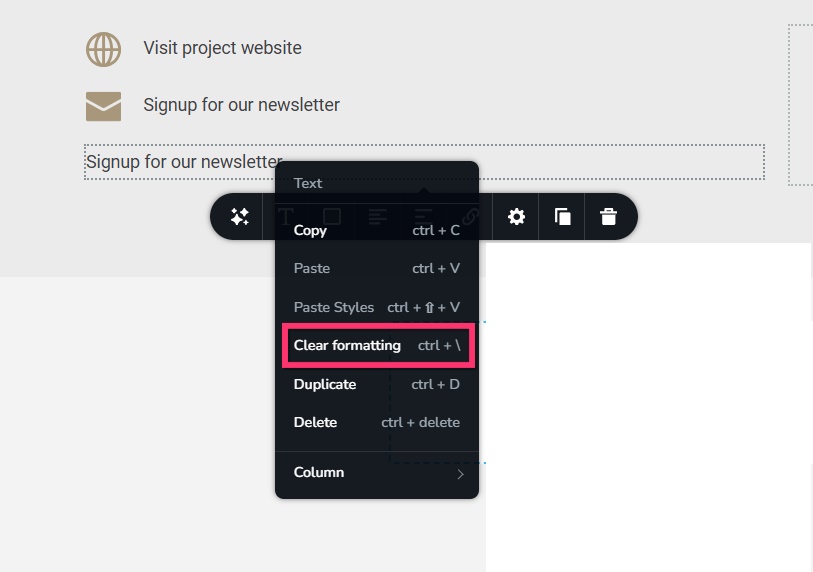
When copy pasting from a Text element to an icon box, since there is no background color, ideally pasted text should not have any background color. I will report this bug and we will work on fixing it.
0
Please sign in to leave a comment.
Comments
5 comments