Cannot find archive page under menu

I am trying to create a blog page which has the blog posts from specific categories.
I created a template archive page under templates and then added in the archive element.
But then when I go to my menu, I don't see my archive page there. I am confused. Where is the blog archive page located and how do I add it to my menu so that I can access it.
-

Hi Gary
You can find your Category archive pages in the WordPress menu under the Categories tab on the left hand side pane.
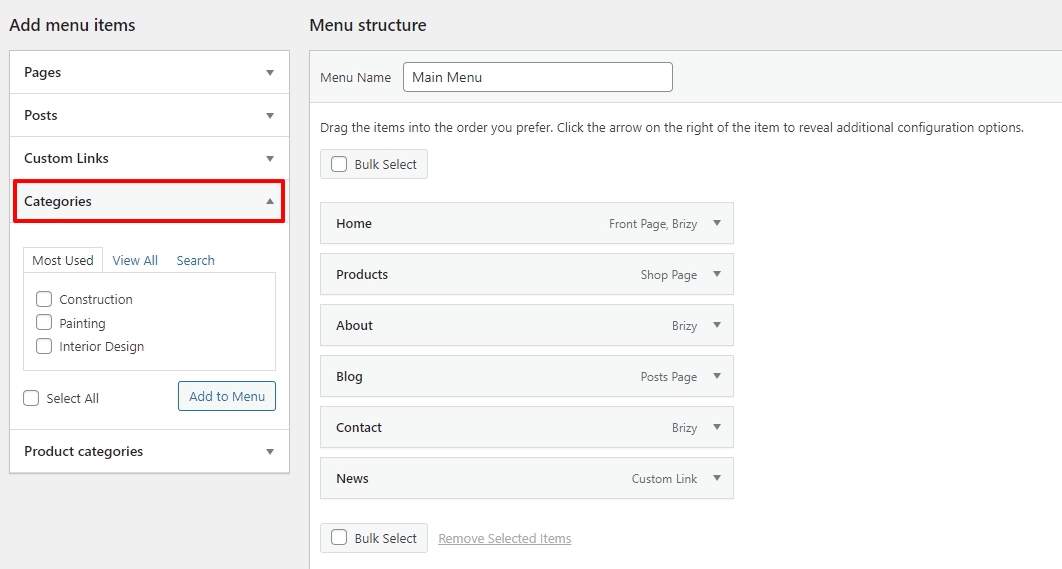
You can identify your blog page by going to Settings- Reading. Once you identify the page, you can add it from the Pages menu in WordPress.
 0
0 -
How do I link to this page now? I cannot seem to link to it. What url are I using? The same blog template url or something else? When I use the blog template url eg. www.mysite.com/blog it just goes to a blank blog post page and not the archives page.
0 -
Hi Gary
There are your category archive pages
deleted.
Looks like you have setup your homepage as your blog.
0 -
Hi, can you please remove my site's url from this post? It's showing up on google search and I don't want it showing up on there. Thanks
0 -
Done
0
Please sign in to leave a comment.
Comments
5 comments