How to get rid of space between blocks

I am having trouble trying to figure out how to get rid of the spacing lines between the blocks. I have already set the padding to zero but it still has the lines above and below the blocks.

-

Hi,
Thank you for contacting us.
Please go to the setting block and change the margin and the padding for this image, see this video.
Best regards, Nelea.
0 -
Hi there,
I have already done that but the line is still present. This problem seems to only exist between the header block and any blocks below it. Also I am unable to drag the block all the way to 0 px. It stops at 15 px. Could this be causing the issue?

 0
0 -

Hi Gary
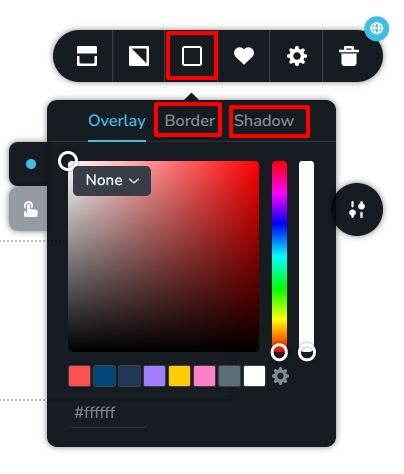
Under Block settings - Color icon - remove any border or shadow.
 0
0 -
Thank you, I was able to get rid of that line by deleting that page and starting a new one.
0
Please sign in to leave a comment.
Comments
4 comments