Custom Post Type Assets Multi Reference and Dinner Menu Question

So everything was going good. I created a database of 42 food menu items and successfully sorted them by type: ie: Appetizer/Salad/Pasta and displayed them all together perfectly using a custom created layout.
https://dinnermenu.brizy.site/
Then I decided to refine it and add a time selector. ie: Lunch/Dinner
So I created a "Time" custom asset with "Lunch" and "Dinner" as the Choices.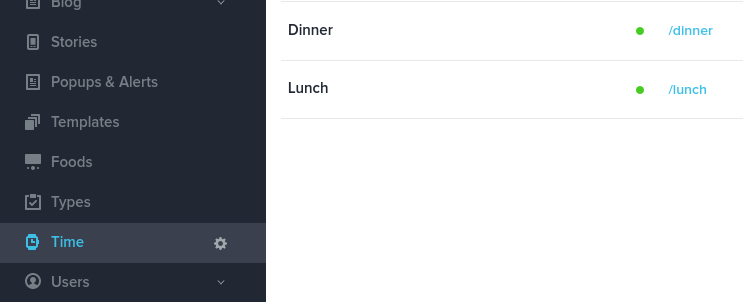
I was hoping this would allow me to display for example: Only items that are both "Appetizers" & "Dinner". But instead it displayed everything that was either an "Appetizer" or a "Dinner". Which unfortunately had the side effect of displaying every menu item under every section of the menu.
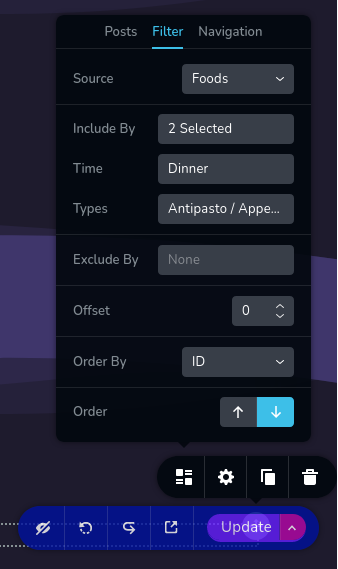
The filter seems to display everything that has either the "Type" "Appetizers" or the "Time" "Dinner" instead of only displaying selections with have both "Appetizer" & "Dinner" as the values.
How would I go about getting it to display only Food Items that are both an "Appetizer" and a "Dinner"?
Does that make sense?
Am I understanding the way this works or is there a better way?
Thank you for your time.
-

Hi Jonathan
I tested the filtering function of the Posts element. The filter seems to take Include condition and ignore the Exclude condition.
This is bug. We are sorry for this inconvenience. We will report this issue to our dev team. We will need sometime to fix this. In the interim please list foods with just the Include condition.
0 -
There seems to also be an issue with offset. No matter what setting it doesn't seem to affect anything.
Is this supposed to work in the same way offset in mysql works?
0 -
Hi Jonathan
Offset feature stopped working after a previous update. We still have not fixed it. This is how it used to work.
- When you add offset 1, latest 1 blog post will be removed from the blog list
- When you add offset 2, latest 2 blog posts will be removed from the blog list
- When you add offset 3, latest 3 blog posts will be removed from the blog list
0 -
Oh good that's exactly the way I was hoping it would work.
I look forward to that working.
It will be a really useful/better solution for sorting data than what I ended up doing instead on a project.
0
Please sign in to leave a comment.
Comments
4 comments