Categories in Brizy Cloud

I am trying to show the categories that I have tagged a blog, which is showing properly, however, those tags are not hyperlinked so you can dive into those specific categories.
Is there a way to make those hyperlinked without manually doing it?
https://www.anewmediagroup.com/top-seo-practices-for-non-profits-you-have-to-start-doing
-
I figured out how a hyperlink to the Category Links, but all of them keep redirecting to the main page, not the category that is tagged?
For example the page above has a Category for this URL: https://www.anewmediagroup.com/nonprofit-marketing
However, it doesn't go to this??
0 -

Hi Bradley
When you use the Text element and type #Category Title, it just displays the category names. This is meant only to display the categories that the blog post belongs to.
You can create a "categories" menu and make it available on all your blog posts. When users click on a category name, the link will take them to the respective category archive page. For example, take a look at this test blog post. https://blog-archive.brizy.site/three-ideas-to-make-your-room-shine On the left side bar, click on any category name and it will take you to the respective category archive page.
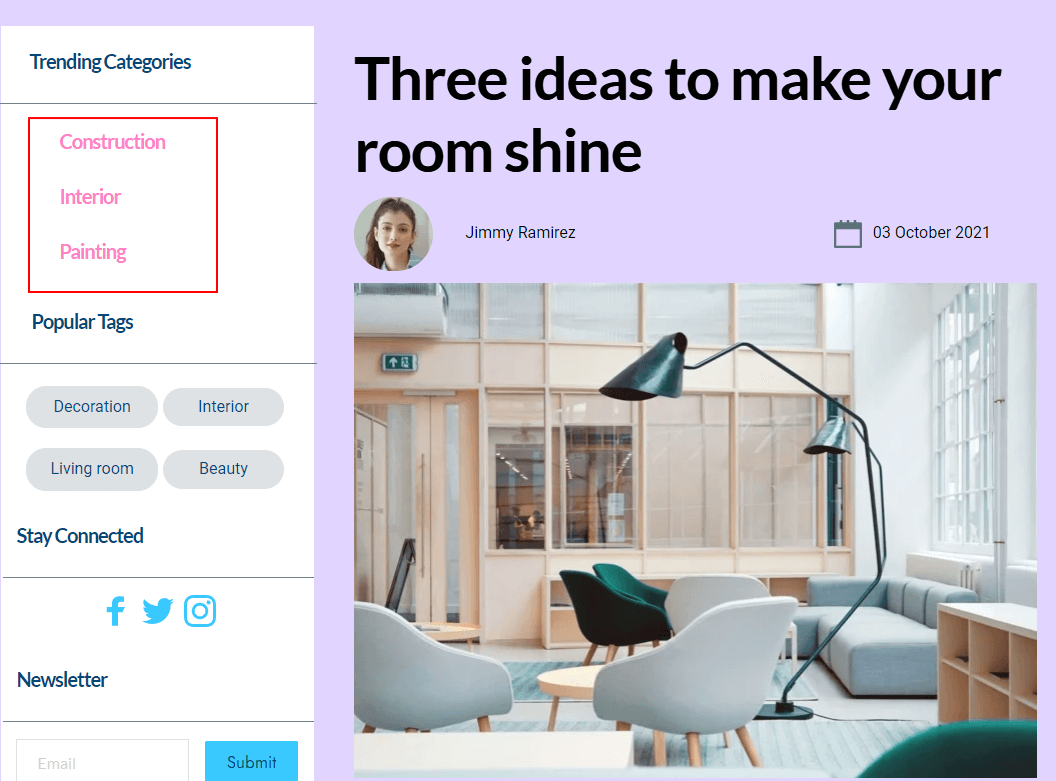 0
0 -
Okay, but not sure how you do this? I have tired to figure this out without any luck.
0 -
Hi Bradley
To create the categories menu, please follow this procedure
- Under CMS- Menu, create a new menu.
- Select all the available categories and add to the menu and Save Changes
- Refresh the editor and drag and drop the menu element to the page and select the categories menu
Please watch this video for more detailed instructions. https://jmp.sh/gcACn4n
0
Please sign in to leave a comment.
Comments
4 comments