Asset type (archive) not showing up

Hi,
In your tutorials for custom post types it shows asset type field but I don't see that in my account.
Am I missing something here?
Thanks
-

Hi,
Thank you for contacting us.
We have checked one project from your account and you have the custom asset, please see here. Can you please tell us exactly in which project you don see custom assets?
Best regards, Nelea.
0 -
Hi,
yes the custom asset shows up, but the Asset Type -> Archive doesn't, and in your tutorials it exists here https://support.brizy.io/hc/en-us/articles/360020165718-How-to-create-link-category-taxonomies-assets
current project i'm working on is ratedefence.com
0 -
Hi,
The archive type for the asset was removed from the Brizy cloud. This is in all projects, not just in your project. Unfortunately, our documentation has not been renewed.
Best regards, Nelea.
0 -
I see, ok. What is the proper workflow then for archive types of assets? I'm trying to better understand that and the reference vs multi reference connections, not really clear on how it works. Do you have better documentation on all this?
Also a second question i just ran into today, if i load a layout that was saved with global elements in it, the elements are loaded but not as global ones. I would like to keep a layout as a template including those, what's the best way to do that?
0 -

Hi Thea
To link your custom assets to its taxonomies, please follow this revised procedure. https://jmp.sh/PRX4PKS
Once you make a block global, you also need to specify its Display Conditions. In the block settings, click on the block icon and then on Display Conditions.
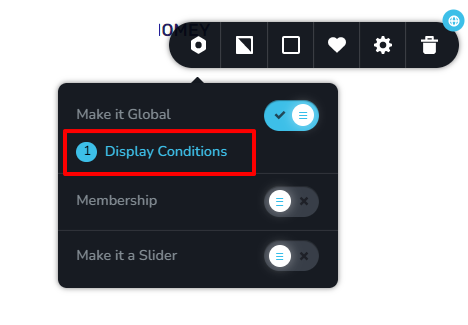
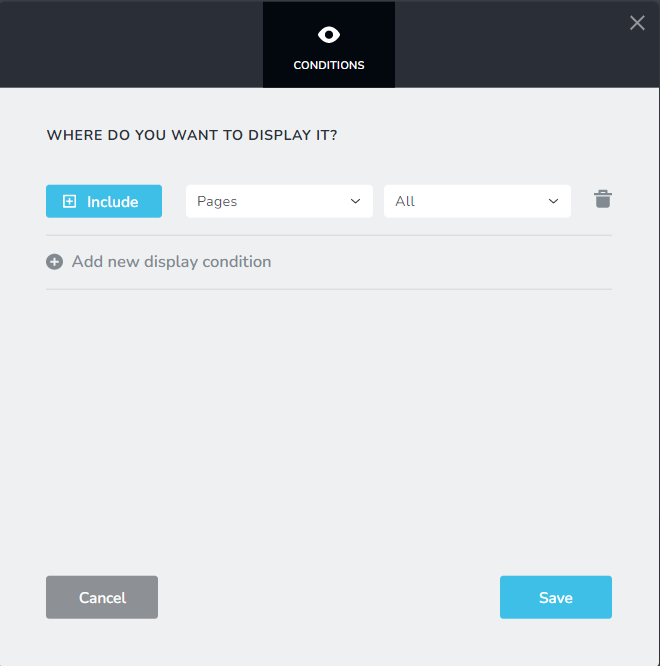
You can specify in which pages/posts you want the global block to be displayed. For example, if you want it to be displayed on ALL pages, you specify it like this
 0
0 -
Thanks for the taxonomies video, that helps a lot and now make sense. Maybe you guys add it to the official docs to not have us ask about it again.
About the second issue, I get your point but if i save a layout, that's basically a template, and i want to have a global block in there, when i load that layout in the page the block is loaded but as a local one.
If i set the block visibility to be on all pages it looks like it's appended everywhere, which i also get. But if i want to just load a block that's the same across my templated pages (I'm in this case listing hotels where some blocks like contact forms are the same), and i save that block into my page layout template (to be loaded on the next page I create), then the whole thing doesn't really work. Or rather I would have to load the layout then replace the loaded local blocks with those same blocks but global saved ones. If i just convert the block into global then brizy just saves another copy of the block.
My point is that global blocks don't save as global into saved layouts. Or i might be missing a step somewhere.
0 -
Hi Thea
You said "My point is that global blocks don't save as global into saved layouts". You are right; global blocks do not show up under "Saved" blocks, but under another tab "Global Blocks". https://jmp.sh/pZDL8yh
Please watch this video and see if its helpful. https://youtu.be/4bjtTi67uv4
If you still need help, may be we should have a zoom consulting session where I can go over this issue with you where I can clarify different questions you may have.
0 -
I get what you mean and thanks for that, but the issue I'm describing is a different one:
- from my understanding, in Brizy cloud we can't duplicate pages, if we want to duplicate a page we have to save the layout of one page, and load it into a blank page and that effectively duplicates the page
- if that layout that we are using effectively as a template to create pages of a same type has a global block in it, that block will not be loaded as a global block but as a local one once the page layout is loaded into the new page
- hence to have a global block in all our pages of that type, we need to manually go into each loaded page/layout and replace the block in question (that was loaded as local from the "template" layout) with a saved global copy of the same block.
If it really works like this and there is no other way around it, then my feedback and feature request would be that there is some way to load global blocks as part of the template, or easier - to be able to duplicate pages completely.
No need for a Zoom call, I'm fine with text instructions and the videos are helpful thanks.
0 -
Hi Thea
In this video, I import a saved layout to a new project and then make few blocks global. See how the global blocks get added to different pages automatically. https://jmp.sh/7JWhAqr
0 -
Hi KC George, thanks would like to see that, however your video seems to be offline
0 -
Hi
For some reason, my video got deleted. Sorry about that. I have re-recorded it. https://jmp.sh/AjruyVC Please see how the global blocks get added to different pages automatically by specifying Display Conditions.
0
Please sign in to leave a comment.
Comments
11 comments