Audio

Hi there,
When I add "Audio" to my Post - I don't want soundcloud so I elect "custom". When I click on +file, nothing happens. I can drag and drop and I can't upload.
Should I be able to load an MP3 or MP4 or maybe link a URL. I want to link the audio to podbean or at the very least link to a media file.
Please help.
-

Hi Kim
I am able to upload MP3 file using the Audio element. Here is my test page. https://homi.kctest.online/test/. The MP3 file should get uploaded to your Media Library and you should be able to select it from there.
Your file size should not exceed the maximum upload size permitted by your hosting company. If you still have the problem, please get back to us. We may have to take a look at your WordPress Dashboard to offer you further help.
0 -
I'm happy for you that it works on your test page.
I had tested with an MP3 in media. I go to the audio block in Brizy, select custom and click on the + to add file. Nothing happens. If my file is too big I imagine I would get an error message. In my case, as expressed earlier, nothing happens. My plugins are current.
0 -
Hi Kim
If you would like me to take a look at your WordPress Dashboard, please add me as a user. My email: kc.george@brizy.io. Please enable the option "Send the new user an email about their account" as in this screenshot https://jmp.sh/tSRznJX
Once you have sent me an invitation, please let me know here.
0 -
Hi Kim
I have received your invitation I am able to login. However I do not have access to your WordPress Dashboard. This could be because you have not assigned me Administrator role. https://jmp.sh/tSRznJX To offer this help, I need administrative role in your Dashboard. Please check
Please also let me know which page you want me to check after I login
0 -
Gotcha. I can't bring up your screen shots (co firewall) but I added you as administrator. Hopefully that gets the job done. :)
I added an audio block to a post "Special: Ukrainian Immigration" posted last week. You can pop into the media file first and you'll see the MP3 Ukrainian media file to link to the post.
I'm trying to add this Brizy audio block so my theme Megaphone will pick up the audio. It didn't find when I tried with soundcloud.
Thanks!
0 -
Kim
I have access to your backend . However unfortunately, I could not make much progress with troubleshooting because the A2J Special: Ukrainian Immigration post would not open for me. Every time I make a change in the backend, I need to check if the page loads correctly. Since the page load in 4-5 minutes or does not load at all, I am unable to make progress with troubleshooting. Take a look at this recording. https://www.loom.com/share/688dc2e66b244f6290752a0e3149d86c
I will need more time to see what I can do
0 -

Can Brizy integrate with an app called AudioIgniter? It's a good player for wordpress.
https://www.cssigniter.com/demos/audioigniter/
Can we integrate with this? Thanks.
0 -
How can I use AudioIgniter with the custom option? It looks like it is possible but maybe not. Can you please let me know or think about integrating this because SoundCloud only allows three hours on repeat? Thanks. I want to provide specific music for my shopping experience.
0 -
I need to add a playlist, not just one track. So this option is really not helpful. I do not want to use Soundcloud because you are limited to 3 hours. I want to integrate with AudioIgniter but this won't work with Brizy. So many great plugins we cannot use because Brizy limits the use of them. Can you please enable this? there needs to be better media functionality and this one track thing is not good enough.
0 -
Clearly it is not possible to use a third party player now. I am putting this request in so we can do audio playlists. Also the playlist feature is the same as the video feature and also does not offer a playlist feature as far as I can tell.
0 -
Hello Armand,
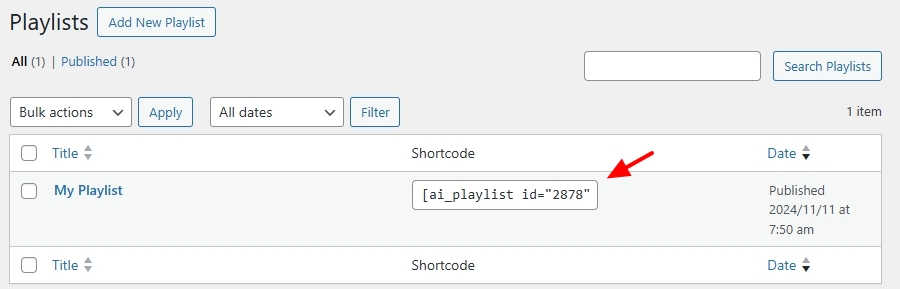
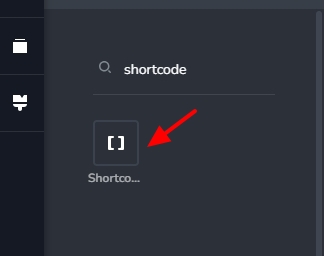
To display a AudioIgniter playlist on your Brizy page, kindly install the AudioIgniter plugin, add your MP3 tracks to the plugin following the procedure at How to Add Audio Player in WordPress with AudioIgniter WordPress plugin and copy the playlist shortcode. On a Brizy page, drag and drop the Shortcode element and paste the playlist shortcode, save your work and check the page preview. You can see a sample playlist at https://brizy.online/audioigniter/
 0
0
Please sign in to leave a comment.
Comments
11 comments