issues w global

builder very slow cant use styling brizzy freezes, layouts wont save also blocks saved items very slow to load in. how can this be fixed
-

Hi,
Thank you for your message!
Can you please tell if you encounter this problem in Brizy Cloud or WordPress? Thanks and hope to hear from you soon!
Kind regards,
Doina
0 -
WordPress
0 -
i dont really use brizy cloud
0 -

Hi Shawn,
Can you please let us know these details also?
- WordPress theme you are using
- Your hosting company and the plan you have selected
- List of Plugins
0 -
hostgator
I am only using a couple plug-ins I actually have deleted all of them to see if that made a difference and it did not. I see that of the People have set up temporary access to their portal can you give me your email and I will do that so you can check it out for yourself
0 -
using theme 2022
0 -
Hi Shawn,
I am happy to take a look at your WordPress Dashboard. Please add me as a user to your WordPress Dashboard. My email: kc.george@brizy.io. Please enable the option "Send the new user an email about their account" as in this screenshot https://jmp.sh/tSRznJX
Once you have sent me an invitation, please let me know here.
0 -
sent invitation please confirm
0 -
did u recieve
0 -
did u receive invitation have yu looked at site for fixes on issues
0 -
Hi Sir
I have looked at your WordPress Dashboard. The entire website loads relatively slower. However I did not find specific issue with opening Brizy pages or changing styling.
There are few things you can consider to improve the overall website speed
- WP Optimize and Litespeed Cache are both caching plugins which offers the same functions. You can delete one of them.
- You have installed Google Analytics Dashboard for WP (GADWP) and Google Analytics for WordPress by MonsterInsights. These two plugins also do the same. You can delete one of these.
- If you are not using Site kit by Google, please consider deleting it also.
Can you elaborate more about the issues you were facing with speed? I would like to check those issues one by one
0 -
Hello Sir
I have looked at your website speed issue. In my tests, global typography updates are taking 3-4 seconds and updating the page takes 5-6 seconds. In my test, page did not freeze after these activities.
Please take a look at my test here. https://www.loom.com/share/25b17ec72ed6439995532e84a9df867e
My impressions after taking a look
- Your website is relatively slow
- Database optimizations I did seem to have helped a little. I have scheduled weekly database optimizations using WP Optimize
- Please try deleting one or two plugins as I have suggested above and see if that helps
- Moving out of Hostinger to another hosting provider might give you the most significant improvement in your website performance. I would be happy to suggest alternate hosting providers you can consider.
0 -
yes what do u suggest that is better hosting company
0 -
Hi Sir
I would recommend Easy WP or Cloudways. They both are our hosting partners and hence Brizy works well with their servers. https://www.brizy.io/hosting-partners
Easy WP
With Easy WP, if you can afford, try the Turbo Plan.

You can get the first month for free. When you signup with them initially select a domain from EasyWP
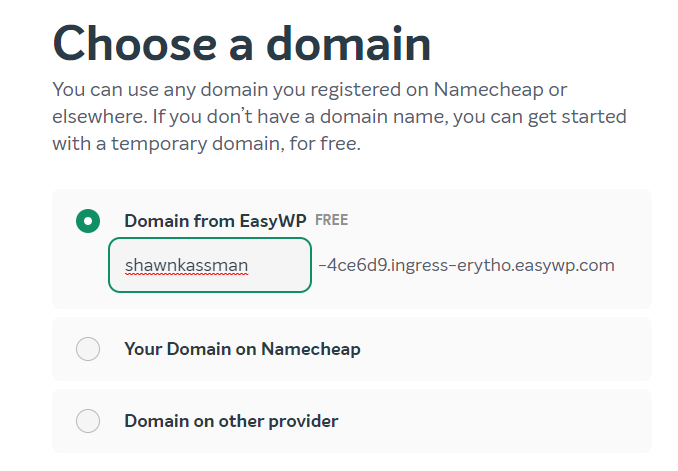
Then clone your website to your EasyWP account, check if the website loads faster. If you see considerable improvement in speed, then you can add your domain to Easy WP and cancel your hosting account with Hostgator. You get one whole month to do this experiment and if you did not choose Easy WP, you have not lost any money (because your first month is free).
Cloudways
Sign up with Cloudways and select "Digital Ocean" server with 1GB RAM and select New York for your server location. https://jmp.sh/4wZn8ub This sever will cost you USD10 per month. Once you setup the server, clone your website to the Cloudways server and then check the speed difference. If you see significant difference in speed, then you can point your domain to Cloudways server and cancel your Hostgator account.
Cloudways charges you per hour. If you used their server for 3 days and then want to cancel it, you only pay for 3 days (close to a dollar)
0
Please sign in to leave a comment.
Comments
14 comments