Brizy menu lost after wp update

Hi,
After i make update for wp, all things about Brizy Free plugin has been disappeared from all site, also the design has not displaying properly.
There is no "Edit with brizy" button, or brizy menu.. also when i go to Plugins page, i see only "brizy pro" plugin, there is no brizy free.. because it is not appear here, i tried to install brizy free.. i get an error says that the folder exists. at plugins page there is a message: "Brizy PRO requires Brizy Free 2.3.30 or newer. BRIZY PRO IS NOT RUNNING."
-

Hi Kenan
To fix this problem, please
- Delete the "Brizy" directory under wp-content/plugins directory on your server.
- Re-install Brizy from the WordPress plugin repository.
How to Delete the Brizy directory?
Most hosting companies provide you access to your server files. For example, if you have access to cPanel , it has a File Manager where you can see your server files. You can delete the Brizy directory using the software your hosting company provides.
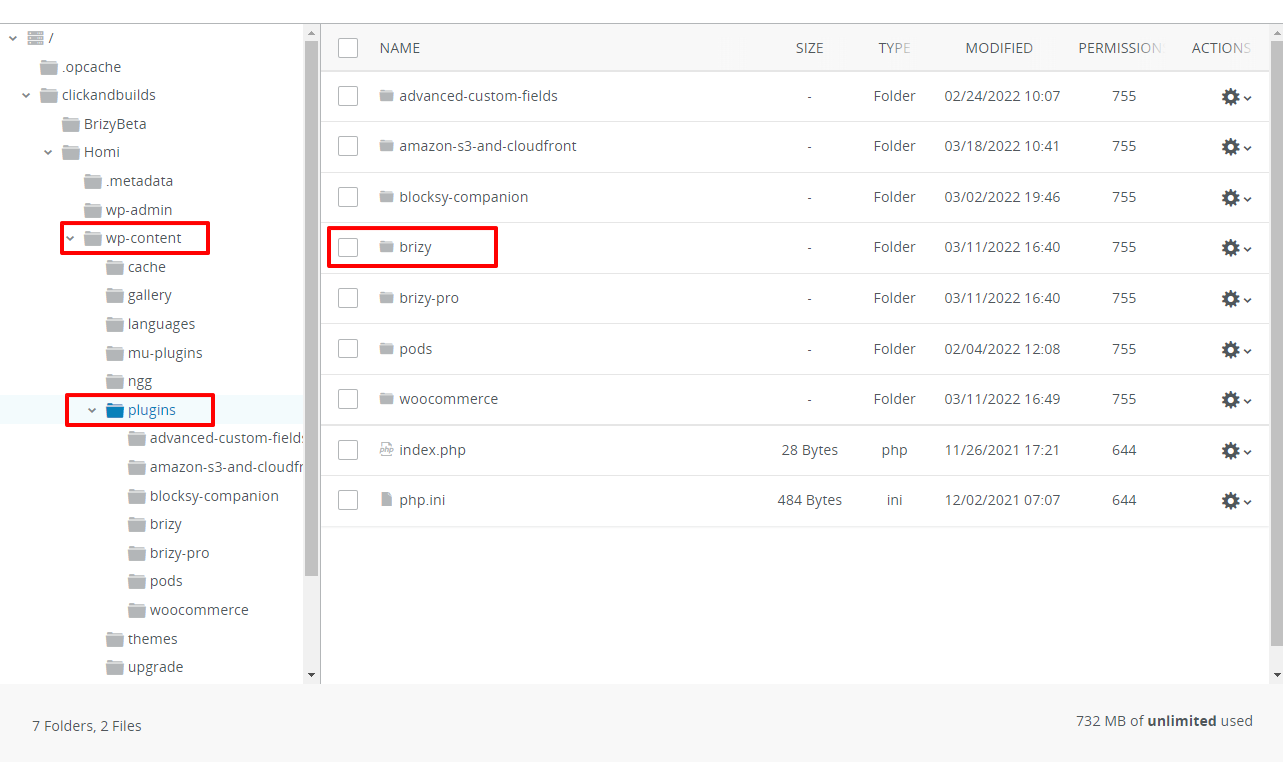
If you do not have a software to access your files on the server, you may need to use an FTP client like FileZilla to delete it.
You can also make a request to your hosting company to do this on your behalf if you are unsure.
0 -
OK. Now everything is fine. Thank you!
0
Please sign in to leave a comment.
Comments
2 comments