add to cart button


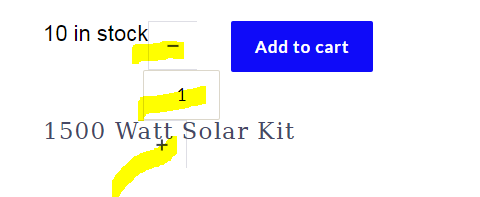
how do we get rid of the - + on the add to cart button? The - + and the numerical number are not horizontal and is not easy to work with as the margins overlay into the surrounding content.
-

Hi Russ
The Add To Cart button normally displays like this. The + and the - signs normally align to the left and right of the quantity.

Do you have a link you can share with us where we can see this issue?
0 -
Hi Russ
I have looked at https://www.wmsolaraz.com/product/1500-watt-solar-kit/. I could not find a possible cause for the incorrect display of the Add To Cart button on your page from the front end. Everything looks fine at the front end.
We will need to look at your WordPress Dashboard to troubleshoot this further. If you need help with troubleshooting, please add me as a user to your WordPress Dashboard. My email: kc.george@brizy.io. Please enable the option "Send the new user an email about their account" as in this screenshot https://jmp.sh/tSRznJX
Please also let me know here once you have sent me an invitation.
0 -
sent
0 -
I have this problem on another site too. so let me know how you fix it.
0 -

Hi Russ,
Thank you for your message!
Please send the details to my colleague and we will do our best to solve the issue. Hope this helps!
Kind regards,
Doina
0 -
Hi Russ
Sorry for the late reply. I did not see your message until half an hour ago.
I looked at your WordPress Dashboard. The "Add To Card" issue you were facing was because of theme incompatibility. I installed Blocksy theme and the Add To Cart button seems displaying properly. Please check https://www.wmsolaraz.com/product/1500-watt-solar-kit/.
Page Builder Framework is one of our theme partners. I am noticing this incompatibility issue for the first time.
0 -
ok thank you for fixing this. Ill just have to use blocksy for ecommerce for now.
0
Please sign in to leave a comment.
Comments
8 comments