WooCommerce Checkout page not loading

Hello there :)
I have installed WooCommerce and while it works for most pages, the checkout page will not load in Brizy, it stays stuck on the loading page. I have tried fixing the issue myself and can report that:
- All plugins are up to date
- Only Brizy, Brizy Pro and Woo Commerce plugins are active, all others are disabled
- I have tried 2 different themes (Blocksy and 2022)
- I have created a new checkout page and assigned it in WooCommerce, when I do this, the old checkout page will load and the new page does not load.
- Mod Sec is temporarily disabled (This has caused issues in the past)
Developer tools shows this error:

GET https://<Domain>/?brizy_media=wp-2ff3d4ae0724fddfca9df4ce2fb36a66&brizy_crop=iW%3D5000%26iH%3Dany 404
Please help!
-

Hi Hazel
Can you confirm these details?
- In the list of pages, when you look at the checkout page, do you see a description "Checkout Page" or "Checkout Page, Brizy" like in this screenshot? https://jmp.sh/AyVdxeZ. If you see it, it confirms that you have assigned the checkout page correctly in Woocommerce.
- "Edit" the Checkout page and please confirm that you see the Checkout page shortcode in Gutenberg like in this screenshot https://jmp.sh/NQ0SWj5 This confirms that the page has the Woocommerce Checkout functionality.
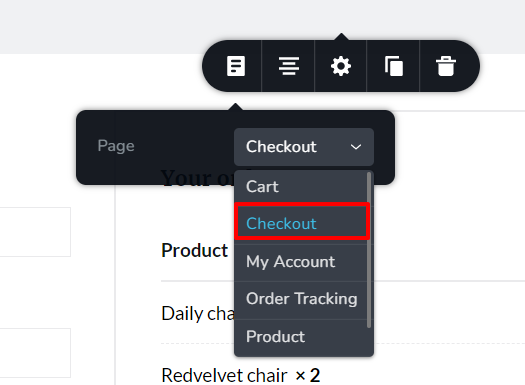
- Edit the Checkout page with Brizy (by clicking on "Edit with Brizy") and ensure that you have dragged and dropped the Pages element and have selected Checkout option in the element
 0
0 -
Hey George, I shall have a look at this as soon as possible, Friday at the latest :) Many thanks,
0 -
Hello George :) I sussed out the problem, might we worth adding to the KB: I was getting the error because I didn't have any items in my basket - and because of this there was nothing to check out. As soon as I added an item, the page loaded without issue. Many thanks, Hazel Spencer Ibble
0
Please sign in to leave a comment.
Comments
3 comments