Deactivating google fonts is very URGENT

We can get massive problems and fines in Germany if Google fonts continue to be loaded from Google servers.
Therefore, please URGENTLY find a way to disable them. Otherwise all pages in Germany must be taken off the net. Please!!!
-

Hello Annette,
Thank you for your message!
Regarding what you said, in Cloud you can remove the fonts. You use a local font, set it as default then remove the google font. In WordPress, please see this articles:
1.https://wordpress.org/plugins/disable-remove-google-fonts/
2. https://ffw.press/blog/how-to/remove-google-fonts-wordpress/
This is a temporary solution until the update will be made. This issue is going to be solved in the 2.4 version (where there is already a beta version), as my colleague mentioned above. Hope this helps and made everything clear!
With the best regards,
Doina
0 -
Hello Doina,
Thanks for the quick reply.
I have installed a local font in cloud and have already deleted all fonts except LATO. It cannot be deleted.How do I set the local font as default?
Kind regards
Annette Jakobi
0 -

Hi Annette
At the moment we cannot change the default font. However the possibility to change the default Lato font is part of the Brizy WP 2.4.0 beta release. You can read more about it here https://www.brizy.io/brizy-wordpress-open-beta-2-4-0
The features of 2.4.0 version are scheduled to come to Brizy Cloud and Brizy WP in the first quarter of 2022 (by March end). When this update is released, you will be able to set a local font as your new default.
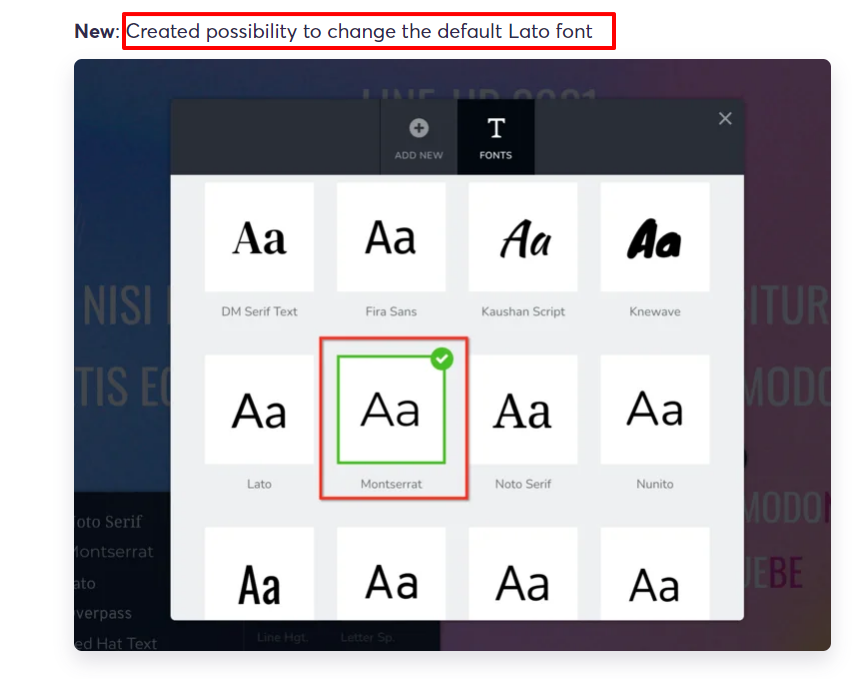 0
0 -

So when is this finally going to be incorporated into brizy cloud then?
The release of this fix for brizy cloud is over four month overdue now...This is such a long lasting issue it's nearly implicable.
Additionally, I noticed that all brizy sites now make CDN requests which obviously could also be an issue in regard to GDPR, i.e. a-cloud.b-cdn.net, b-cloud.b-cdn.net.
This might be handy for sites using the cloud hosting option but should be disabled once the site is locally hosted (or synced to another webspace).
Please be so kind and explain how to deal with this. Thanks!0 -
Hi Daniel,
This feature is already implemented with Brizy Cloud. You can upload font files to a Brizy Cloud project and make it your default fall back font. In this example, my default fall back font is Montserrat Local.
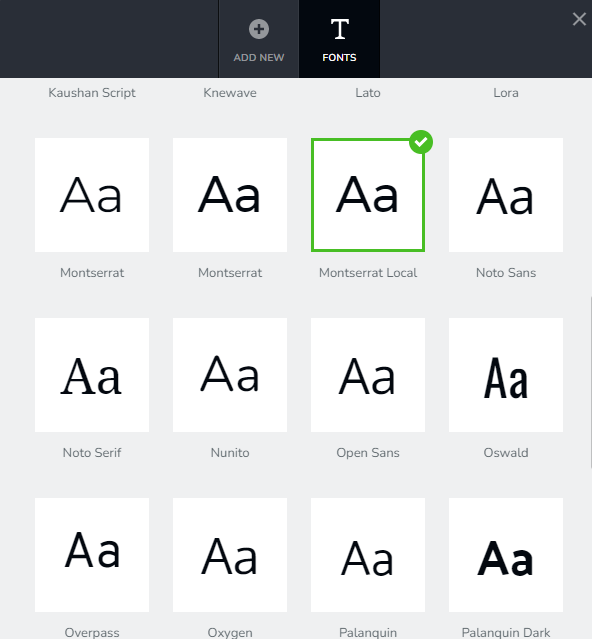
If you upload a set of fonts that you use for your project and select locally hosted fonts for your all your typographies, then your Brizy Cloud project will not send any font request to Google. For example, please have a look at this Brizy Cloud project: https://brizycloud.kctest.online/ If you look at the waterfall of the GT Metrix performance report of this website, you will notice that not a single request goes to fonts.googleapis.com, fonts.gstatic.com or ajax.googleapis.com. Here is the report https://gtmetrix.com/reports/brizycloud.kctest.online/wupH9j7S/
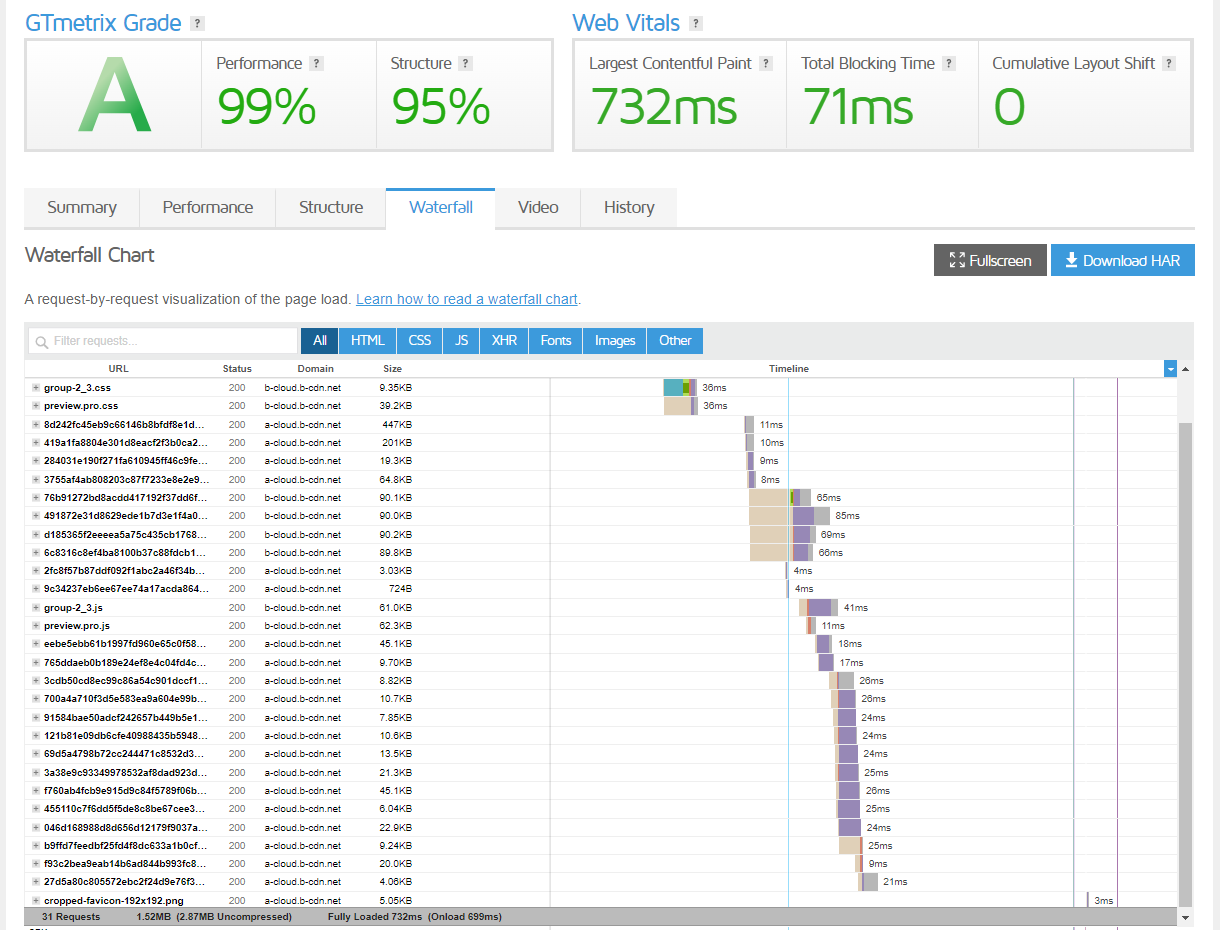
Brizy Cloud uses the Bunny CDN. All HTTP requests going to b-cloud.b-cdn.net are internal requests to a Brizy Cloud website.
0 -
Hey George,
thanks for your reply and sorry for being so rude. It's just so much time has gone by and people are getting more and more nervous regarding privacy concerns.
If you upload a set of fonts that you use for your project and select locally hosted fonts for your all your typographies, then your Brizy Cloud project will not send any font request to Google.
Ok, I see. I can confirm it works the way you mentioned above.
This will do the trick I guess even though it would be much better to have a privacy-first default setup with only a small set of local fonts that come with every project and that might be extended by manually enabling google fonts if needed.Regarding Bunny CDN. As far as I can tell, this might be a problem with EU privacy regulations even though they say they are GDPR-compliant as the surely will log requests made. Or do you know which (meta) data will be processed by them of website visitors and if so, how long they will be stored by Bunny?
Brizy Cloud uses the Bunny CDN. All HTTP requests going to b-cloud.b-cdn.net are internal requests to a Brizy Cloud website.
So b-cloud.b-cdn.net redirects to a site owned by Brizy? Either way, it might it be necessary to have information about which data is processed when these requests are made. Sorry to bother about this but it's really essential for us in making decisions whether we are able to use brizy cloud for any future web projects or not... Thanks!
0 -
Hi Daniel,
You can read more about Bunny CDN logs here https://docs.bunny.net/docs/cdn-logging. They say
"To comply with GDPR and privacy regulations all logs are provided with anonymized IP addresses"
They collect these details: https://docs.bunny.net/docs/cdn-log-format and logs are stored for 3 days.
When you access a Brizy Cloud website, your first request is processed by the AWS server which hosts the website. The second request onwards are served from one of the Bunny CDN network servers. These servers have cached pages of your website.
0 -
Thanks for the hints, George.
The Bunny CDN docs also state:
To comply with GDPR and privacy regulations all logs are provided with anonymized IP addresses. To enable full IP logging, you will first need to accept and sign the Data Processing Agreement (DPA) in your account settings. After that, a new setting will be enabled in your pull zone logging settings to disable anonymization.
So have you signed a DPA for your Brizy Cloud service and enabled IP deanonymization? I think it's important to clarify this and make this information available as part of your brizy cloud terms and privacy policy in order to be fully transparent what's happening in privacy regards.
It might even be very helpful if brizy cloud users could use this information in their privacy policy page for every project and link to a page on brizy.cloud that informs about all things privacy and data processing when visiting a brizy site.
When you access a Brizy Cloud website, your first request is processed by the AWS server which hosts the website. The second request onwards are served from one of the Bunny CDN network servers. These servers have cached pages of your website.
How about an option to disable CDN usage in case of self hosted sites (using server sync or html export)?
0 -
Hi Daniel,
In our Bunny CDN account we have enabled IP anonymization.

We are open to publish a document in our knowledgebase which users can link to. What else would be useful to include in the document?
Bunny CDN is applicable only when you host your website with Brizy Cloud. If you use HTML Download or Server Sync, this option does not apply.
0 -
Ok, thanks.
We are open to publish a document in our knowledgebase which users can link to. What else would be useful to include in the document?
Sounds great! Right now, I'm not sure what else the document should/needs to contain but I'm no expert here. Having documented the different scenarios (which data is transferred to whom in which case of usage) might be a good starting point for structuring this document.
Bunny CDN is applicable only when you host your website with Brizy Cloud. If you use HTML Download or Server Sync, this option does not apply.
I'm afraid this is not the case. I just tested again with a site that we use the html export option on own hosting and the CDN requests are still made. I can send you the link via PM if you wish.
BTW: I realized that setting the new default (local) font is possible via double-click on the font representation and that only after setting the new default font, the remaining google font can be deleted. Only then all Google Fonts server requests are removed.
0 -
Hi Daniel,
The HTML download ZIP file should not have any reference to b-cloud.b-cdn.net or something similar. If you find it, it is an error. I would like to take a look. Can you please send the URL to kc.george@brizy.io?
You must set all your typographies to local font and also select a local font as a fall back font. Deleting existing google hosted fonts from your list of fonts is not essential.
0 -
Hey,
I sent you the files to your inbox, thanks.
Now I wanted to check how a site w/ enabled server sync is handled but there I cannot set a default/fallback font via double click. I have uploaded custom fonts and only the remaining default Lato Google font. It's an older project so maybe there might be issues w/ "legacy" projects?BTW: Server Sync doesn't work reliably and I also found that disconnecting a server synced site in the publishing options fails too due to errors. So no chance to update a published site. But I guess I'll create a new post for this (again)...
0 -
Hi Daniel,
You are right; the fonts are being fetched from Bunny CDN. When you upload local fonts, it should be ideally available with the HTML ZIP file. I have escalated this issue. We will take a closer look at it.
0 -
Sounds good, thanks for letting me know as well.
Have a nice weekend!0 -
Hey,
do you have any news about this remaining issue here?
0 -
Hi Daniel
Our team is still working on fixing the error with the HTML Download ZIP file. We need more time to complete it.
0
Please sign in to leave a comment.
Comments
16 comments