Carousel issue on Pop-up.

Hi,
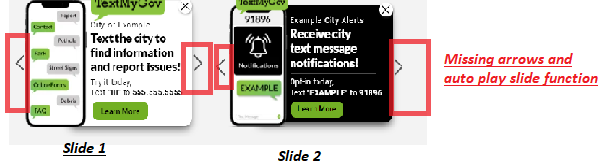
I am experiencing an issue with the Carousel element, particularly the slider aspect of it on a popup.
It's failing to rotate the slides and also failing to display the arrow buttons on the side once its embedded to a site.
I created 2 different popups that are experiencing this issue. I even tried placing them both on different web builders and the issue is still there.
These popups are both set to (on page load after 1 second), with the carousel set to rotate between 2 slides with (auto play speed 12 seconds).
Any help with this would be great.
Popup 1 Details:
-Name: Bzy lawrence popup
-URL: https://pear9762972.brizy.site
-Embedded page locations: Page 1, and on temp page 2.
-Code:
<script>!function(p,n,o){if(!(o=n.getElementById("brz-external-popup")))return(o=n.createElement("script")).async=1,o.id="brz-external-popup",o.src="https://s3.amazonaws.com/brizy.cloud/popups/v2/popup.js",o.onload=e,void n.body.appendChild(o);function e(n,e){e="https://pear9762972.brizy.site",p.brzExternalPopup?p.brzExternalPopup(e):(n=o.onload,o.onload=function(){n(),p.brzExternalPopup(e)})}e()}(window,document);</script>
Popup 2 Details:
-Name: Bzy lauderdale popup
- Popup URL: https://lychee9691922.brizy.site
-Embedded page locations: Page 1, Temp Page 2.
-Code:
<script>!function(p,n,o){if(!(o=n.getElementById("brz-external-popup")))return(o=n.createElement("script")).async=1,o.id="brz-external-popup",o.src="https://s3.amazonaws.com/brizy.cloud/popups/v2/popup.js",o.onload=e,void n.body.appendChild(o);function e(n,e){e="https://lychee9691922.brizy.site",p.brzExternalPopup?p.brzExternalPopup(e):(n=o.onload,o.onload=function(){n(),p.brzExternalPopup(e)})}e()}(window,document);</script>
-

Hello Hayley,
Thank you for your message.
Interesting that you have 2 images on this carousel element, for both pop-ups:
https://jmp.sh/utVNNvP // https://jmp.sh/Mwux8Tv
The slider won't work in this case, because the image element will block the carousel.
Regards, Natalia
0 -
Hi Natalia, the 2nd link you provided goes to a broken page.
I'm not sure what you are talking about with the image element blocking it, do we need to assign it a css class?
We have used this style of pop up a handful of times before with no issue at all. As you can see in this example, the popup works as expected.
Working Carousel Popup details (for comparison).
-Popup Name: Bzy-TMG-Dual-ML
Project URL:https://lime6156484.brizy.site
-Embedded pageThis issue occurred with newly created popups from this week.
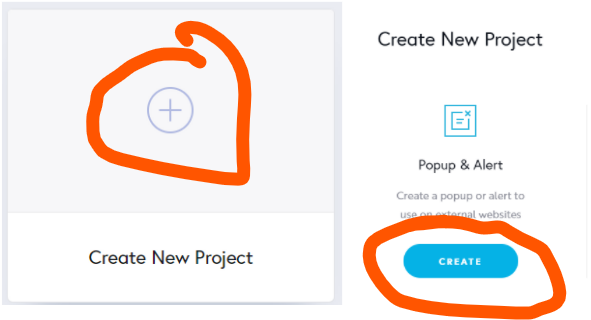
The issue is when I create a new project (As shown in the screenshot)
I can recreate the popup on older popup project blocks and it works fine.
 0
0 -
Hello Hayley,
Apologies for this late reply and apologize for my mistake in the first reply.
It seems that with the latest update on Brizy pop-ups (app 2 weeks ago) the team added a framework code in the editor mode that will display how the pop-up will look in the preview mode. So this was a confusion for me. Apologizes again.
I wanted to inform you that one of our front-end developers is looking into this bug right now. I will do my best to have a result as soon as possible.
Will keep you updated.
Regards, Natalia
0 -
Natalia, I appreciate the update.
Let me know if you need anything else from me while you investigate the issue. I look forward to seeing what you find.
0 -
Hello Hayley,
Thank you for your patience.
The team managed to fix this bug today. We are working on a new update, which is planned for Saturday.
A new update notification will come soon.
Thank you!
Natalia
0 -

Dear Hayley,
This issue was fixed. Please update the pop-up from the editor mode and check again.
Please let us know if you have any other questions.
Best regards, Nelea.
0 -
That worked, the carousel element is now functioning. Thank you.
0
Please sign in to leave a comment.
Comments
7 comments