Problem with integrattion html code in Editor mode..

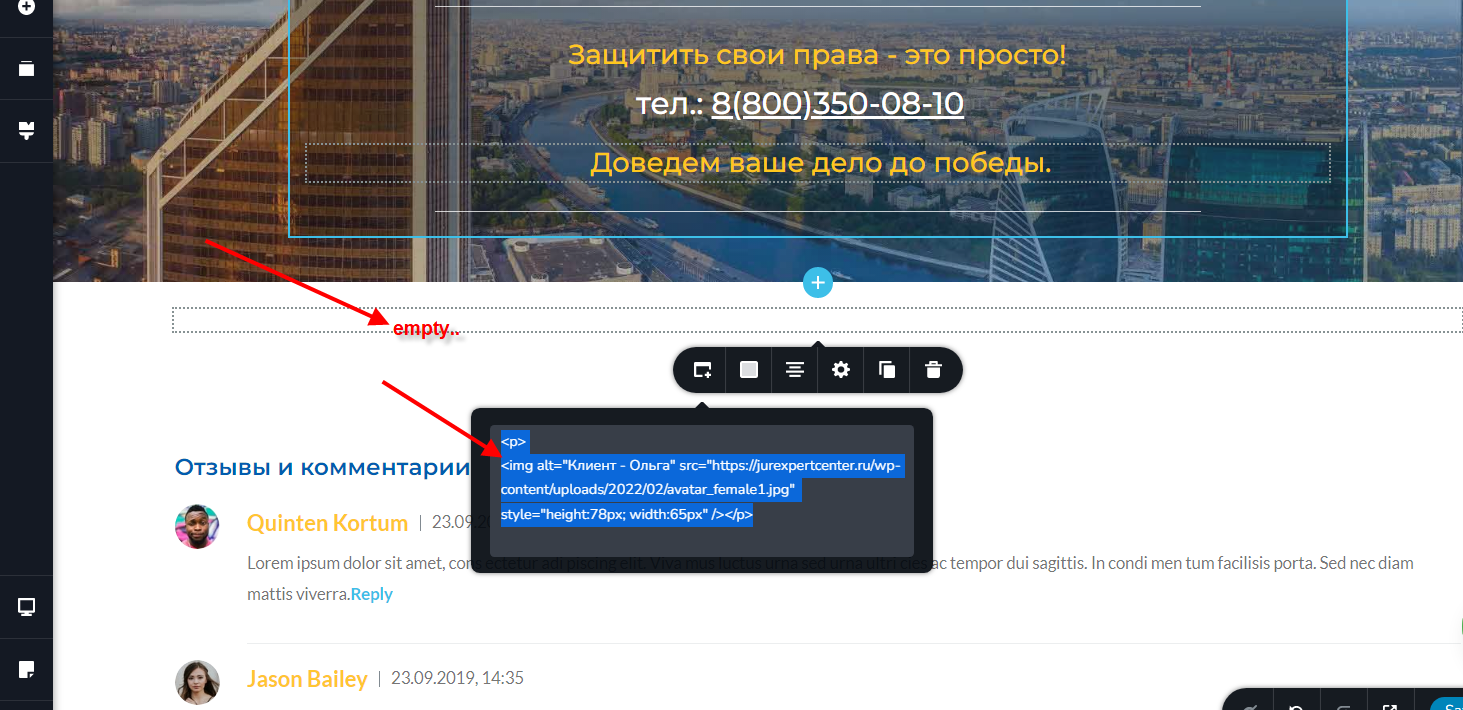
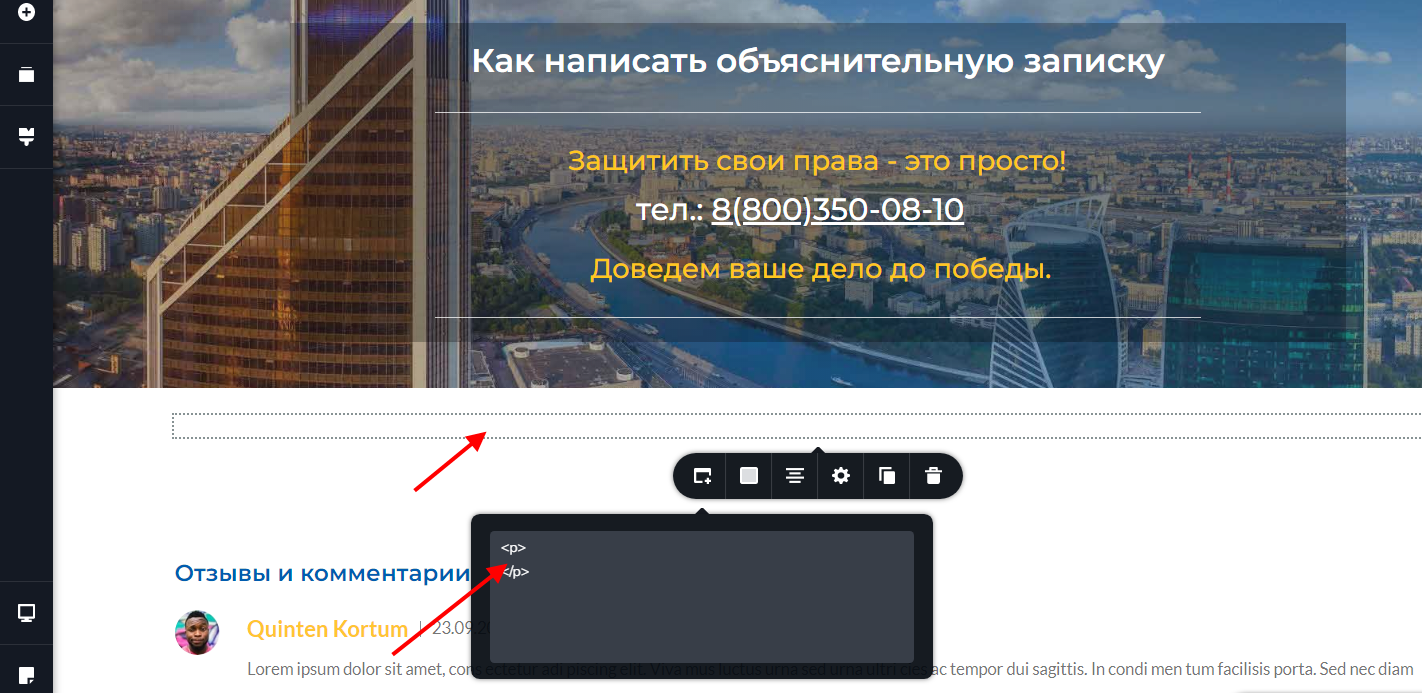
If I integrate the html code in admin mode, everything works. if I create a user with editor rights, then when inserting the code, all IMG tags are deleted automatically..
I have code like this:
|
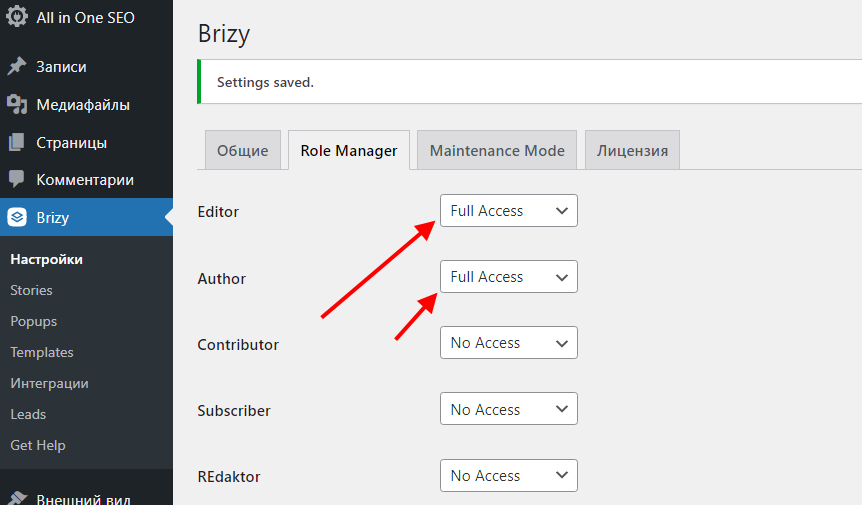
<p><img alt="Клиент - Ольга" src="https://jurexpertcenter.ru/wp-content/uploads/2022/02/avatar_female1.jpg" style="height:78px; width:65px" /></p> 2. I switch to the page, nothing appeared - all the code with IMG tags and maybe something else, just doesn't show up and is deleted... as can be seen in the following screenshot.. user rights in wordpress - editor. in brizy - full access..if I add administrator user rights, then everything works.. but this is not right..What to do?
|
-

Hello Ivan,
Thank you for your message.
Thank you for all details. We could reproduce this inconvenience and create an issue on this topic. Our team will investigate this problem and will strive to solve it as soon as possible.
Best regards, Nelea.
0 -
Hello Ivan,
I received a reply from our dev team and this is not an issue, this is how Brizy builder was made. This interdiction was introduced specifically to limit a user's execution power in the builder, because a user with the role of editor, or other sub-roles could cause some damage to your script site. That's why some features of the users with low privileges have been limited.
Best regards, Nelea.
0 -
OK. But how do I pass the tasks to the editor if he can't make trivial changes? he prepares the code for embedding, embeds everything, but there is no image.. ? do I need to grant him admin rights to embed the code? and then he will definitely have access to cause damage...?
Something tedious to correct... I can't give the editor admin access.. What should I do?0 -
Hello,
We're sorry, but we will not change access for the editor as well as for other sub-roles. This interdiction was introduced to protect your sites. You can only add the embed code by yourself.
Best regards, Nelea.
0 -
very very very sad and bad....
0 -
Other designers-editors, I believe, allow you to add any code, which means that they are doing well with security. I assume that your unwillingness to add the simplest access for embedding any code is related to other security problems in your product! This needs to be solved!
0 -
you contradict your logic!
I have 5 editors and if I need all of them to work on the site? how do you imagine it ? do I need to give everyone admin access? or then finish their work by myself ???
then why do big agencies need your product?0 -
Hi,
The user with the editor role can try to add the code with the shortcode element, please see here.
I understand your frustration, but our dev team told us that they will not change the access for the editor users.
Best regards, Nelea.
0 -
the short code doesn't work either!!!
images in code are deleted!0 -

Hello Ivan,
Natalia here.
It is not possible to add the embed code for Editor rules. We will not change this option.
In the shortcode element, you can paste HTML code without any issues. Just make sure this code is correct.
Regards, Natalia
0 -
before I wrote that the short code does not work, I specifically tried to do it! it doesn't work through the editor's account! the short code also removes images.
I would be glad if this method would be working0 -

Hi Ivan
Editors should be able to add images using the Brizy Image element (or if they are adding a post in Guternberg, they should be able to add images in Gutenberg).
Do you have a specific reason why you would want editors to add images using HTML embed code instead of using the Image element?
0 -
Hi!
Our task is to do a lot of informational articles. where there is a lot of text, a lot of pictures. with the help of standard functions1 BRIZY is a very long time!
It's easier to make an article in a simple html editor.
The function of working with html code is very poorly developed in your constructor!
There is not even a simple </blockquote> tag!
For a long time there were problems with transferring the copied text (from another page) - with formatting, and there are still questions! it may be impossible to reset the format when copying and pasting text!
Therefore, when creating an information site or information pages, it is easier to use a third-party html code editor! after that, I just have to be able to insert all my code on the page!
This is a standard WordPress function. But it is blocked through your constructor! I can't even use the standard WP function of inserting short codes.. the question is in the images.. something else must be blocked..And imagine that the editors work with full functionality, I need to distribute admin rights to all editors..?
look, you even have these functions here in the simplest version)))
This is very important! for a long time we did not want to completely switch to BRIZY due to the lack of a full-fledged text editor functionality! The functions were implemented earlier on Brizy cloud than on WP.. but this is not our option..
this is all for reclamation0 -
Hi Ivan
For best results, you must use the Brizy Text element to enter text and use the Brizy Image element to add images. If you are publishing informational blogposts, you also have the option to do the data entry in Gutenberg using the native WordPress block editor.
We do not recommend adding text and images using the HTML embed element. If you use HTML embed element to do data entry, you are likely to face problems. Please do not follow this approach.
If you paste formatted text, Brizy Typography element will retain its formatting. If you would like to paste non formatted text, you can paste text first into a text editor like Notepad and then copy paste from Notepad into Brizy.

This is the Typography toolbar in Brizy and you can use the above 13 functionalities to edit text.
You do not need to assign admin rights to your editors for them to carry out data entry. If you would like to discuss this further during a zoom consulting session, please let me know, I can schedule a session with you and we can discuss these details at length during the session.
0 -
This option is suitable for preparing a good design.
But there is no quick editing of large text with pictures!
the first reason is the long response of the tools when editing.. Unfortunately, BRIZY is not the fastest constructor..
And it is very difficult to edit a solid text of many thousands of characters. If you want to insert an image, you will have to split the text field into several.
If the text field is large when moving to a part of the text, to change the title style (for example), the control panel opens either far below or far above! have to wind the whole page up and down many many times!
eyes get tired, time is spent a lot.
There is no good tool for working with a table! what is there is very slow and unfinished! there is no correct alignment, field sizes, etc.Also there is no </blockquote> tag...
and that's why it's easier to do all this in the html editor and add ready code!
it will be simpler - fewer code characters, easier to manage..
These are all the minimal functions of the simplest and most convenient editor! Don't complicate it! just make it convenient and then have all the beauty that you already have!
PS\ and more. Brizy makes sooo great code! lots of styles in tags.. very heavy code...0 -
Re: If you would like to discuss this further during a zoom consulting session, please let me know, I can schedule a session with you and we can discuss these details at length during the session.
My native language is not English and sometimes I resort to the help of an interpreter. And so it can be a little hard..
But you can discuss it in correspondence )
Thanks!0 -
Hi Ivan
Like I mentioned earlier, doing data entry and adding images using Embed element is not a recommended practice. Since Brizy is not designed for data entry using the embed element, if you follow this approach, you are likely to face problems.
If you like the WordPress classic editor or the Gutenberg block editor, feel free to use either of these for data entry and use the content element to bring in the content into a Brizy page or a post. I can demonstrate how to do this if you are willing to have a zoom session. English language fluency is not a significant factor for a zoom session since you will learn more by seeing what is on the screen than listening to a voice
0 -
"Integration", that would be interesting! how we can make it?
0 -
Hi Ivan
I need sometime to understand your project better by looking at your WordPress backend. Once I understand how you have setup your WordPress project, I can suggest an alternate approach for your editors to add content.
To fix time for a zoom meeting, can you contact me through Messenger by clicking on "Message" button on this page https://www.facebook.com/karamchand.george
0 -
Hello Ivan,
Natalia here!
Thank you for your patience. We've added the embed element for editor users.
I've already tested your html code - https://jmp.sh/panuO9j. in a page with editor role. Everything works perfectly.
Let us know if you have any other questions or issues.
Regards, Natalia
0
Please sign in to leave a comment.
Comments
20 comments