Part of my short code is not Working in Popup but it workin

Hi
i have a short code written in a popup , the short code retreives data from my google spreadsheet directly to the popup this part of it WORKS!
the code is written between <code> </code> The reason for this is i am using a plugin called : Code Click-to-Copy by WPJohnny
What this does is it gives u the ability to press on the code and it copies it automatically to clipboard
At first i thought the plug in was the issue so i tried three other plugins but they all have the same behavior <pre> </pre> and <code> </code> do not work in a popup window ? ? can u help me make them work or does this need an update ?
here is the code below
<code>
[sheetdb url="https://sheetdb.io/api/v1/sbetjb5rimrse"]
<h4><center>{{Name}}</center></h4>
[/sheetdb]
</code>
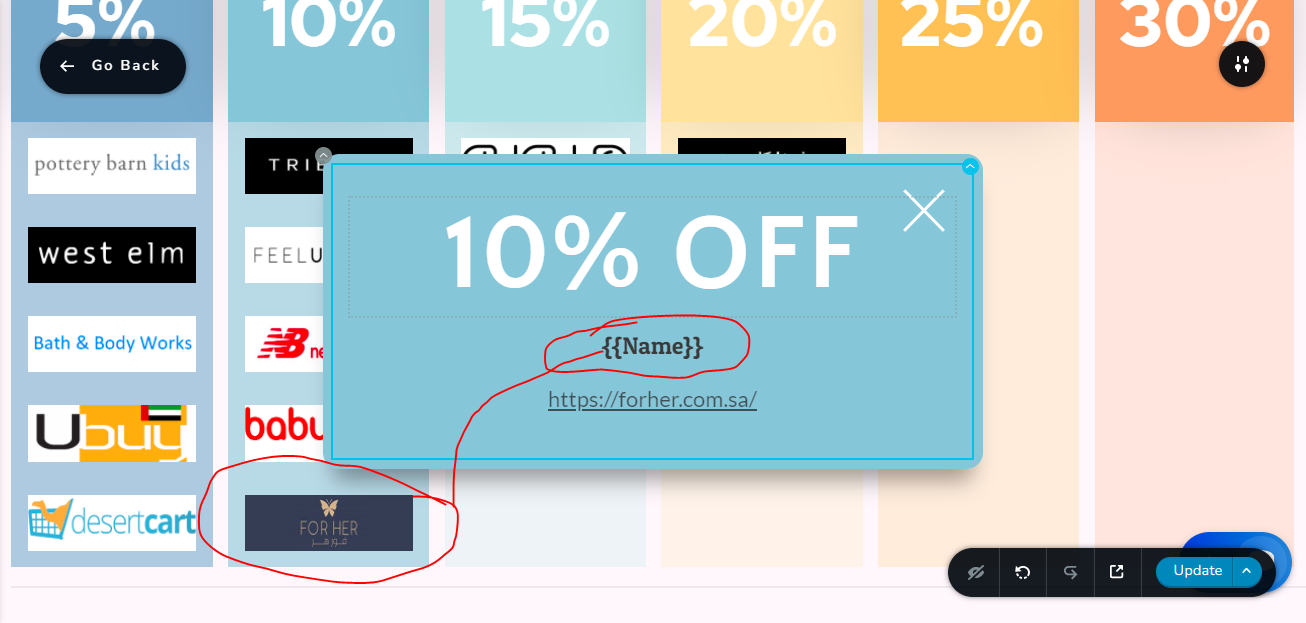
In this photo this is where the code is not working in the popup
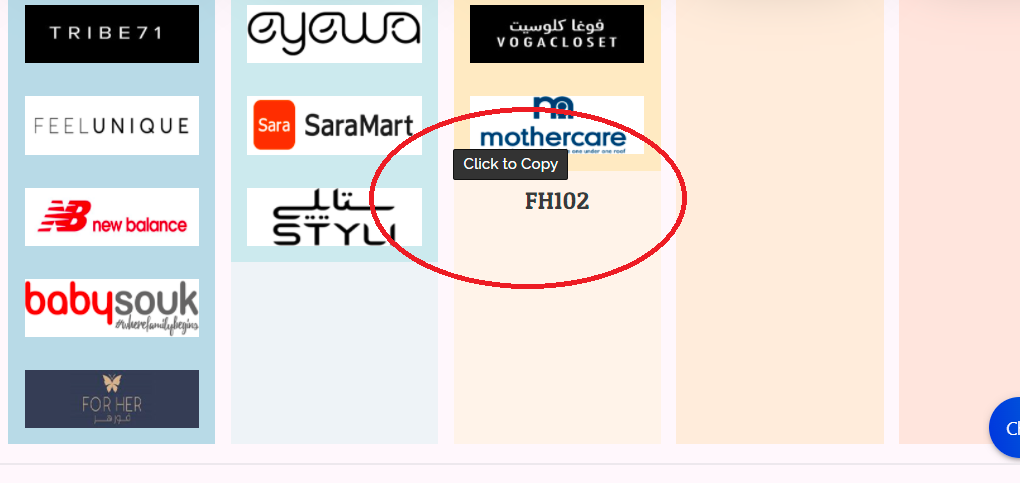
In this photo you can see the code working on the page if u hover on the word it tells u click to copy
-

Hi,
What element did you add this code to? In Shortcode element or in Embed element?
0 -
Hi i tried both and both gave the same results
0 -
Hi what happened with this? Last message u send was asking if i have the latest update but it seems the posts got deleted? Any way to solve my issue?
0 -

Hi Angelo
I am not sure if the code you are pasting is the right one. Let me suggest an alternate method to embed a Google spreadsheet to a popup.
Follow the instructions in the first part of this video. https://youtu.be/yuJObmU5MJM. In your Google Spreadsheet, go to File- Share - Publish to Web
Your embed code should look something like this. Please specify the appropriate height and width for your iframe. Feel free to embed this code in your popup using the Shortcode element and see if it works.
Please click on "The Spreadsheet" button on this page: https://homi.kctest.online/spreadsheet. You will see a spreadsheet in the popup. For this embed, I have used the above code.
Please let us know if you need any further assistance.
0 -
Hi george
thanks for the info but my problem is not that i can't see my data in the popup i can see it, it works well everything works as it should gor the link between the spread sheet and the popup the only problem is the first part of the code
the code is written between
What this does is it gives u the ability to press on the code and it copies it automatically to clipboard and when u hover over the area it tell u press to copy as well.
This is the part that is not working for me
I tried three other copy plugin's like anything to clipboard and copy to clipboard and others.
They all work in the same principle, whatever u need to be copied u include in between
or
And it works automaticallyI have tested all of them inside the popup and outside it
* Inside it none of them works i just get the spreadsheet data i don't get the copy functions
* outside the popup on the main screen both work the copy works and the data from the spreadsheet no issues at all
I hope this clarifies my issue more
Kind regards.
0 -
Hi Angelo
I am sorry; I could not understand your question well earlier. The plugin Code Click-to-Copy by WPJohnny may not be compatible with Brizy. That could be the reason why you are not able to make it work.
You may need to explore other plugin options to achieve a similar result. For example, consider the plugin https://wordpress.org/plugins/syntaxhighlighter/.
In this test page https://homi.kctest.online/spreadsheet, click on the "The Spreadsheet" button to see a popup with the iframe code attached using this plugin.
0
Please sign in to leave a comment.
Comments
6 comments