Site menu is broken, and I can't update Brizzy Pro

My menu looks like this currently, and according to other posts I've seen, a plugin update will fix this
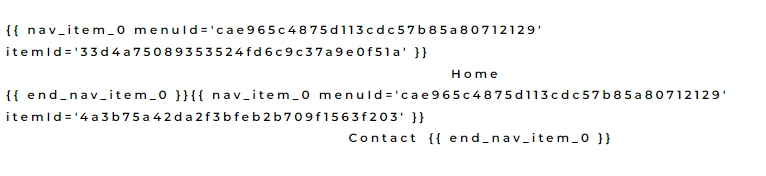
Problem is I can't seem to update my Pro plugin:

No update available. Can anyone assist please?
Thanks. :)
-

Hi Dave,
Thank you for contacting us.
The menu is broken because you have an older version of Brizy Pro. Please try manually to reinstall Brizy plugins (deactivate, remove and install again). After this, the menu will work just fine.
Best regards, Nelea.
0 -
Thanks Neela...just to confirm, if I follow the uninstall/re-install process - will all my settings etc. still be in place?
0 -
Hi Dave,
It will not affect your settings if you delete/re-install the Brizy plugin.
Best regards, Nelea.
0 -
Hi Nelea, Thanks, this fixed the issue. Much appreciated. 😀
0
Please sign in to leave a comment.
Comments
4 comments