Add new font to styling not working

Hello,
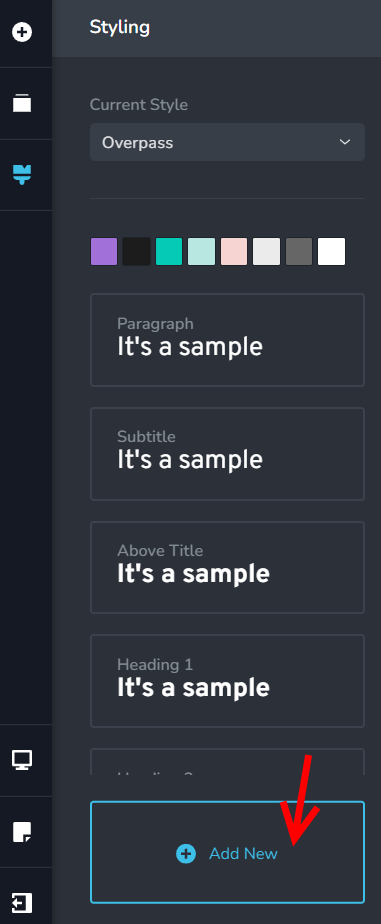
I'm able to upload new fonts OK, and use them but when I go to use the feature "styling" in brizy pro (not cloud) it won't work. I would like to change the main font throughout my whole site as well as font colors, I seen someone mentioned there is an error on global colors too.
Wondering if my issue then is on my side or yours? I followed the YT tutorial on using this feature and I seem to have done everything correctly.
John
-

Hi John,
so you have this issue on Brizy WordPress? This option will not change the global site styles but it will create a new option that you will be able to use in the element settings. After that when you want to change a style, you will change from here and it will change to all the elements where this (new added) style was used. Could you please send us a screen recording to see what exactly the problem is and try to reproduce it? Thanks.
0 -
Hi Alex I got the functions working. Why it was a problem for me is because the slider on that styling panel does not work. You have to click inside the area and then use the keyboard to scroll down to H3... H4 and so on. It's definitely a bug, if I zoom in or out it wont get it working. The slider on the font styling themselves are too small also, when your changing the tags around its difficult, but at least they work.
When I go into mobile view my H1/H2 tags etc are all set to custom, maybe it was from editing before, so any changes in that styling panel for mobile did not work on my end until I reset their title tags... just an FYI.
0 -
I'm glad to hear that.
Regarding the "the slider on that styling panel does not work": are you referring to this: https://jumpshare.com/v/YZXkigytoRYCtYzmYZCI ? As you can see it works for me. Did you check this in a different browser?0
Please sign in to leave a comment.
Comments
3 comments