Brizy Pro: You can't use a One Site License on a multisite installation.

When I originally purchased the Personal option last year it was supposed to be for 3 websites, now I see it has been downgraded to 1? I have another site that I wanted to use this on, and now it won't let me. I'm not very happy abut this, I think I will go elsewhere to find editors.
-

Hi Brian,
Thank you for contacting us.
It was an issue on our part. This issue was already fixed. Please update Brizy Plugin to the latest version Brizy Free 2.3.28 and Brizy Pro to 2.3.21, and check again.
Best regards, Nelea.
0 -
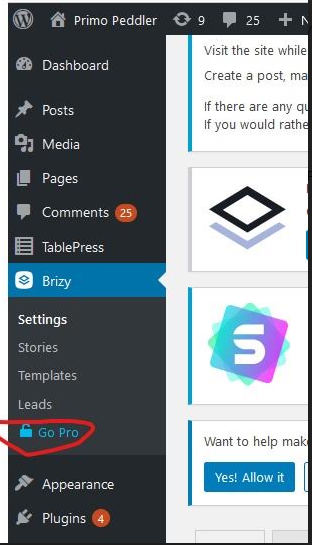
Okay, thank you for that. I installed the latest upgrade to Brizy Pro like you said, but I'm still having issues with using it, and I have a "Go Pro" icon under Settings. When I click on this it just takes me to the Brizy pricing page. How do I activate this? I see that under WP Licenses I have licenses enabled for both of my sites. Thanks.
 0
0 -
Hi Brian,
Thank you for contacting us.
We have checked your account, you have the Personal Plan with 3 licenses. You have activated only 2 licenses. You have one more license left to use for another site. In the dashboard, you have the Go Pro icon because you don't have Pro options included in your plan.
Best regards, Nelea.
0 -
I don't understand what you are saying. I have activated the license for this website "primopeddler.com", but this is where I am seeing the Go Pro icon in the dashboard. If the license has been activated as shown in the screenshot, why am I seeing the Go Pro icon?
0 -

Hi Brian,
sorry for not getting back to you sooner.
Do you still have this problem? Let's fix it.
From the previous screenshot, it looks like Brizy PRO is not installed. The "Go Pro" message only appears when the Brizy PRO is not installed or is not activated. Even if no license is added, this message does not appear. So, please make sure the Brizy PRO plugin is installed and activated: https://jumpshare.com/v/SmgqhDxxL9mKZms5pmhD (eventually you can send me a screenshot). After that, we will check the license issue.
0 -
Hi Alex,
I thought that it was activated, but apparently not. I activated it, and now things appear to be fine. Sorry about that, not sure what happened on my part. Thanks for your help!
0 -
No problem at all. Let us know if you need anything else.
0
Please sign in to leave a comment.
Comments
7 comments