Custom Post Types

How do I add a custom post type on the author page?
there is no selection inside the archive element
-

Hello Patrick,
I am sorry, but I could not understand your phrase "adding a custom post type on the author page".
Can you please elaborate your question in more detail?
1. What is the goal you are trying to accomplish?
2. What Custom Post Type are you wanting to create?
3. What plugin are you using to create the custom post type?Best regards, Nelea.
0 -
i use the pods plugin to create a custom post type,
but when I create a author template page, there is no way to change the archive element to another post type
0 -
Hi Patrick,
Can you please check and confirm if your Custom Post Type supports the Author filed?
1. At the WordPress backend, on the left sidebar, under Pods Admin, click on Edit Pods.
2. On the right-hand side pane select the 'Advanced Options' tab. See this screenshot https://jumpshare.com/v/18Fy33bADQ85rdGn2e8n
3. Scroll down to the "Supports" row (the third row from the bottom) and please check if you have enabled Author option here. See this https://jumpshare.com/v/n8OOEhXco9R6i5RH9TBgBest regards, Nelea.
0 -
Hi it has been a while since i have done this and cant remember how to get custom post types to show on the author page, and the images you send is not there anymore, could you please tell me again how to do this
0 -

Hi Patrick,
Please watch this video for the procedure to check if your custom post type supports the Author field. https://jmp.sh/uPtjvcT
-1 -
I tried what you said in the video but it is not working
0 -
Hi Patrick,
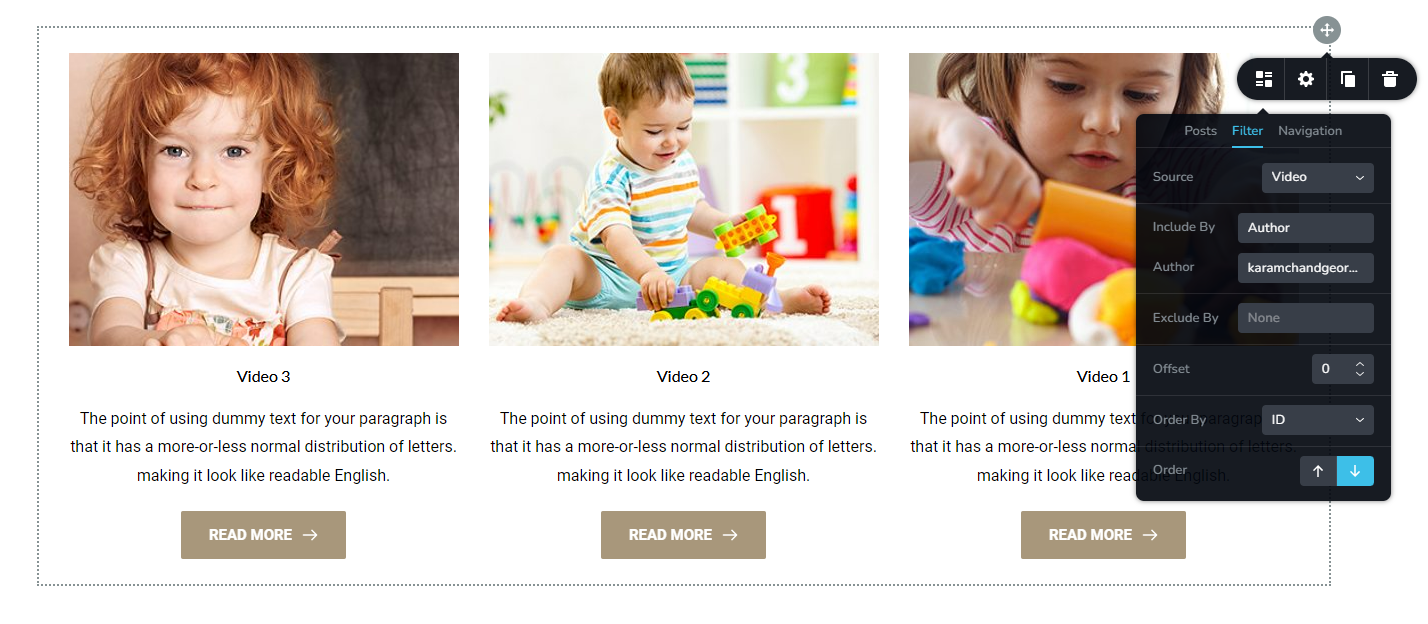
Author pages for custom post types are not supported in Brizy. However you can create a regular page and use the Posts element to list custom post types created by a specific author.
In the Posts element Filter, select your custom post type as the Source. In the Included By, select 'Author' and under Author, select the name of the author. https://jmp.sh/M6JM9A8
 0
0
Please sign in to leave a comment.
Comments
7 comments