Add to Cart Styling Issue

Hi there,
Using Version 2.3.25 and Version 2.3.18 (Pro).
I using a bundling extension that updates product types in WooCommerce to show bundled items in a list before presenting the add-to-cart button. However, I cannot access the Add to Cart element in Brizy to custom style the div to force flex to following the column direction and justify the content left. When extracting selectors from WP customizer, the Brizy div's dynamically change, resulting in custom styles being impossible outside of Brizy Builder.
Please advise how I can extract the static class or id name to update the CSS on the add-to-cart element, as it is also affecting variable products. 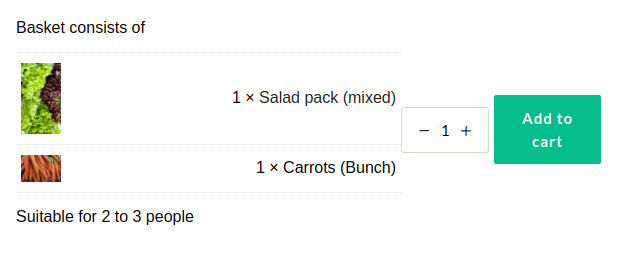
Thanks in advance.
-

Hi,
Usually, we do not offer any custom code or Custom CSS solutions but I will try to help you. Does the extension you use not add divs with classes you can use? What is the link to your site where we can see this page?
0 -
Hi there Alex,
Thank you for the response.
I am fortunately not needing any custom code or custom CSS solutions. I am able to change the flex direction and justify-content cascade myself. However, the Brizy classes dynamically update which then overrides my styling in the WP customizer once I find the class or selector.
Again, the "Add to Cart" element provided in Brizy Pro does not allow one to override CSS styles like the other elements in your builder. I'm merely asking if there is a parent class to the Add To Cart element I can access to do the custom CSS myself.
Below is the issue I'm facing with the Add to Cart element in a template for WooCommmerce: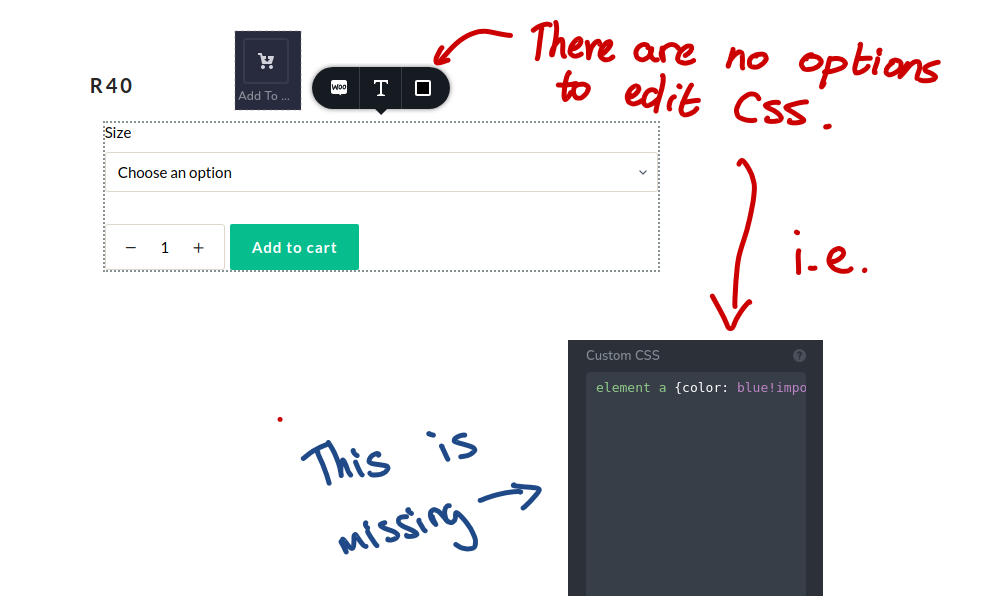
I completely understand that this feature may not exist yet, hence my request on which class the builder sets for the "Add-to-Cart" element in the builder. I'm happy to tinker away at the flex-direction, but I cannot nail down what the parent element is that atomically sets this element's flex-direction to row. This problem persists in Add-To-Cart instances where the plugin has been disabled, so it is not related to the expansion of WooCommerce features, but the page builder's template.Please let me know if you require further details.
Kind regards,
Matt0 -
Hi Matt,
have you tried to address this class: https://jmp.sh/cB2fJ7e ? Also, not sure if this will help you but you can try, you could add a separate column just for the "Add to cart" element and then address the items in it: https://jmp.sh/yTOFvxc You can use ">" symbol to address the direct children of the element.
0 -
Hi there,
I did add a column to see if the child elements would change to the flex-direction I set, but it doesn't work for any of the Add-To-Cart elements used in a template. Do you think the option of directly changing the CSS to element (like the other elements) will come in a future update?
Thanks again for your response.
Matt0 -
Hi Matt,
I will add this to our feature request list and discuss the future implementation with the team.
0
Please sign in to leave a comment.
Comments
5 comments