Wordpress.org Site Menus Showing Developer Code When Published

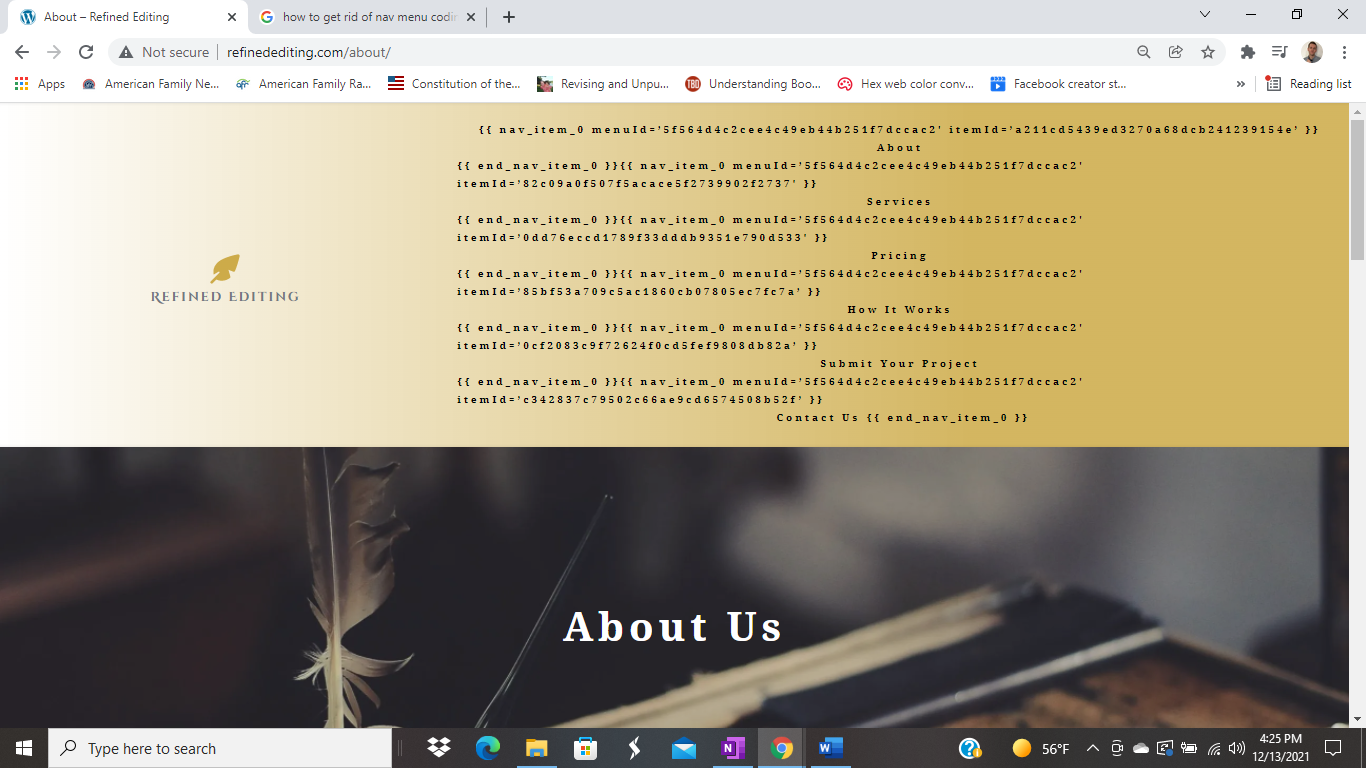
This suddenly started happening on my site (entirely brizy created from scratch with all brizy pages where this issue appears) when I had not seen it be an issue before when the menus were first created. I tried to show a potential client my site, and it showed all of this code below the menu buttons. It does that on every page of the site, and it does not go away when I recreate the menus in the theme editor or move the blocks or recreate the blocks in Brizy Pro builder.
I can't find anything in the forums here or on wordpress.org showing someone dealing with this issue. Can anyone assist?
-

Hi,
Thank you for your message.
Please, do not forget to update the PRO plugin too. The mega menu fix is on the PRO version.
We've released the new version for Brizy FREE 2.3.24 and Brizy PRO 2.3.17. Both plugins should be updated, not only the FREE version.
Let us know if you will have any other questions.
Best regards, Nelea.
0 -

Nelea,
I am running the updated versions of both and having the same issues. Please open a ticket so I don't need to post my public information. I've temporarily removed the menu for obvious reasons.
thanks,
beth
0 -
Hi Elizabeth,
I have created a ticket for you so please send your login details there and we will look into it.
Best regards, Nelea.
0 -
Nelea, that was exactly what I needed. Apparently, there had been an update since I created the site, and the Brizy Pro update resolved the issue. Thank you!
0 -
Thank you that worked! I was looking at another installation when I said it was fully updated.
0
Please sign in to leave a comment.
Comments
5 comments