Archive Element Modifications

I created a Search Page template in Brizy as a means of searching a rather large WP Easy Cart store, and inserted the Archive Element to retrieve the results. Because store items are not real posts, the images won't show on the results, and I would like to delete that component - but can't. I would also like to modify the text field to link to the Title rather than the description, but can't. Might there be any means of building more modifications into the Archive Element besides just row, columns and pagination?
-

Hello Michael,
Can you please confirm that you are using this Display Condition to display your Products in the Search Template? See please here.
Your product images usually show up in the search results page. Take a look at this test page for an example. https://homi.kctest.online/?s=chair
You should be able to modify the Text element and link it appropriately when you are using the Archive element. When you say you can't do it, what exactly do you mean? Can you share a screenshot or a screen recording to demonstrate your problem?
Best regards, Nelea.
0 -
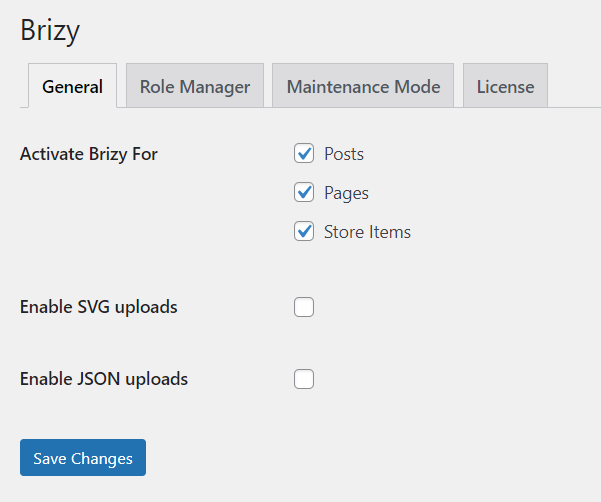
Here are the screenshots you requested:
1) Settings in Brizy. Is it possible that these features are unique to Woocommerce?
2) Settings in template:
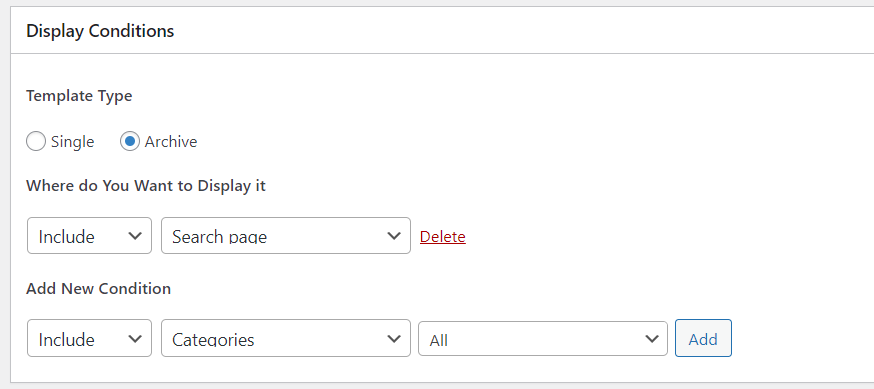
3) What I see in the builder:
 0
0 -
And while I have your attention, I am using the Blocksy theme (always) and rarely can use slider (dots, squares, etc) or other pagination for the shapes are always skewed like this...

Slider dots become tall slots, and as you can see above, the numerals are fine but the first/last is not formatting properly.
0 -
Hello,
From the screenshots you shared, it appears that you have not set up Woocommerce on your website yet. Can you please confirm if you have installed Woocommerce plugin? Only after you install Woocommerce, you can set up Product pages and Brizy Templates for your products.
Best regards, Nelea.
0 -
Nelea -
As I stated in my first post in this series, I am using WP Easy Cart, and not Woocommerce. It is a far superior store plugin.
0 -
Here are some screenshots, but I believe you may have built this specific to Woocommerce:
0
Please sign in to leave a comment.
Comments
6 comments