Image not completely visible in Mobile

I have made a template to automatically display my posts. This contains pictures and text.
In dekstop view I get the complete image, but when I'm in mobile view the image is cropped on the sides. I can not change the width of the image box so the picture stays cropped in mobile view.
-

Hello,
Thank you for your message!
Can you please send us a screenshot or a video with the problem that you encounter? Thank you!
With kind regards,
Doina
0 -
I want to but I don’t see the option to upload a file
1 -

Hello,
Could you please send us the URL of the page you found this inconvenience?
Best regards, Nelea.
0 -
Hello,
Sorry for the late reply, support is limited on weekends.
I have checked your website in the mobile version and everything looks fine, please see here.
Best regards, Nelea.
0 -
Yes but you have to click on one of the company logo's. If you use my direct link you will get to the right page.
0 -
Hi,
In the mobile version please try to change the size of the image from here , if you select the Custom option, the image will take the dimension of the container in which it was inserted.
Best regards, Nelea.
0 -
I don't have that option:
The page is setup by using a blogpost template:
0 -
I know but that is not the page. When you click on that image you get to the next page. This page is where the error occurs. That specific page looks fine on desktop, but not on mobile.
0 -
Hello,
I have created an internal issue and one of the developers is already looking at your project. I will come back with a message when I have news about it.
Best regards, Nelea.
0 -

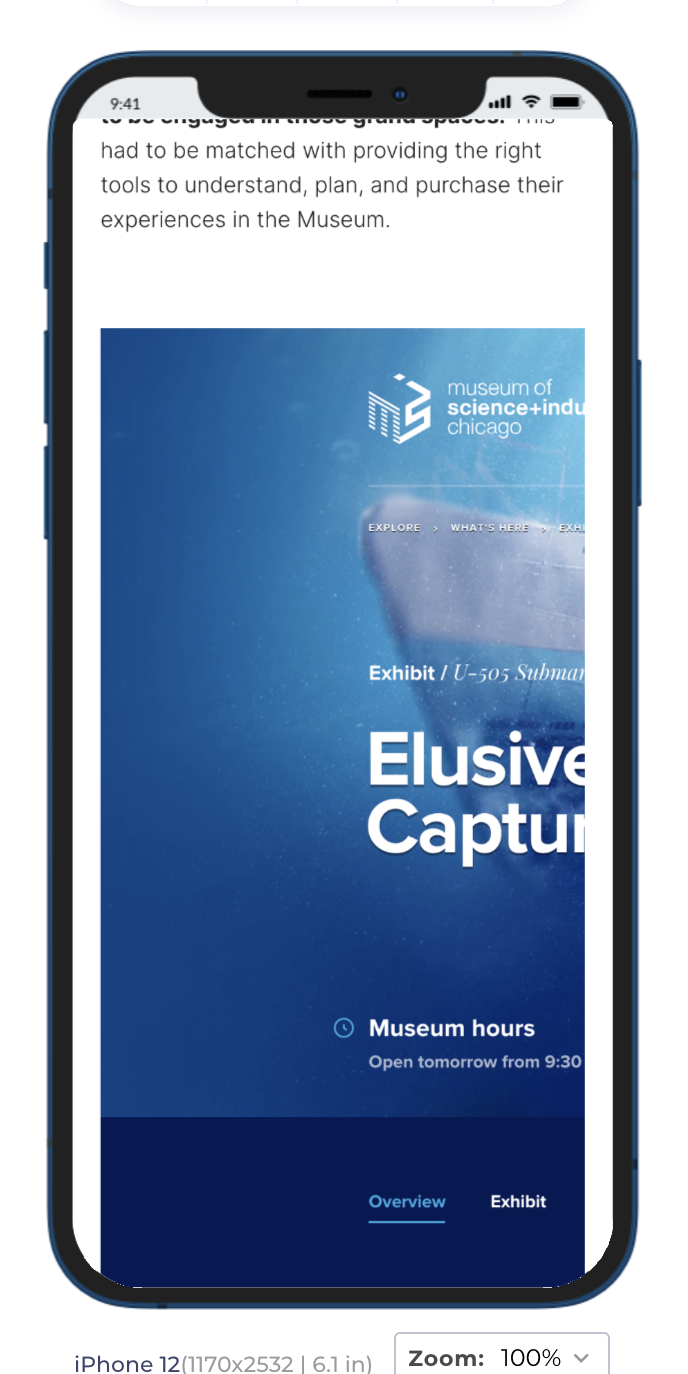
I think I'm seeing this same issue. Image set to custom. Displays fine on desktop and Brizy's edit view of mobile. On actual phone (or emulator here) it's only showing part of the image. Is critical issue that will delay our launch tomorrow.
 0
0 -
Troubleshooting this a bit. It seems to be related to when the column is full width or close to that. If you take the column and drop it to say... 50%, it'll show the whole image scaled. Move it back to full width or anywhere near... broken.
0 -
Hi Steven,
We have an open issue on our internal desk about this and we will fix it in one of the next updates. Sorry for the created inconvenience.
Best regards, Nelea.
0 -
Any update regarding this issue?
0 -
Hello J.BW. Steege,
This issue is fixed, can you please check again and confirm if everything works well at your end?
Best regards, Nelea.
0
Please sign in to leave a comment.
Comments
16 comments