Brizy wont update live site

Here I am again with another problem but a different website. The first problem Brizy froze and you all said it was a host problem and the Host said it is a Brizy Problem. I am trashing that whole site because it is not functioning at all and no one will help me get it fixed. This problem is just as hard as it stopped updating and now I have tried all of the suggestions from the help blog from purging the cache to creating everything in incognito windows but nothing works and I am running the latest versions of Brizy and Brizy Pro.
Help Me Please
-

Hi Claude,
Thank you for contacting us.
I have created a private ticket for you. You had to receive a notification regarding this by email. Soon one of my colleagues will contact you for more information.
Best regards, Nelea.
0 -

I thinks this is a real issue. I have had similar kind of problems with mobile version >> Live site wont refresh eventhough I have cleared the cache on server side and then deleted history and old files on my mobile and several other mobiles. This is getting really frustrated.
0 -

Hello Tumoas,
Thank you for your message!
Can you please give us more details? A link to your website? Do you encounter the same problem as the previous user? At the same time, make sure you have the latest versions of Brizy: Free 2.3.21 and Pro 2.3.16 . Hope to hear from you soon!
With kind regards,
Doina
0 -
Here is the link to my site: https://tellabout.life/ Everytime we open the site block change position on the pages – Namely the footer blocks also the popup’s seem to cause a page to crash. We are running Brizy Free Version 2.3.22 and Brizy Pro Version 2.3.13. A
-1 -
Hi Claude,
Thank you for contacting us.
Yes, we know about this issue- that sometimes the block changes its position on the website. This is an issue and we try to solve it as soon as possible. We are sorry for this inconvenience.
Best regards, Nelea.
0 -
Have you solved this issue as it looks like it is being reported as such. I am still having issues with it not updating and the blocks mooving. Please advise me of the solution.
Thanks,
Claude
0 -
Hi Claude,
The issue with the block that changes sometimes the position was not solved yet. We are very sorry for this inconvenience but we don't have a solution at the moment. Our team is still working to solve this problem. We are doing our best to release the fix this problem as soon as possible.
Best regards, Nelea.
0 -
Brizy just updated to Version 2.3.24 causing a problem with Menus. Now we get this;
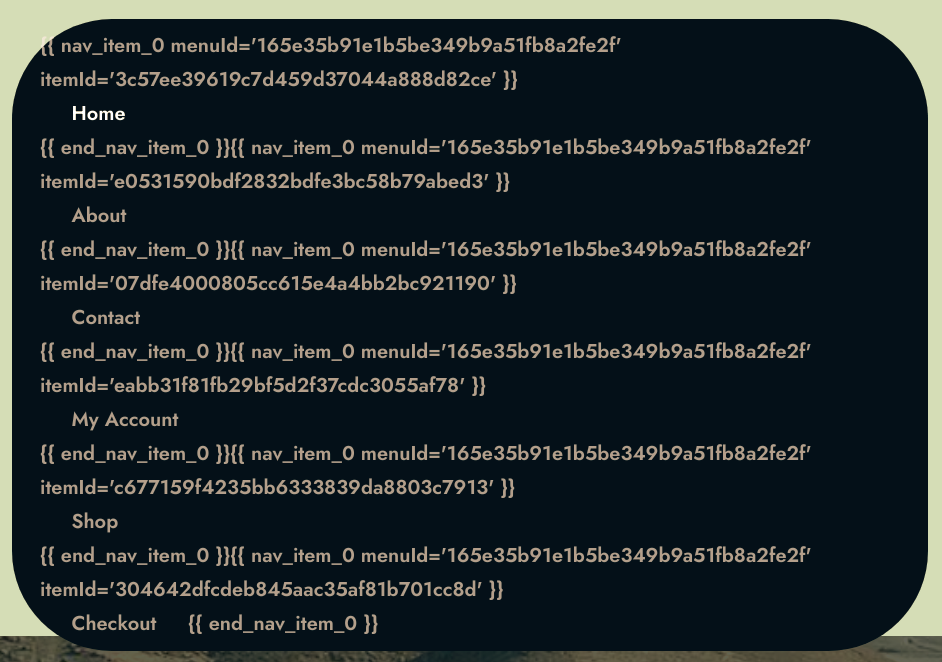
Any suggestions?
0 -
Hi Claude,
Could you confirm that you have the latest Brizy Pro version 2.3.17? Both plugins should be updated, not only the FREE version. If you have this version then the menu should work fine.
Best regards, Nelea
0 -
It is version 2.3.13. and no option for an update was present. I went ahead and uploaded the new version and tried to manually update. This is what I got: Plugin could not be activated because it triggered a fatal error. Fatal error: Cannot redeclare brizy_pro_notices() (previously declared in /home2/starosus/Tellabout.life/wp-content/plugins/brizy-pro-3/brizy-pro.php:57) in /home2/starosus/Tellabout.life/wp-content/plugins/brizy-pro/brizy-pro.php on line 55 After this happened it DID give an option to update and I updated. But it did no good as the menu error has not gone away; Can you please help resolve this problem? Thanks, Claude Hedspeth A
0 -
Hi Claude,
Please try to fully reinstall both plugins FREe and PRO (deactivate, remove, install again). Clear the website cache and check your page again.
Please do not reply to the notification email - noreply@brizy.zendesk.com. The emails will be received as spam and they will not be posted here.
Best regards, Nelea.
0
Please sign in to leave a comment.
Comments
11 comments