Brizy Wordpress Activation Failed on Local Machine

Hi,
I am working on a website locally and trying to activate my Brizy Pro plugin. After generating a new license at Brizy.io's dashboard and pasted in the activation field on my local Wordpress/Brizy installation, it show a page with Block reason "Your request was not allowed due to IP blocking (not white listed)." I do see in Brizy.io dashboard under the license activate column it says 127.0.0.1 Please assist.
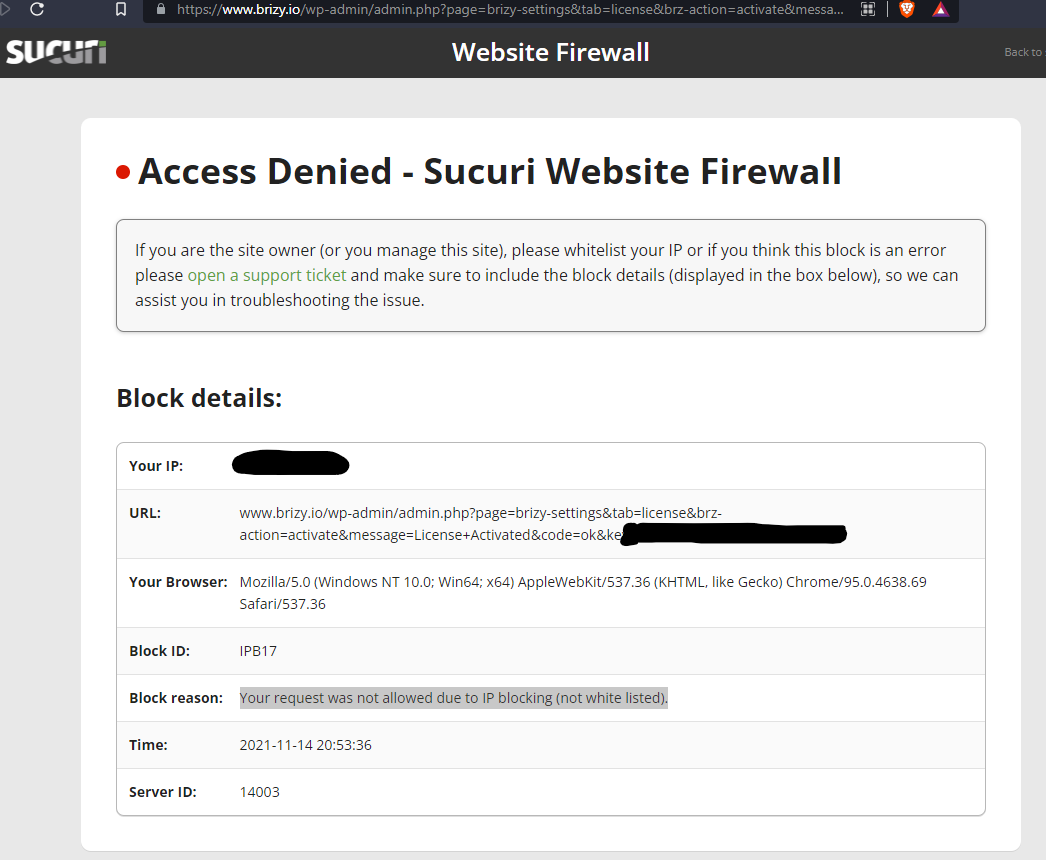
-

Hi Jason,
Thank you for your message.
While you are working on localhost you could try to deactivate "Sucuri" plugin and check if you will be able to activate license.
Let me know if this helps.
Best regards,
Denis.0 -
Hi Denis, Thanks for getting back to me. I don't have Sucuri plugin installed. I also deactivated all other plugins. Only Brizy and Brizy Pro are activated. Once I paste in the license key and click on the Activate button, the Sucuri page shows up. The Securi page url is actually from Brizy's site.
0 -
Hi Jason,
Sorry for misunderstanding.
Do you plan to run your website on live hosting in nearest time?
Kind regards,
Denis.0 -
I missed this message.
Yes, I plan to run websites on live hosting.
Just developing the website on a local server right now and trying to activate the plugin.
Does activation not work on a local server?0 -
It turned out that for some reason, when the website is set up to use port 8080, that access denied page will show up, but when using a port like 8888, the activation will be completed successfully.
0
Please sign in to leave a comment.
Comments
5 comments