Dynamic Image Height un adjustable!

Hi,
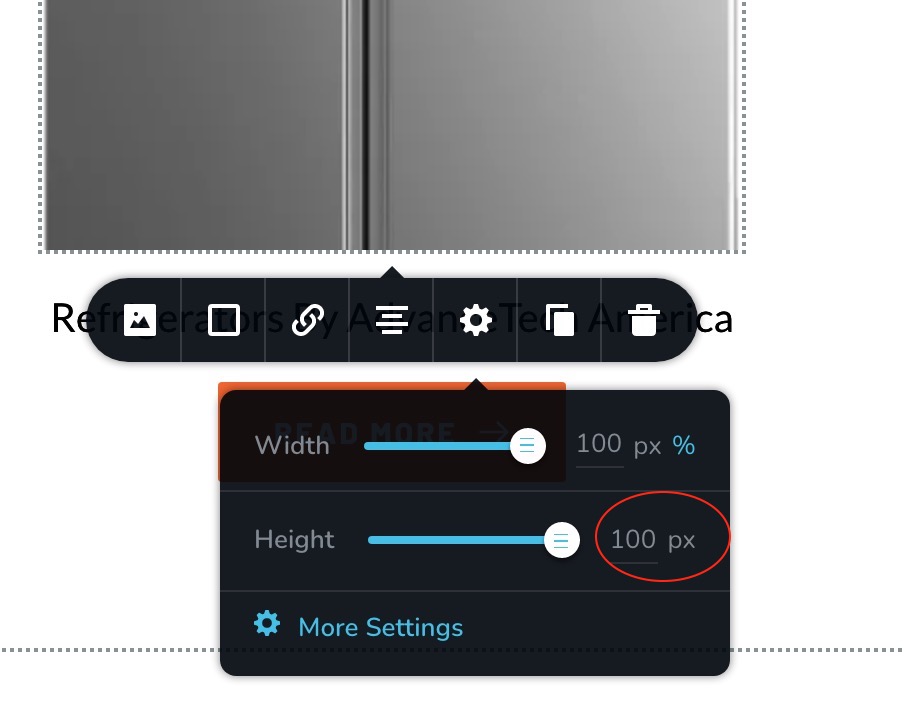
there is a provision to adjust dynamic image width by % but not the height. the height adjustment is only possible by pixels. There doesn't seem to be a way to adjust the size! I have already sent you an email. Please see the attached!
Please give me a solution ASAP.
-

Hi,
Thank you for getting in touch with us.
This function was made to have only PX and not % because it is unknown what height the image will get so it has the correct %. In this case, you can set up only the px for the image.
Best regards, Nelea.
0 -
Hi Nelea, this is a known bug. Currently there is no way to fit the a dynamic image in a column... suggest you check with Denis!
0 -

Hi Bency,
We are sorry for misleading. As mentioned in the ticket conversation team is working on upgrading "Image" functionality. This is a pretty complex issue and requires time to be done.
Sorry for the inconvenience and thank you for your patience, we highly appreciate that.
Best regards,
Denis.0 -

Any news on this matter?
0 -
Hi Webmaster,
With the new update, we have made some changes, so the optimized image option was removed from the dashboard. Now you can install an optimizer plugin like ShortPixel Image Optimizer and optimize your image in the way you need. Also, you can select the size of your image from here https://jumpshare.com/v/3k89nsmlXZnVYPwVemTf . If you select the Custom option, the image will take the dimension of the container in which it was inserted.
Best regards, Nelea.
0 -
Hi, the new image dimensions option works only for the Featured Image, but not for pictures stored in custom fields. This is a huge limitation, comparing with the old system. Hopefully you’ll add this feature also for other images as well. Thanks. Best Amadeus
0 -

Hello,
Thank you for your message!
I will tell about this to our team. Till then, if you have any other questions, please feel free to ask! We will be happy to help!
With kind regards,
Doina
0
Please sign in to leave a comment.
Comments
7 comments