Upgrade

Hi guys, I love Brizzy and bought a Freelancer Pro yearly subscription and would like to upgrade to lifetime. But i can not find any "Upgrade" Menu item under "Account". Can oyu help?
Thanks,
Masiar
-

Hello Masiar,
Thank you for your message!
If you want to upgrade, you can do that directly from your Brizy account: https://jumpshare.com/v/6lCg4h1ydj5sSwq4mMLY . Go to Account -> Payments and choose the "Upgrade Subscription" button. Hope this helps!
Have a nice day and best regards,
Doina
0 -
Hi Doina, I dont have the upgrade button :-( look at the screenshot https://share.getcloudapp.com/p9uNAwvk
0 -
Hello Masiar,
Thank you for your message!
We will do the upgrade manually for you as soon as possible. Thank you for the understanding! If you have any other questions, feel free to ask! We will be happy to help.
With the best regards,
Doina
0 -
Hello Masiar,
Quick update!
Please buy the Lifetime Deal and we will refund the money for the Freelancer Pro. Thank you very much!
With the best regards,
Doina
0 -
Hi Doina, OK will do so and write you back. Thanks masiar
0 -

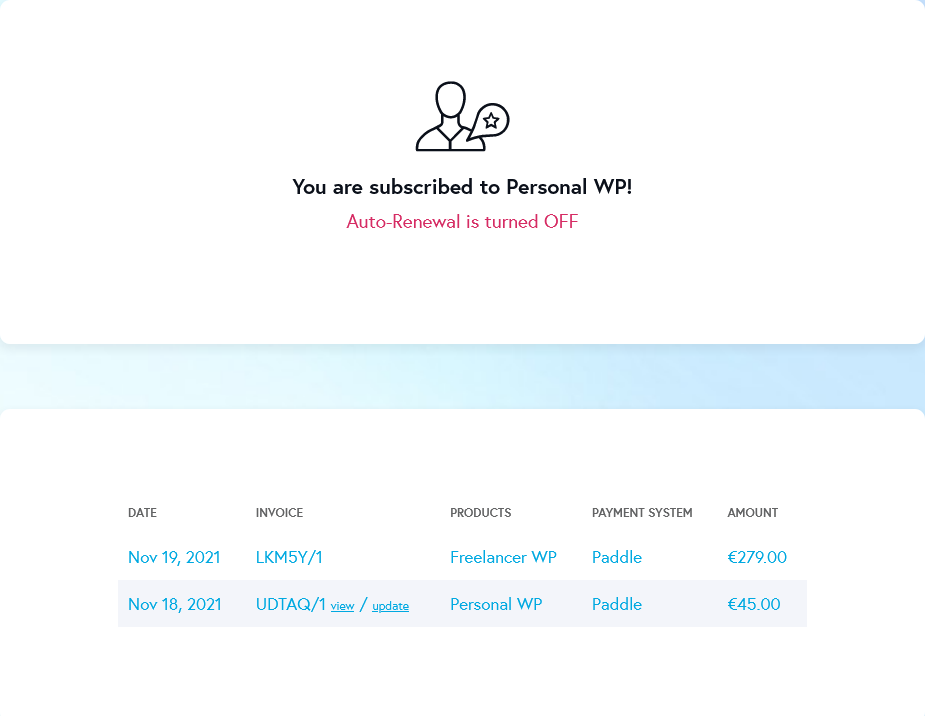
For me, the upgrade button also is missing. I trust you will also do a refund for the amount I already paid yesterday.
 0
0 -
Hello Felix,
Thank you for your message!
We took out the refund button, so if you want to upgrade to some plan, tell us and we will do it manually. Besides this, I didn't really understood your question. Do you want a refund or to upgrade? Hope to hear from you soon!
With kind regards,
Doina0 -
Thanks for your answer, Doina!
I want a refund for the Personal license. As I couldn't upgrade I bought Freelancer separately.
Many thanks in advance!
Felix
0 -
Hey Felix,
We already did the refund for the Personal license as you asked! Hope this helps. If you have any other questions, feel free to ask!
With the best regards,
Doina
0 -
Thank you Diana!
0
Please sign in to leave a comment.
Comments
10 comments