Contact forms - Select drop-down options

Hi,
I'm using the 'Select' style form box in both contact forms within a page and within a popup, and it doesn't seem like the drop-down options inherit the text style (in my case I care about font size) from the placeholder. Can you confirm that this is the case?
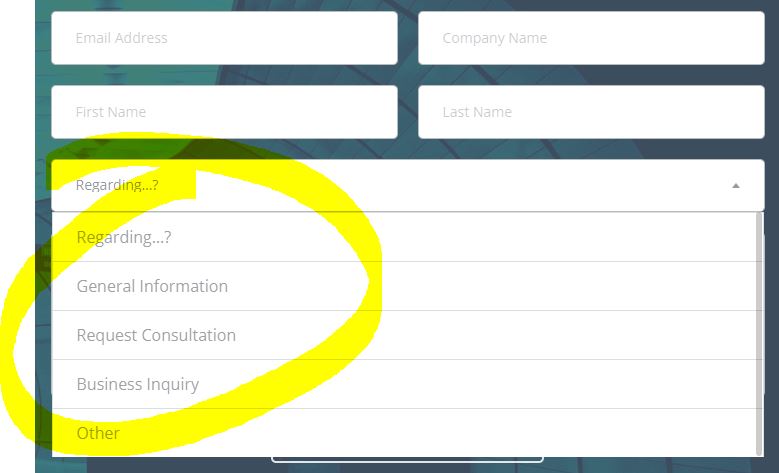
I'm using Brizy PRO 2.3.14 & Brizy 2.3.18 and this happens regardless of device/browser (it seems, from my limited testing.)
If it is not possible to edit via the GUI, but it's possible to edit the CSS, could you let me know which element to target? Maybe select2-results__options.option or something (see code)?
Code from the options element:
<ul class="select2-results__options" role="listbox" id="select2-xxlwxfkzvnpmssrtmjxpvukhlpxklhbrhodw-results" aria-expanded="true" aria-hidden="false"><li class="select2-results__option" id="select2-xxlwxfkzvnpmssrtmjxpvukhlpxklhbrhodw-result-kva2- " role="option" aria-selected="true" data-select2-id="select2-xxlwxfkzvnpmssrtmjxpvukhlpxklhbrhodw-result-kva2- ">Regarding…?</li><li class="select2-results__option" id="select2-xxlwxfkzvnpmssrtmjxpvukhlpxklhbrhodw-result-co5q-General Information" role="option" aria-selected="false" data-select2-id="select2-xxlwxfkzvnpmssrtmjxpvukhlpxklhbrhodw-result-co5q-General Information">General Information</li><li class="select2-results__option" id="select2-xxlwxfkzvnpmssrtmjxpvukhlpxklhbrhodw-result-y7zz-Request Consultation" role="option" aria-selected="false" data-select2-id="select2-xxlwxfkzvnpmssrtmjxpvukhlpxklhbrhodw-result-y7zz-Request Consultation">Request Consultation</li><li class="select2-results__option" id="select2-xxlwxfkzvnpmssrtmjxpvukhlpxklhbrhodw-result-dri2-Business Inquiry" role="option" aria-selected="false" data-select2-id="select2-xxlwxfkzvnpmssrtmjxpvukhlpxklhbrhodw-result-dri2-Business Inquiry">Business Inquiry</li><li class="select2-results__option select2-results__option--highlighted" id="select2-xxlwxfkzvnpmssrtmjxpvukhlpxklhbrhodw-result-lh8j-Other" role="option" aria-selected="false" data-select2-id="select2-xxlwxfkzvnpmssrtmjxpvukhlpxklhbrhodw-result-lh8j-Other">Other</li></ul>
Also I should note that the form block is contained within a column block and they have slightly different CSS options under the advanced menu. So also, could you specify where to put the custom CSS if it's an option?
Within form block, the options are:
- CSS ID
- CSS Class
- Custom Attributes
Within column block, the options are:
- CSS ID
- CSS Class
- Custom Attributes
- Custom CSS ( element { CSS goes here })
If nothing works it's also ok. In terms of importance it's still functional, just looks a little awkward.
Thanks!
Greg
-

Hello Greg!
Can You provide me the link to your website?
Kind regards,
Miahil
0 -
Surely, with the caveat that it's under construction: www.flux.llc
Thanks,
Greg
0 -
Hello Greg!
Thank you for reporting that to us.
I created an internal issue to investigate and fix it.
Until that, if you are familiar with the CSS, you can add it in column block options into - Custom CSS field.
I will contact you when a fix will be ready, ASAP.
Sorry for the inconvenience.
Kind regards,
Mihail
0 -
All good, thanks for looking.
I'm not so familiar. I could add a basic font-size command. But there's too many layers of CSS generated by the tool to figure out which to target, unless you know off hand(?).
Thanks,
Greg0 -
Hello Greg!
Thank you for your patience.
I will let you know when issue is fixed.
Kind regards,
Mihail
0
Please sign in to leave a comment.
Comments
5 comments