Change from site url to home url for images being rendered in posts

Hi,
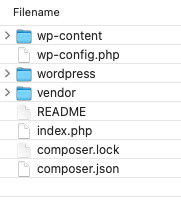
I'm using composer (package manager) as a set up for my wordpress site. Therefore the folder structure is different. The image attached shows that the wp-content is moved outside the wordpress directory, and this is where I have all of the images, plugins and themes saved.
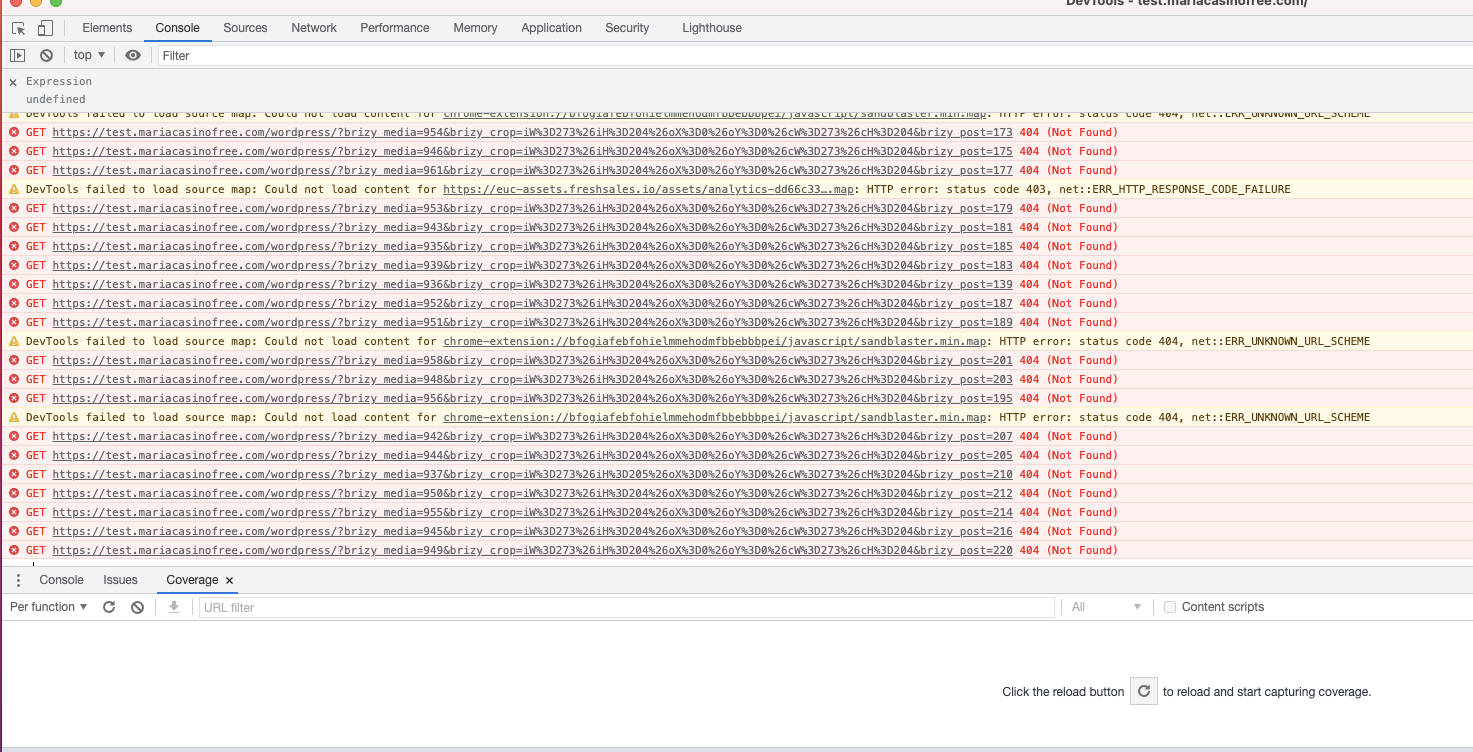
I've noticed when it comes to images of particularly posts I get an error in my inspect element 404. This is because Brizy uses the site url in order to render the image. Example : https://test.mariacasinofree.com/wordpress/?brizy_media=956&brizy_crop=iW%3D273%26iH%3D204%26oX%3D0%26oY%3D0%26cW%3D273%26cH%3D204&brizy_post=195
If you remove the /wordpress/ from the above link there will be no more 404 error therefore my question to you is is there a way for brizy to use the home url instead of the site url as these are set differently in my database.
Site url is set as: https://test.mariacasinofree.com/wordpress/ - (to read from the wordpress directory)
Home url is set as : https://test.mariacasinofree.com/ - (this is used so that the url of the website will not show where the directory of wordpress is)
This is urgent .
-

Hi,
I can see the image when I access your link: https://jmp.sh/PwSFFb8 Does the problem only appear in some posts? Do you have any optimization plugins? Try disabling all external plugins and check again. It seems that the errors in the console are related to lazyload.
0 -
Yes I'm aware that the images are still visible. If you open the link of the image and go on inspect element you will notice a 404 error in the console. This is the error that I'm referring to that are showing up in the console. If you remove the /wordpress/ then the error is gone. Therefore I think that since I have site url set as https://test.mariacasinofree.com/wordpress/ , brizy is using this url to render the images.
With regards to optimisation im using shortpixel for images only. I've disabled all plugins however the problem still persists. May you please check if there is a setting within brizy that I could use the home url instead of site url for rendering of images (specificially for posts only) or another alternative as its effecting my SEO performance due to all of the 404 image errors in inspect element.
0 -
I have also disabled the lazy loading but the issue doesn't relate to this as the same link is being used. So if its being rendered after the users scrolls or when the page loads, the 404 error will still show like the screenshot below :
 0
0 -
Hi,
there is no such setting in which you can change the way Brizy loads images. If you want to change this then you have to inspect the code yourself and make these changes at your own risk.
Can you please confirm that we are talking about the latest Brizy versions - Free 2.3.18. and PRO 2.3.14? Once confirmed, I will create a private ticket and we will try to find a solution for you but if this will be due to the fact that you are using a modified folder structure then we will not be able to help you.
0 -
Yes i confirm that I'm using the latest versions of both free and pro. The only thing that is modified is that the wp-content folder is not found in the root directory of wordpress however the website still works as normal. Would really appreciate your help with this as I do not have much options left.
0 -
I have created a private ticket for you so please send your login details there and we will look into it. Thanks.
0
Please sign in to leave a comment.
Comments
6 comments