High server CPU load when in brizy editor

Hi!
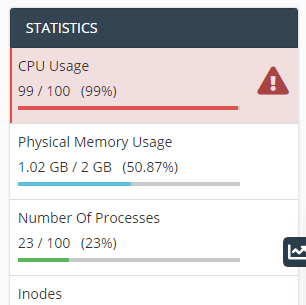
Noticed that my website is getting maxed out on cpu when i use brizy editor to edit my pages and posts. Why is that? At this point, if i open editor for longer time it gets ewen worse, to the pont that my website is not acessable for few minutes after i close the editor.
-

Hello!
Do you use some additional plugins?
What is your server configuration?
Please make sure that you are using the latest Brizy plugin versions, which are 2.3.17 for Brizy free and 2.3.13 for Brizy Pro.
Try to fully reinstall plugins (deactivate, remove, install again)
Clear the website cache and check your page again.
After it, go to Settings --> Permalinks and push the save button. In general WordPress settings, I mean.
Let me know the results.
Kind regards,
Mihail
0 -
Yes, i have these plugins:
BBQ Firewall, Code Snippets, LiteSpeed Cache, Yoast Duplicate Post, Yoast SEOIm using Host service at area.lv. Brizy plugins are up to date. Tried deactivating them. I contacted host service provider and they said that problem is brizy plugin. Will tray reinstalling and clearing cache.
0 -
Cleared the cache and reinstalled plugins. Still getting the same CPU high load state when editing my pages. And eventually it gets to the point that my web page is in this high CPU load for 10 minutes, despite i closed editor and all open entities of my page.
0 -
Hello!
I've created a private ticket, you should receive an email notification regarding this. In this ticket, please, provide us the link to your website and admin access to the WP dashboard, we would like to check the problem from your dashboard.
Kind regards,
Mihail
0
Please sign in to leave a comment.
Comments
4 comments