Brizy causing problem with other plugin

Hi there,
Please check the following correspondence from the plug-in owner:
Hi Jotte,
Thanks for setting up the staging site. I can immediately see there's a conflict with the Brizy page builder. Their pro plugin is adding a filter that tells WooCommerce to look for all templates only in the WooCommerce plugin folder. (For reference this is in the brizy-pro\content\placeholders\single-product-aware.php file)
However the price input template is in my plugin's folder, so Woo is looking in the wrong place and therefore not able to find the price input template. Officially, compatibility with 3rd party plugins is not covered under the WooCommerce Support Policy, but I will poke around a little bit more to see if I can come up with a short-term fix. The Flexible checkout fields are displaying since they do not use the wc_get_template() function and print their output directly. We might be able to do something similar.
I would advise contacting Brizy support. I have never seen anything like this and we'd need their advice on how to get around that. This seems like it would introduce a lot of compatibility issues for any plugin that is using wc_get_template().
2nd mail:
Hi Jotte,
I was able to cobble something together that might serve as a short-term patch. You can see the snippet I am running on your staging site here:
https://www.vincentdocquir.be/1633697622831/wp-admin/admin.php?page=edit-snippet&id=6&result=updated
Effectively, I am removing the main functions from my plugin where wc_get_template() is called and instead I am directly pasting in their content in the same place. This appears to be working with the price input displaying and functioning on the front-end: https://www.vincentdocquir.be/1633697622831/?product=surprise-boeket (I am less certain it would work on a variable product, but since your surprise product is a simple product we should be ok there).
This is not a particularly elegant solution, but hopefully it will buy you some time for Brizy to hopefully investigate. My lack of familiarity with their code means I don't understand why those filters are the way they are, I can only detect the result.
If you are satisfied with the functionality on the staging site you can install the Code Snippets plugin on your live site and add that snippet there as well.
Site: https://www.vincentdocquir.be/product/surprise-boeket/
I can give access to the staging site if necessary. For now the bug is fixed with the snippet, but that's not a permanent solution.
-

Hello Jotte!
Can you please let us know, Which Plugin? Add please a link to this plugin.
Brizy is compatible with the WooCommerce plugin.
And also please describe to us more about the issue. And what is happening without the fix provided by the plugin developer?
Kind regards,
Mihail
0 -
Hi Mihail,
The plugin is Name Your Price; https://woocommerce.com/products/name-your-price/
Kathy, de owner of the plugin also reached out to Brizy Help desk too.
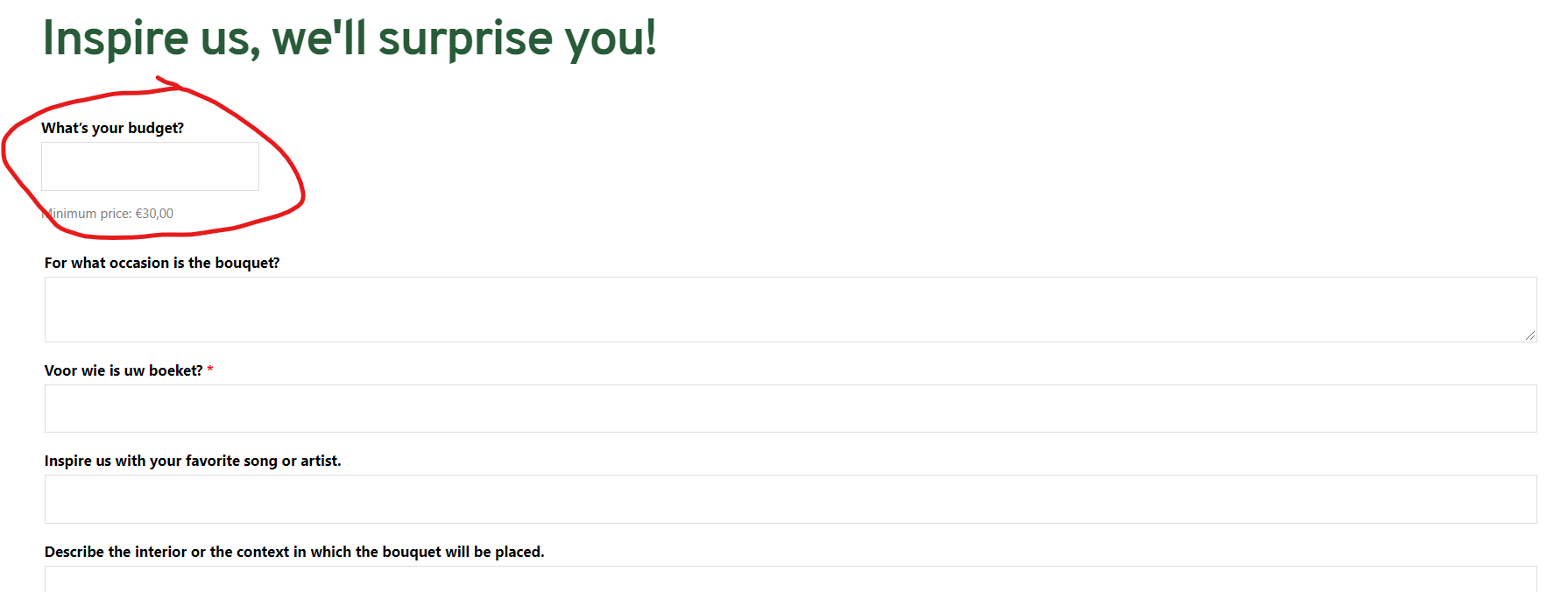
The problem was that the price field, in which customers can put in their prefered price was not showing up. So when filling in the other information and clicking add to cart it would do nothing (nothing added to cart) as there was no price.
With te script she wrote, the problem is fixed for now. But I need to make sure that this will not happen again as the webshop was down for 1 week because of this.
https://www.vincentdocquir.be/en/product/surprise-bouquet/
 0
0 -
Hello!
Thank you for the info! I think the fix provided by plugin dev should work for you.
May I ask you to provide a code that was added by the Plugin developer?
Kind regards,
Mihail
0
Please sign in to leave a comment.
Comments
3 comments