Website not working after updating

Hi there!
Unfortunately the site I am currently working on stopped working after updating Brizy and Bizy Pro — which really makes me angry because it is not the first time. And as I have to showcase the page in two days it would be great if you could help me solving this problem.
The issue: I have a frontpage which used to load posts sorted by categories. After updating Brizy and Bizy Pro everything is gone — loading the right posts, the fields and the entire design I made for those.
In the screen shot attached you can see how the page looks like when Brizy Pro is deactivated. When activating Brizy Pro there is nothing but the logo …
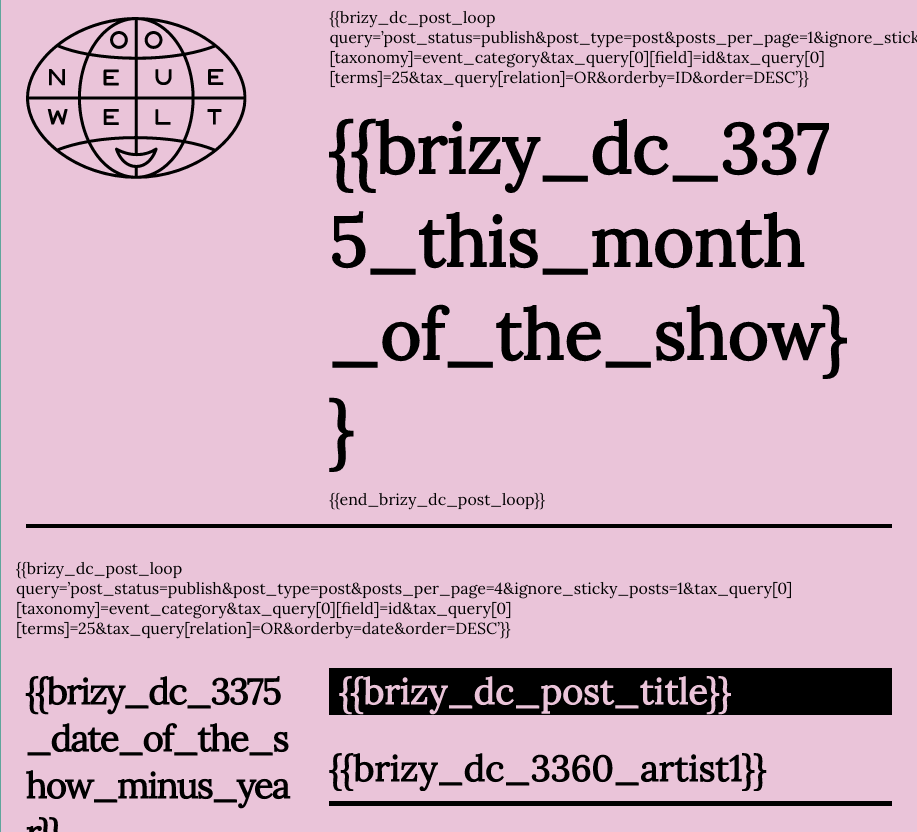
How can I make it work again?
(Brizy: Version 2.3.17, Brizy Pro: Version 2.3.13, PHP 7.4)
-

Hi,
Thank you for contacting us.
Please try to fully reinstall plugins (deactivate, remove, install again). Then clear the website cache and check your page again.
Let us know if all is working fine. Thank you.
Best regards, Nelea.
0 -
Of course that’s what I did first of all. Unfortunately it didn’t help …
0 -
Hi,
Could you please disable all plugins, except Brizy Free and Pro, and check if the issue still persists?
Best regards, Nelea.
0 -
Unfortunately that didn’t help either.
0 -
Hi,
We would like to check this problem from your dashboard. Could you please send us the WP credentials to this site? We have created a private ticket for this request. You had to receive a notification regarding this by email. Could you send us in that private message the WP credentials to this site?
Best regards, Nelea.
0 -
Thanks!
0 -

I have updated in brizy bro 2.4.2. Then updated but not loading my site, please help.
0 -
Hi,
Thank you for contacting us.
Please update the latest Brizy Free and Pro version 2.4.3. If the error still occurs please temporarily deactivate all external plugins (except Brizy Free and Brizy Pro) and activate one of these recommended themes https://www.brizy.io/theme-partners . Also, please send the URL of your website.
Best regards, Nelea.
0 -

Hi Prakash
As I have mentioned to you in this post, we will need to take a look at your website to help you with this. https://support.brizy.io/hc/en-us/community/posts/7767959383185
0
Please sign in to leave a comment.
Comments
10 comments