Brizy Plugin will not update and only displays a critical error blank page on live site

After editing the template and going live, it will not update and additionally now displays a critical error on the live site. We have tried a number of things including a site restore and nothing works. This is the landing page 
This is what is displayed now!

I have both Brizy Version 2.3.17 and Brizy Pro Version 2.3.13 running on the site.
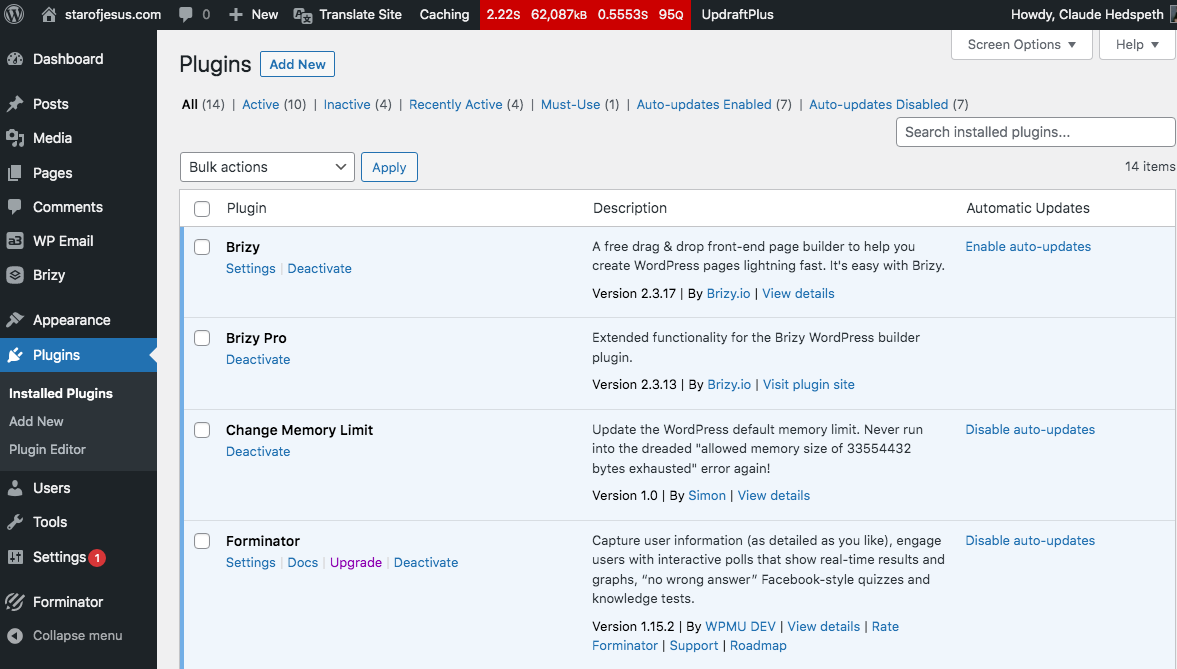
The problem happened when I linked a square donation sight through a button link and updated the page.
I have tried a number of things to correct this problem that includes deleting the plugin and reinstalling the Brizy zipped file and doing a full restore.
I need some insight on how to correct this problem.
Thank You!
-
Finally got a page error response!;;
Fatal error: Uncaught Exception:
in /home2/starosus/public_html/wp-content/plugins/brizy/editor/http/client.php on line 93Call stack:
-
Brizy_Editor_Http_Client::request()
wp-content/plugins/brizy/editor/api/client.php:226 -
Brizy_Editor_API_Client::compile_page()
wp-content/plugins/brizy/editor/user.php:122 -
Brizy_Editor_User::compile_page()
wp-content/plugins/brizy/editor/post.php:319 -
Brizy_Editor_Post::compile_page()
wp-content/plugins/brizy/admin/popups/main.php:40 -
Brizy_Admin_Popups_Main::enqueuePopupScripts()
wp-includes/class-wp-hook.php:303 -
WP_Hook::apply_filters()
wp-includes/class-wp-hook.php:327 -
WP_Hook::do_action()
wp-includes/plugin.php:470 -
do_action()
wp-includes/script-loader.php:2083 -
wp_enqueue_scripts()
wp-includes/class-wp-hook.php:303 -
WP_Hook::apply_filters()
wp-includes/class-wp-hook.php:327 -
WP_Hook::do_action()
wp-includes/plugin.php:470 -
do_action()
wp-includes/general-template.php:3015 -
wp_head()
wp-content/themes/the-core-parent/header.php:8 -
require_once()
wp-includes/template.php:770 -
load_template()
wp-includes/template.php:716 -
locate_template()
wp-includes/general-template.php:48 -
get_header()
wp-content/themes/the-core-parent/404.php:6 -
include()
wp-includes/template-loader.php:106 -
require_once()
wp-blog-header.php:19
Hope this helps
-
require()
index.php:17
Query Monitor
0 -
-

Hi,
Thank you for contacting us.
Thank you for all these details! We would like to check this problem from your dashboard. Could you please send us the WP credentials to this site? We have created a private ticket for this request. You had to receive a notification regarding this by email. Could you send us in that private message the WP credentials to this site?
Best regards, Nelea.
0 -
Hi Nelia, Here are the admin credentials for you to review and make suggestions to correct the problem. (Deleted by Brizyteam)
0 -
Thank you.
0 -
I responded to the email dated 10/7/21 where your support tech declared that the problem I was having with the sight not working was the result of the server for hosting service we are using. I asked them about this and every setting that Brizy said needed to be present was already in place except one.
Hi Natalia,
Thanks for your response, however I have disabled all plugins on the site except the Brizy Plugin Version 2.3.17 and the sight can’t be found:
When all the plugins are active except for Brizy Plugin Version 2.3.17 the website works but not with the graphics of the layout that was chosen:
In exploring you Curl 28 fixes
https://www.wpbeginner.com/wp-tutorials/how-to-fix-curl-error-28-connection-timed-out-after-x-milliseconds/
https://docs.presscustomizr.com/article/326-how-to-fix-a-curl-error-28-connection-timed-out-in-wordpress- Temporarily Disable WordPress Firewall
Answer: None Present so Not Applicable
2. Deactivate All WordPress Plugins
Done:
- Ensure Your Hosting Server is Using the Latest Software
According to the requirements, My Hosting Server need to be PHP 7.4.13 or higher, curl 7.74.0 or higher, and OpenSSL 1.1.1 or higher. As you can see, mine is using PHP 7.4.23, curl 7.79.1, and OpenSSL 1.1.1 – So we are good there!
4. Fix SSL Insecure Content Issues
According to what you sent me the error is a Curl is 28 and not 7 so it is not an SSL problem
5. Seek Help from Hosting Provider
I did this and had them update memory limits.
memory_limit = 256Mupload_max_size = 64Mpost_max_size = 64Mupload_max_filesize = 64Mmax_execution_time = 300max_input_time = 1000
They did all of them except max_execution_time = 300 which requires an hosting plan upgrade..
They did return with “ In the error , it says there is an issue with public_html/wp-content/themes/the-core-parent/theme-includes/includes/sub-includes/auto-setup/class-fw-auto-install.php:1869) May I ask you to check this class-fw-auto-install.php file with the theme vendor to see whats the error ? This file is the source of the error which is making the website go down. “
I do not want to upgrade to a plan that is 10X what I am currently paying for hosting with no guarantee that it will work, and based on what you send me about Curl 28 errors, everything the articles said was an issue really doesn’t appear to be an issue. I believe that the Brizy Plugin may be the problem so is there a way to delete the plugin and roll it back to version 2.3.16 to see if that works or provide some alternative fixes that we haven’t tried yet.
Looking forward to getting this back up and running.
- I have another Brizy site up on the same hosting that is working with no issues and is running version 2.3.16.
Claude Hedspeth
Our Hostin service said that the problem rests with Brizy Plugin Version 2.3.17 so I feel I'm in the middle with no solution and I did respond to this on 10/10/21 and I havent heard back. Please respond.
0 -
Hi Claude,
I will open a ticket again. You had to receive a notification regarding this by email.
Best regards, Nelea.
0
Please sign in to leave a comment.
Comments
6 comments