WooCommerce product sorting

Hi There,
With WooCommerce you can set the sorting/ordering of products manually to display in the order you wish.
How can this be accomplished using Brizy WooCommerce?

-

Hi Riaan,
Thank you for contacting us.
Not sure that I understand what do you mean by "with WooCommerce you can set the sorting/ordering of products manually to display in the order you wish.". Do you mean you can change products order manually in dashboard? If so, then without other plugins this couldn't be done out of the box.
Best regards,
Denis.0 -
Hi Denis,
Thank you for your response, my apologies, here is a better explanation.
In the screenshot, I have attached in my first correspondence, you will see sorting is highlighted in black. This gives you the ability to manually reorder products how you would like them displayed.
For example, if I move the fourth item to the top it will display this as the first item.
However, testing both the Brizy archive and products component does not work if you have Woocommerce default "custom ordering + name" selected. Have a look at default product sorting.
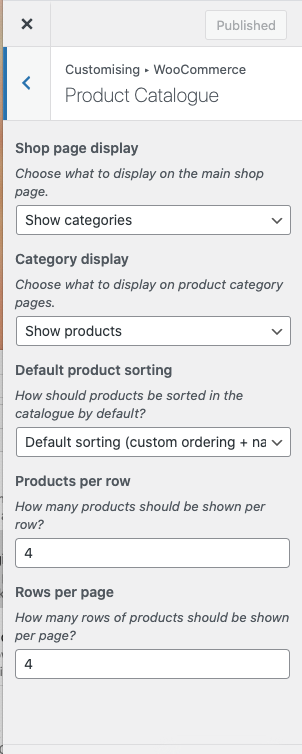
My question is how can I use the Brizy archive component to display products after you have ordered them manually?
Thank you for you assistance.
0 -
Hi Riaan,
Thank you for your reply an explanation.
At this moment you can't have customer order for products when you create template using Brizy. I forwarded your question as feature request to our team. Hopefully, in future updates this will be implemented.
Best regards,
Denis.0 -
Hi Denis,
Thanks for your response, do you know of a plugin or code snippet I can use in the function.php page to override the Brizy ordering?
Thanks for you assistance,
Riaan0 -
Hi Riaan,
Sorry for late reply.
This is a pretty complex task. At this moment there is no way to add custom order for WooCommerce products. This requires additional customization to achieve now the result you need.
However, there is a trick that you can try to use. If you order products by date, you can change products order by editing product's date. Please, check below example in screenshots.
Products grid before editing date: View screenshot
Editing date: View screenshot
Products grid after editing date: View screenshotHope this helps.
Best regards,
Denis.0 -
Hi Denis,
Thank you for your reply, this is what we ended up doing as a quick workaround.
The issue with doing it this way is, it affects product ordering in all categories. With WooCommerce sorting, it's grouped to that particular category meaning if you have the same product in multiple categories it will be ordered at category level and not globally.
Can the Brizy sorting default "date" now be overwritten using a function in the function.php file?
This code snippet is suppose to give the ability to order items by "menu order", but it does not override the Brizy Archive component, any suggestions?
add_filter( 'woocommerce_order_get_items', 'filter_order_get_items', 10, 2 );
function filter_order_get_items( $items, $order ){

    // no need to reorder if less than 2 items
    if(count($items) < 2) return $items;

    $sorted_items = $products_items_ids = array();

    // Get the array of product/variation IDs with Item IDs within the order
    foreach( $items as $item_id => $item ){
        // Get the product ID (Added WC 3+ compatibility)
        $product_id = method_exists( $item, 'get_product_id' ) ? $item->get_product_id() : $item['product_id'];
        // Get the variation ID (Added WC 3+ compatibility)
        $variation_id = method_exists( $item, 'get_variation_id' ) ? $item->get_variation_id() : $item['variation_id'];
        if( $variation_id > 0 )
            $product_id = $variation_id;
        $products_items_ids[ $product_id ] = $item_id;
    }

    // The WP Query based on the product Ids from this order
    $query = new WP_Query( array(
       'posts_per_page'  =>  -1,
       'post_type'       =>  array( 'product', 'product_variation' ), // <== HERE MISSING
       'orderby'         =>  'menu_order',
       'order'           =>  'ASC',
       'post__in'        =>  array_keys( $products_items_ids ),
    ) );

    // Loop in the Query
    if( $query->have_posts() ){
        while( $query->have_posts() ): $query->the_post();
            // Get the post ID
            $post_id = $query->post->ID;

            // Get the corresponding item ID for the current product ID
            $item_id = $products_items_ids[ $post_id ];

            // Get the new sorted array of items
            $sorted_items[$item_id] = $items[$item_id];
        endwhile;
    }
    wp_reset_query();

    return $sorted_items;
}
Thank you very much for your assistance, I really appreciate your help.
Kind regards,
RIaan0 -
Hi Riaan,
Sorry for late reply.
I asked our developers to check if this code will work. I'll reply you as soon as I will receive update from them.
Best regards,
Denis.0
Please sign in to leave a comment.
Comments
7 comments