Contact Forum Issue.

Hi, I am having an issue with my Contact form on the mainpage. It was included in one of your Templates as a way for the customer to put their phone number and issue and send it to an e-mail for me to call them back. I have tried configuring it by using the Wordpress button and filling in my personalized e-mail and also tried using the Gmail button and filling in my gmail address. But the result is always the same. When you fill out the fields and click the Send button, no e-mail is sent to me and there isn't even a notification saying if it was sent or not. It actually kicks you off the webpage completely and sends you to a blank white screen with a "0" in the top left corner.
-

Hello Mathew!
Please, let me know which cache plugin do you use? Is it Page Optimize by Automattic?
Disable it and check your form again.
Kind regards,
Mihail
0 -
I have not enabled the Captcha.
0 -
Just to be clear, this is the part I am having issues with. When you fill out the fields and click "Call me" it just kicks you off the webpage to a white screen with a 0. I used the builder to link my g-mail with no success.
 0
0 -
Hello Mathew!
Not the Captcha.
I am talking about the cache plugin. Please check carefully my message.
Kind regards
Mihail
0 -
Yes. I have previously said, I have not set up the Google captcha. I tried to set it up using the tutorial but when I enter the keys and click submit it won't process.
0 -
As far as this Cache plugin you speak of, I did not know such a thing existed. Can you give me more insight into that?
0 -
Hi. I was able to fix the problem myself by updating the Brizy Pro Plugin and Disabled Wordpress's optimizer Plugin as I read it conflicts with Brizy. So everything is working now except for one forum. All the forums on other pages are working fine but the one on the homepage is giving an error. It has identical settings to the other ones. Any idea why this might be?
0 -
Hello Mathew!
Glad to know that you found the troubles issue.
Can you tell us more about your error? Which error? Can you add the links to the form, so we will check it too?
Kind regards,
Mihail
0 -
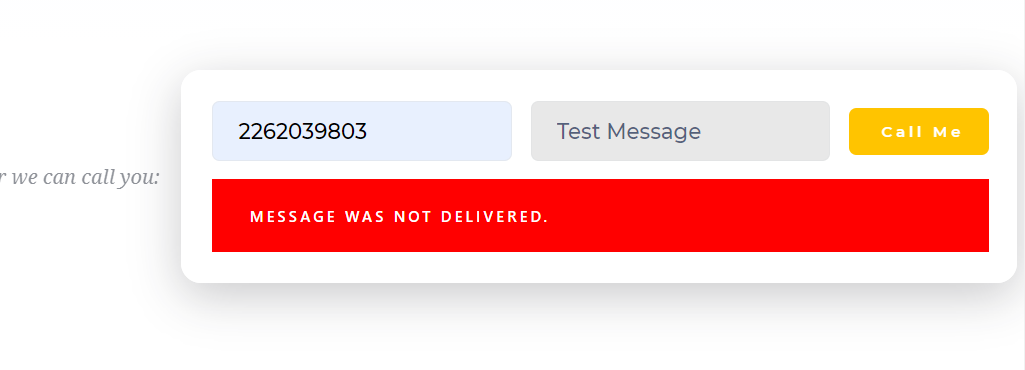
This is the message that pops up. The strange thing is I saved this piece of the website and made a new page then re-loaded this contact plug-in with the same setting and it works. So the homepage is the only page where the plugin is failing to send an e-mail. The other pages do not have this issue.
 0
0 -
Hi Mathew!
Sorry for the delay, support is limited on weekend.
Did you try to create a form from scratch for your page? Just to be sure that all the connection steps are made right.
Kind regards,
Mihail
0 -
Yes, when I create one from scratch it works. But I'm not interested in using the other ones as I prefer this format and setup. And creating one from scratch does not give you the options to make it look identical to this one.
 0
0 -
Hi Mathew!
Can You add the link to your website? Where can I check your form?
Kind regards,
Mihail
0 -
Sure. It's https://tech-guys.ca/
0 -
I've created a private ticket, you should receive an email notification regarding this. In this ticket, please, provide us the link to your website and admin access to the WP dashboard, we would like to check the problem from your dashboard.
Kind regards,
Mihail
0
Please sign in to leave a comment.
Comments
14 comments