slider in preview does not slide

Hi Brizy Team,
I prepared a slider with some slides, hosting a button and setting the slide time to 4 s. (see screenshot)
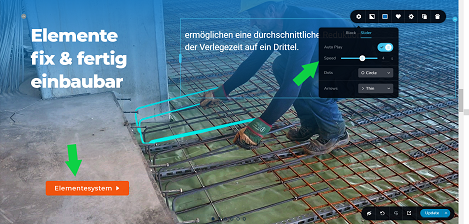
When looking at the slides in preview, first of all the button does not get displayed and second the slides do not switch through automatically. (see screenshot)
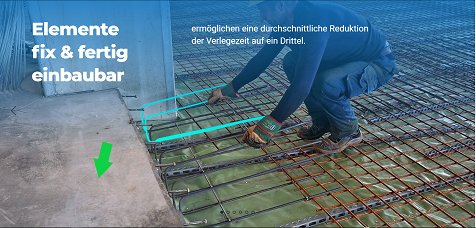
I have to press the little icons on the bottom of the slide to switch to the next slide.
Only if I manage to fit the slide in perfectly into the screen moving the browser fader up and down on the right hand side it slides occasionally, but also not all slides and continuously.
Please let me know if you have an idea what i am doing wrong.
the site I am talking about is:
https://www.best-baueisen.com/leistungen/?preview_id=476&preview_nonce=ad72485203&preview=true
I will send you admin logins to your office email address.
Best regards,
Max
-

Hello Max!
Thank you for the access to your website.
Can I ask you to update Brizy Pro plugin to 2.3.13? Please do it, and check again if trouble still exists.
Kind regards,
Mihail
0 -
How do i do that? there is Brizy Pro plugin to 2.3.11 installed and no available update indicated.Best regards,Max0
-
Hey Max!
You can fully remove it and install it from the scratch, as per instructions here: https://support.brizy.io/hc/en-us/articles/360019679472-How-to-install-Brizy-PRO-and-activate-your-PRO-license
You don't need to input the license again.
Kind regards,
Mihail
0 -
i am running brizy pro v 2.3.13 now. The mentioned issues remain. Please help.
https://www.best-baueisen.com/leistungen/?preview_id=476&preview_nonce=ad72485203&preview=true
I did send you login details to your support email address.
Best regards,
Max
0 -
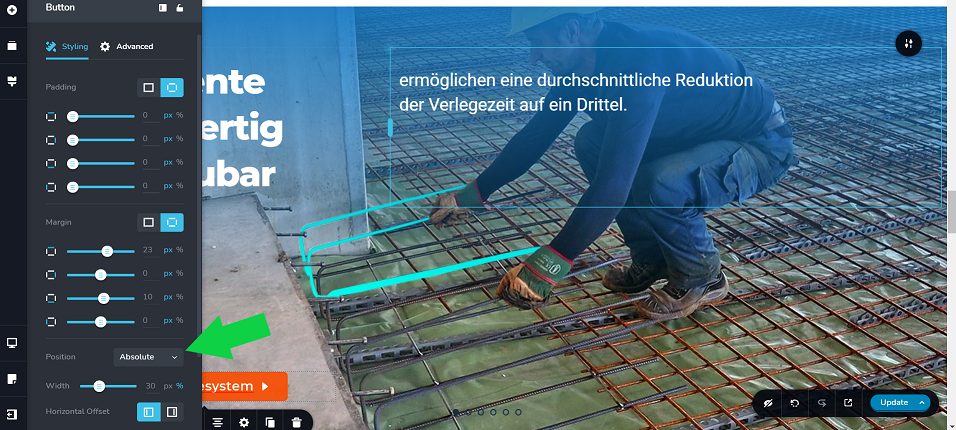
If you check the settings of the button on Slide One and Two you can see the button is there and the settings are set to Position "absolute". In the preview there are no buttons displayed on Slide One and Two, but on Slide three you find Two buttons, only one of which is supposed to be there.
 0
0 -
Hello Max!
Looks like you choose not an easy way to add your buttons.
Try to add Rows and columns to your slides. At this moment you have one button Elements not connected to your slider blocks.
Please try to edit slides as per my screencast: Add button to slider
This way, the button will remain inside of element which you need
The Absolute position is not the best solution for your buttons on the slider Element. Let me know If you wish me to create an example on your page and save it for you.
Kind regards,
Mihail
0
Please sign in to leave a comment.
Comments
6 comments