Specific plugins disable custom css feature in brizy pro

I have a website in development that has a little bit of styling css (a highlight effect) added to certain text via the Custom CSS feature in Brizy. This worked fine until a few updates ago (not sure which one, I've been on holiday for a few weeks).
The Custom CSS:
element .highlightstroke {
margin: 0 -0.2em;
padding: 0em 0.2em;
border-radius: 0.8em 0.3em;
background: transparent;
background-image: linear-gradient(
to right,
rgba(253, 240, 126, 0.1),
rgba(253, 240, 126, 0.7) 4%,
rgba(253, 240, 126, 0.3)
);
-webkit-box-decoration-break: clone;
box-decoration-break: clone;
}
I target a specific bit of text inside a paragrafph via
This is a paragraph and here comes some <span class="highlightstroke">HIGHLIGHTED TEXT</span> inside this paragraph.
After the update it now shows the code, instead of the intended effect.
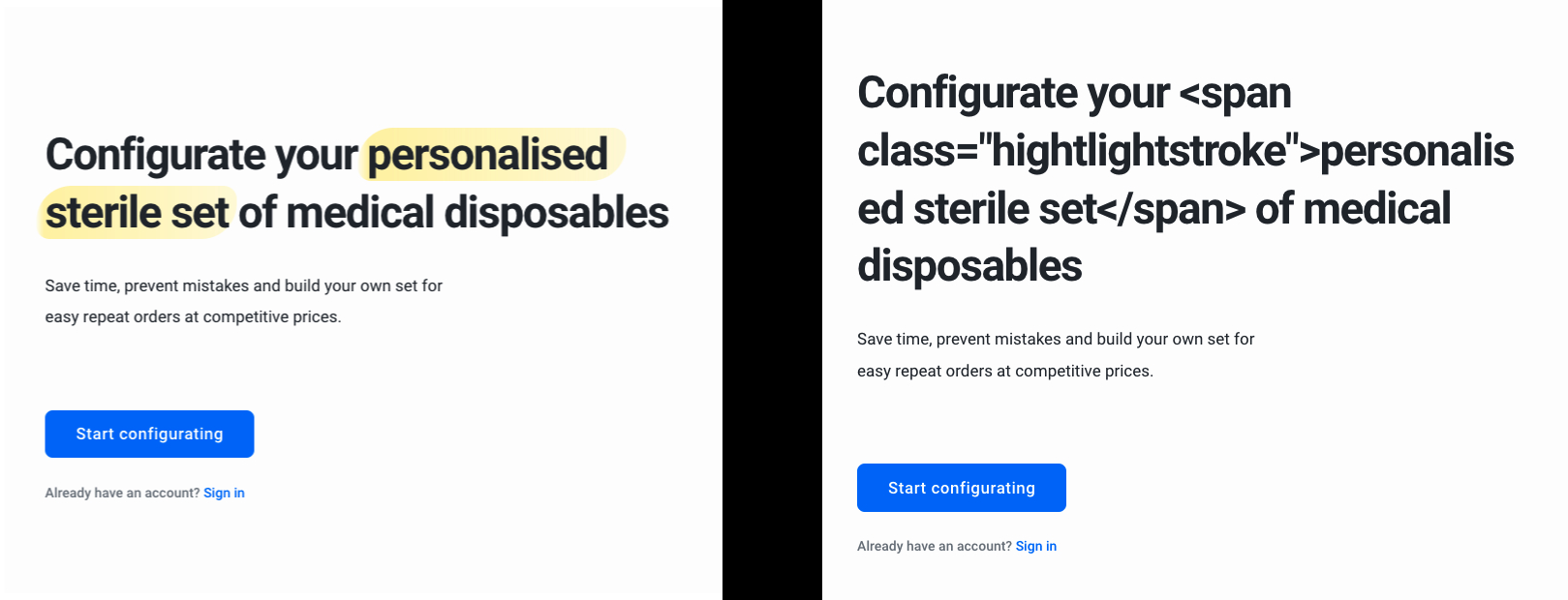
By disabling all plugins except for brizy, and re-enabling them one by one, I noticed there are two plugins that cause the error: Woocommerce and Yoast SEO. When these plugins are disabled, the css works. When one of these plugins are enabled (or both), it no longer works and you just see the plain html instead of the applied css effect.
I hope to learn how can circumvent this issue.
-

Hi,
That's interesting and I managed to reproduce this. I created an internal issue and I will talk to our devs about this.
We will come back with a fix or solution in one of the next updates.
1 -
Thanks for looking into the issue. Looking forward to the update.
We were planning to go live Tuesday 21st of September. Do you think the update will be before that, or is it better to take out all the custom css everywhere and adding it perhaps later back?
0 -
Hi,
no, I don't think it will be until then. You can use the Embed element to add these texts that contain HTML tags, because the problem is now with custom CSS, but with the fact that the text element does not recognize HTML tags.
0
Please sign in to leave a comment.
Comments
3 comments