video background cut off top end

Hi Brizy team,
I have a full height page element and a youtube video set as background. The element settings are set to full height. (see sceenshot)
in youtube the video gets displayed in full height.
The video background does cut off a couple of mm on the top end as you can see in the screenshot when you look at the bug/banner on the top left. I have no idea why and how I could avoid this from happening.
Do you have an idea?


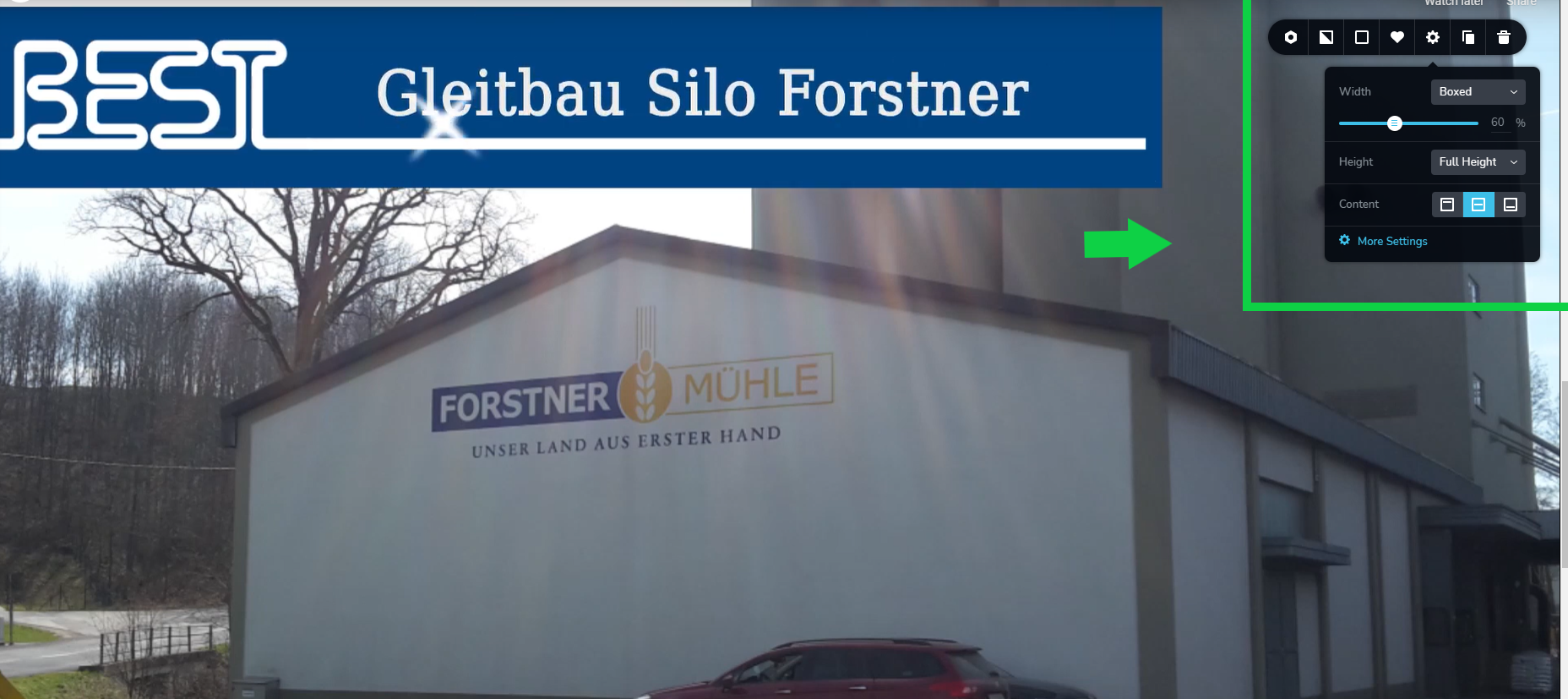
-

Hello, Maximilian!
Can I ask you to provide us a link to your website, or page directly with a mentioned question?
Thank you.
Kind regards,
Mihail
0 -
Hi Support, the site I am talking about is:
0 -
Hello!
Can you please add the link again? Here are no links in your message.
P.S. Please, do not reply to non-reply@zendesk.brizy.io email address. Your last message was received as spam and we had to recover it.
Kind regards
0 -
Hello,
the site link is:
https://www.best-baueisen.com/
I will send you admin logins to your office email address.
0 -
Hello Maximilian!
Thank you for the link.
Here is added a top space of -50 px https://prnt.sc/1sxqq85
Try add This CSS to block Advanced settings:
.brz .brz-iframe.brz-bg-video__cover, .brz .brz-iframe.brz-bg-map__cover {
    top: 0 !important;
}
Kind regards,
Mihail
0 -
Hi Mihail,
perfect this was the solution. Thanks for teaching me this.
best regards,
Max
0
Please sign in to leave a comment.
Comments
6 comments