Brizy deactives by unknown issue!

I make my site with brizy and everything works great until I am in the office.
Tomorrow morning when I come back to office the site looks like that there is no brizy at all!
I should open the wordpress, go to the page which has been edited with brizy and click on update to activate it again.
What is the problem here?
-

Hello Mohamedreza,
Thank you for your message!
Regarding what you have said, can you please give us more details about this? Explain what exactly is the problem. Provide some screenshots please. At the same time, do you have the latest Brizy versions: Brizy Free 2.3.13 and Brizy Pro 2.3.11? What theme do you use? Did you try to delete the plugins and reinstall them again? At the same time try to clear the cache on the server and browser. Hope to hear from you soon!
Kind regards,
Doina
0 -
I have the brizy pro 2.3.11 (latest version). If you check this website right now: gallerynorthstar.se so you can see everything works fine. But when I leave the website with no interaction on wordpress dashboard for a day or two, then it is look like the brizy plugin has been deactivated. My site looks like the default wordpress theme. Then I have to go to the wordpress dashboard, open the home page (edit it with brizy) and push the update button. Everything goes fine again!
0 -
Hello Mohamedreza,
Thank you for the quick reply!
Regarding what you said, can you please try to change all of your passwords and see if this still occurs? At the same time maybe try to delete the plugin ad reinstall it again and see what happens. The fact that the site works is good, though I am not sure that this problem is related to Brizy. Hope to hear from you soon!
Have a nice day and kind regards,
Doina
0 -
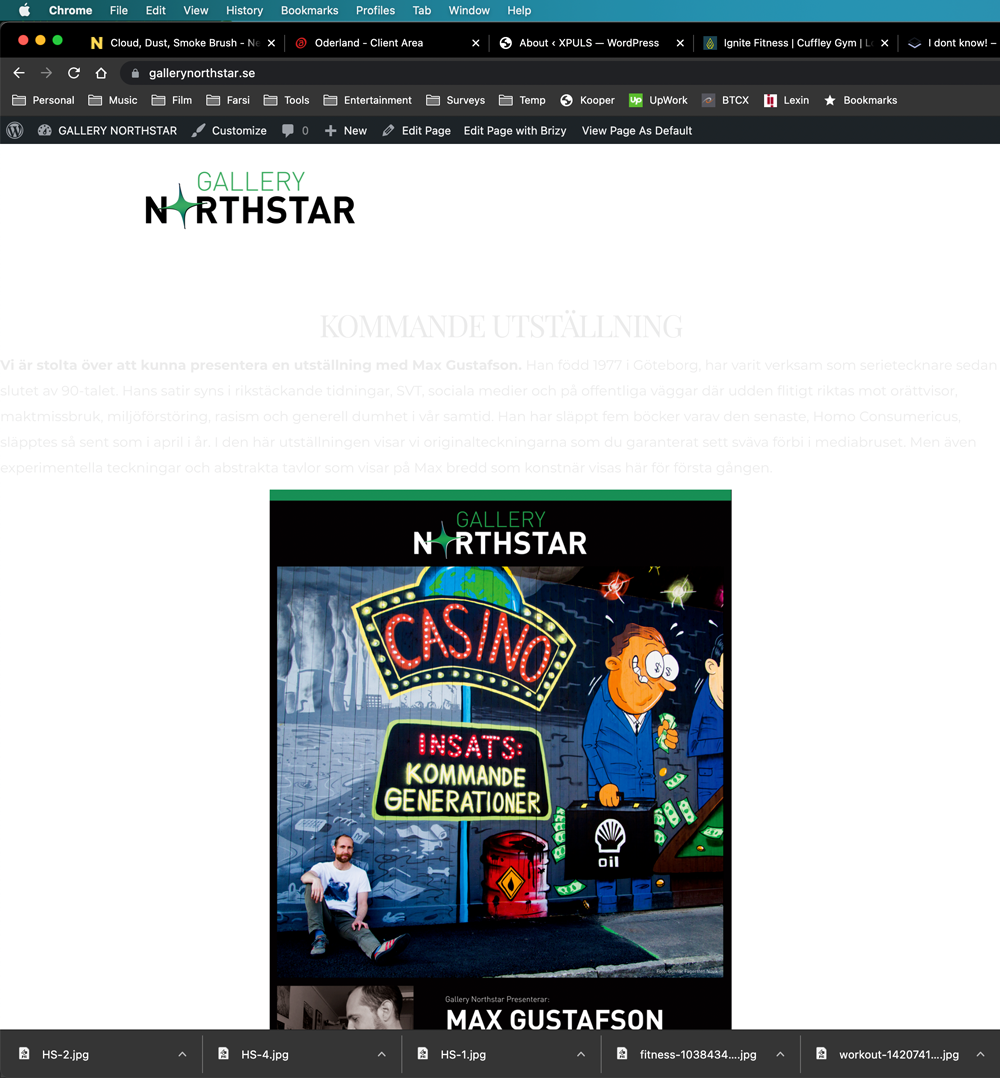
Hi there again.
Now you can check it: https://gallerynorthstar.se/
There is no brizzy here...
0 -
 0
0 -
Last night everything was ok. This morning it is look like this. Changed all the passwords. uninstalled and reinstalled the brizzy two days ago...
BUT WHY?
0 -
Now as soon as I open "edit with brizzy" and push the update button, everything will go back to normal. BUT MY CLEINTS ARE LEAVING!!!
0 -

Hello!
Thank you for providing the link to your website. At this moment, as I see everything is working well.
And you updated plugins to the latest versions Brizy Free to 2.3.13 And Brizy Pro to 2.3.12 ?
Now, you should enable the WP_DEBUG_LOG
Here are some more instructions
And this way you will be able to fix if the reason of your issue is in some error on your website.
Please let us know the results.
Kind regards,
Mihail
0 -
This is the debug.log
I cannot upload it so I copy paste it.
[09-Sep-2021 10:30:37 UTC] PHP Notice: Trying to access array offset on value of type null in /home/tryffels/xpuls.se/wp-content/themes/gutenix/assets/css/dynamic/dynamic-css.php on line 503
[09-Sep-2021 10:30:37 UTC] PHP Notice: Trying to access array offset on value of type null in /home/tryffels/xpuls.se/wp-content/themes/gutenix/assets/css/dynamic/dynamic-css.php on line 5030 -
Does this mean the gutenix theme is the problem?
But my other websites with the same problem has the default theme...
How should I fix this?0 -
Hello!
I see, thank you. No PHP Notice shouldn't break the website.
We have an idea, that it can be connected with auto-updates enabled for Bryzi plugins on your websites, so after each plugin update, you should re-publish your pages.
I know you are tired of updates, but we just released Brizy Free 2.3.15 where is done an fix for it. So please update your Brizy free plugin and let us know the results.
Thank you for your patience.
Kind regards,
Mihail
0 -
Yes!!!
The autoupdate is turn on for me. I will do this update as well to fix this problem.
I will post the result after a few days...
Thanks!0 -
Hello!
Yes, please, keep in touch.
Kind regards,
Mihail
0
Please sign in to leave a comment.
Comments
13 comments