Missing Wordpress Elements

Hi-
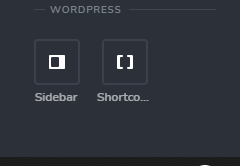
I am missing my wordpress elements. Any idea how to get those activated? I have Brizy Pro.
-

Hi Max,
I created private ticket, we would like to check problem from your dashboard. Please, provide us in this ticket link to your website and admin access to WP dashboard, we'll check the problem.
Kind regards,
Denis.0 -

Hi Denis,
I am facing the same issue as well. I am a brizy pro member but I am not able to see the WordPress elements.
Please advice
Thanks,
Sandeep1 -
Hi,
Thank you for your message,
- Please, make sure that you installed both Brizy Free and Brizy Pro.
- Check if you activated Brizy using your license key.
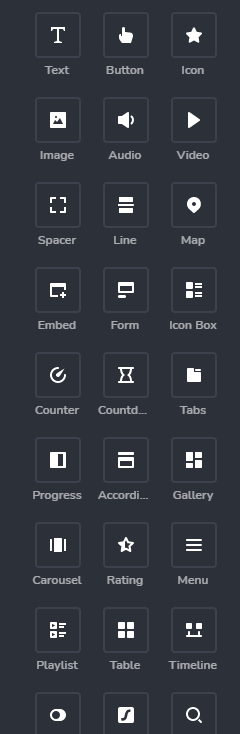
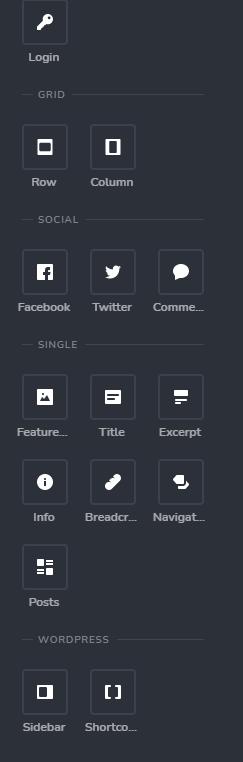
- Please, open any page in Brizy editor and provide me screenshot of the elements that are available for you.
Best regards,
Denis.-1 -
Confirmed 1 and 2 - 3 below:
 0
0 -
Hi Max,
Sorry for late reply, support is limited on weekends.
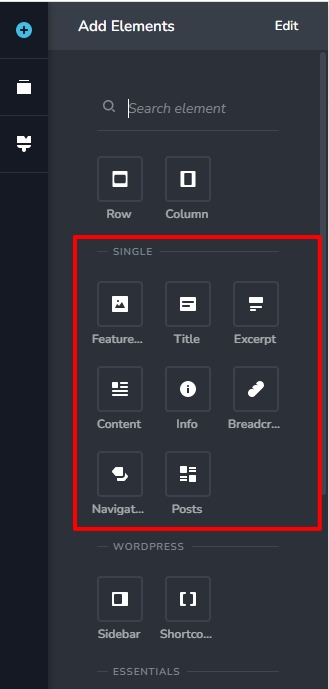
Thank you for providing screenshots. All Pro elements are available. The difference is that some of them were moved to another group. For example, "Breadcrumbs" and "Posts" elements are now in "Single" group.
Let us know if you will have any other questions.
Best regards,
Denis.0 -

I have the exact same issue!!! I was looking all over for the wordpress elements.
1 -
Hi Thierry,
In my last reply to this post I mentioned that all elements are available. Some names were changed and added in other groups.
Best regards,
Denis.-1 -

Hello, you said " some names were changed and added in other groups. ", can you tell which groups please, im looking for post and post title elements to create my article template
0 -

Hello El,
Thank you for your message!
First of all, please make sure you have the latest versions of Brizy: Free 2.3.21 and Pro 2.3.16. Besides this, see this image. Hope this helps!
With kind regards,
Doina
-1 -

Still happening to me lol, any good answer?
0 -

Hi Carl,
What elements are missing? Can you please share screenshots?
0 -

Same issue here and I've seen this as a recurring theme for users. At work I use Elementor and I've never experienced majoy issues like this.
A good formulated response with a step by step process would be appreciated Brizy team. Or should I just pay for Elementor instead?
0 -
Hi Mario,
If you are asking about elements useful for building a single blog post template, when editing a regular page, you will find these elements under the heading 'SINGLE'.
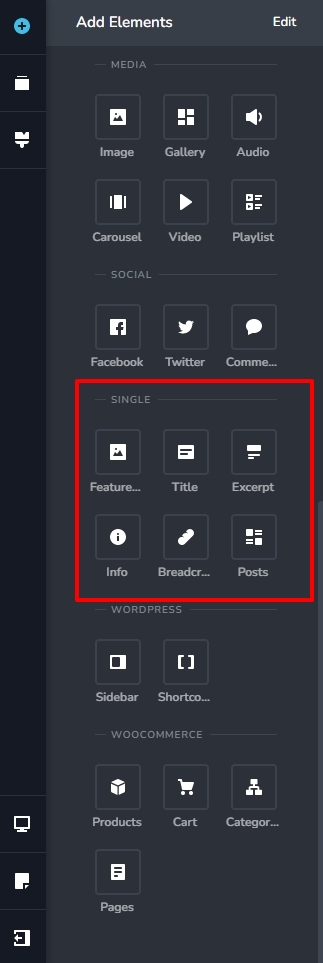
Available Brizy elements change according to the context. The 'Content' and the 'Navigation' elements are available only when developing a blog post template. Please have a look at this tutorial for more details on developing a single blog post template. Creating Dynamic Templates | Brizy WordPress 101 | Lesson 19
 0
0 -

I do not have the single elements either! What to do?? brizy Pro Plugin activated and license is valid.
0 -
Hi
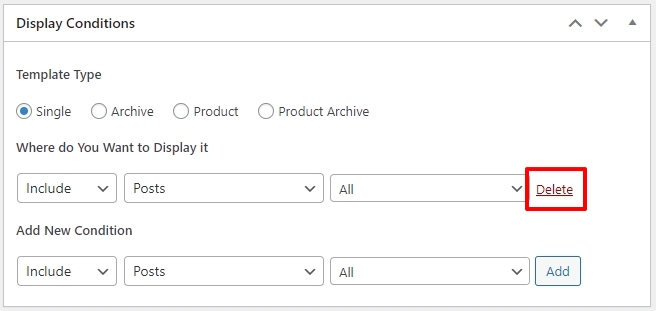
The Blog Post related elements are available only when adding a blog post template. Please check if you have added this Display Condition to your Brizy Template. A 'Delete' option next to your Display Condition confirms that you have successfully added the condition. If you do not see the 'Delete' option, please click on the 'Add' button to add the display condition
 0
0 -
Thanks George. Thats it. Was pretty sure it was done right but you got me. Thanks for the quick feedback.
0
Please sign in to leave a comment.
Comments
16 comments