Image Link Underlined (want to remove it!)

Hi,
I've made a website with one of your templates "ADVISORS".
The problem is, whenever I add hyperlink to images and texts, blue underline is created, which I can't remove (please see below).
I applied the methods found at this community,
https://support.brizy.io/hc/en-us/community/posts/360060187611-link-underline
but, none of these were effective.
Could you please help me out?
Thanks!
Jim
-

Hi,
Thank you for your message.
I tried to reproduce the problem you reported with the templates "ADVISORS" but all seems to work fine. Could you please confirm that you have the latest Brizy Free 2.3.9 and Brizy Pro 2.3.7 version? Could you please temporarily deactivate all external plugins (except Brizy Free and Brizy Pro) and activate a WordPress default theme? do you have the same problem? Also, please send us the URL of your website.
Best regards, Nelea.
0 -
Hi,
Thank you for your response.
Yes, my Brizy and Brizy Pro are all latest version (2.39 and 2.3.7 respectively).
I also tried to deactivate all external plugins and run theme again, but it was of no use.
My default theme is "Blank Canvas"
Thank you very much again.
Jim.
0 -
Hi,
I just checked your project and found that we have a plugin that caused this error, please see here. Could you please disable the optimization plugin then check again in incognito mode?
Best regards, Nelea.
0 -
Hi Nelea,
Thanks for your help!
However, the link you gave me is out of order. Would you please re-send the link? Also, I've already tried to disable all plugins and check my website, the problem was not solved.
In particular, when I visited my website through incognito mode (after turning off optimization plugin), the website is not going to work, showing "nginx".
Thank you again!
Best,
Jim
0 -
Hi,
We just check again your project and found that underlined imagine
is it's because of the theme you're using, please see here, so if you will change the Theme this issue will not appear. If you want to remove it, you can add some custom CSS. For this click on the text, go to the Settings -> More settings -> Advanced and there in the Custom CSS add this code:
a[data-custom-id="bbeiqjhwekojbrissghwwgdoomtptznqapci"] { border-bottom: none !important; }Best regards, Nelea.
0 -
Hi Nelea,
Great! I've solved the problem thanks to your help!
Really helpful advice and great communication. Thank you Nelea and Brizy!
Best regards,
Jim
0 -
You are welcome. Thank you for your confirmation!
Have an nice day.
0 -

I'm having the same underline issue in the logo image in the footer of my site at https://precedentstrategies.com/. Do I use the same Custom CSS code line to fix it, or was that specific to the other user's site?
-> Advanced and there in the Custom CSS add this code:
a[data-custom-id="bbeiqjhwekojbrissghwwgdoomtptznqapci"] { border-bottom: none !important; }0 -

Hi Kenneth
Do you still have this issue? When I checked, I could not see it. https://jmp.sh/bcxzCfZ
0 -
Yes, I do. Very strange that it isn’t happening for you. Here is what it looks like on iOS Safari right now: https://jmp.sh/0EZOx1Z (incognito). The underline is always present, not just on mouse over. Same appearance on Chrome and Safari desktop.
0 -
Hi Kenneth,
Can you please try this? Change your theme from Brizy Starter to Blocksy and see if it makes a difference.
Blocksy is one of our recommended themes. https://www.brizy.io/theme-partners
0 -
Changed to Blocksy. Seems to have fixed it on desktop -- Safari and Chrome. iOS of both browsers still underlines.
0 -
Hi Kenneth
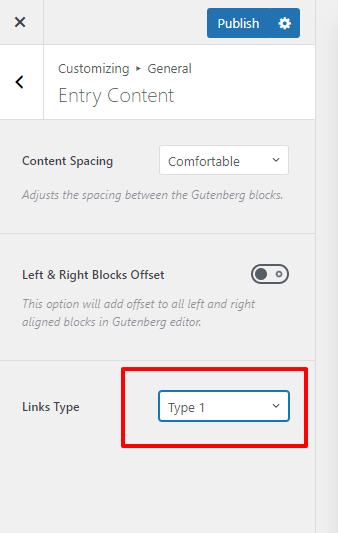
In your WordPress Dashboard under Appearance - Customize - General Options - General - Entry Content try changing link type to Type 1 and see if that helps. Feel free to try other link types as well.
 0
0 -
No change. Line still present in iOS Safari and Chrome, and Firefox desktop. It looks like the line was physically added to the images either by Brizy optimizing them (or some other optimizer), but some browsers are dropping the line in the resizing process. We're going to replace the images directly and see if that fixes it.
0
Please sign in to leave a comment.
Comments
14 comments