2 issues since last plugin update.. please look at this.

Hello team,
Thanks for such a wonderful builder. In love with Brizy.
My team has identified since last plugin update the following two issues:
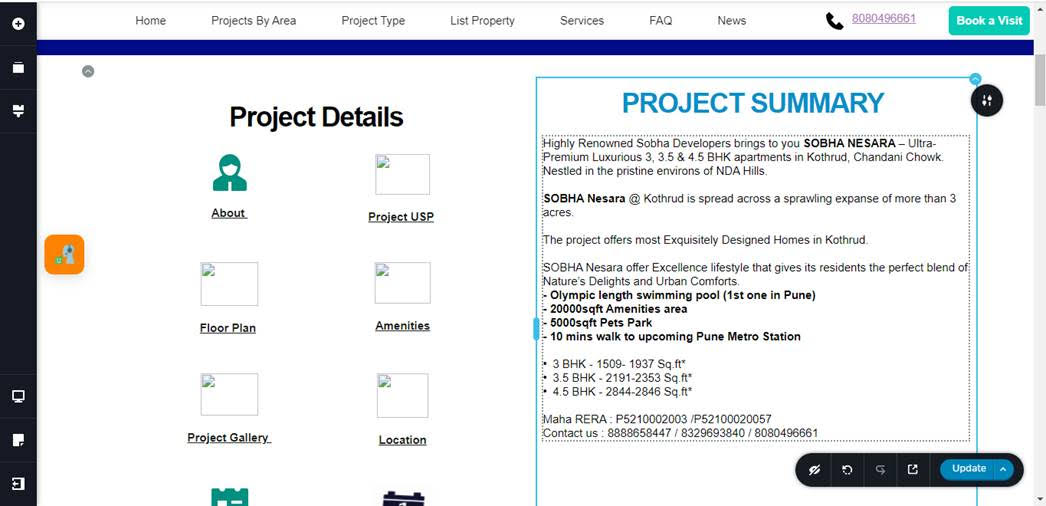
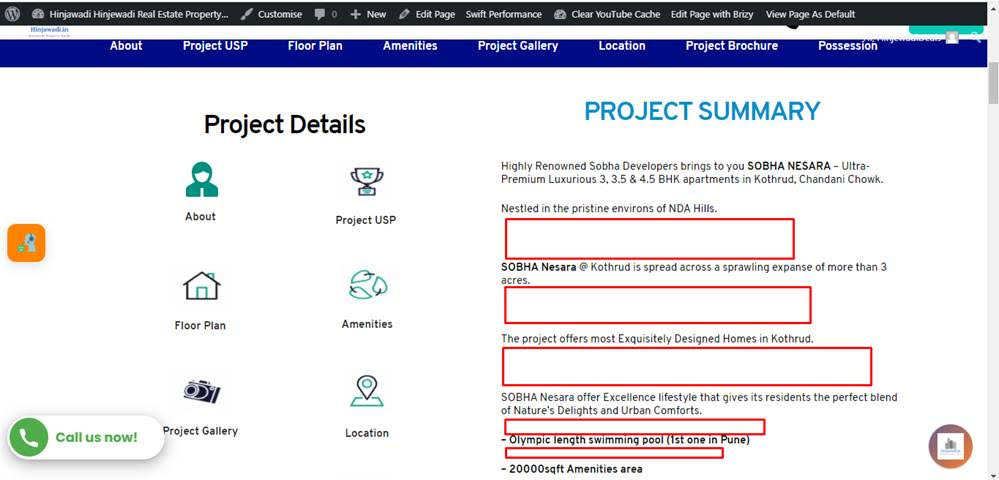
1) White spacing between backend view and frontend view is starkly different:
The front end view has lots of spaces compared with the backend which is desired. See images below.
Backendview:
Frontend image:
2) Another issue is when we use a saved block again, all the images within that block are uploaded again (doubling/tripling) to the media library. So for those reusable saved blocks, using of each new instance creates more images inside the media library. Rather the same original images of the saved block should be pointed to by the new instance of the saved block. This i feel is critical one.
Please see the screenshots attached for the first issue. Appreciate a resolution at your soonest please.
regards,
parag
-

Hi,
Thank you for your message.
1. The space can appear from the theme you have installed. Could you please activate a WordPress default theme? Do you still have this problem?
2.Could you please temporarily deactivate all external plugins, except Brizy Free and Brizy Pro, then save a new block and check if the image will be doubled again to the media library.
Best regards, Nelea.
0
Please sign in to leave a comment.
Comments
1 comment