Table Header only in italic font available?

Hi Team Brizy,
I am working with Brizy Pro. I am working with the table and somehow cannot change the italic style whic is in the table by default. Even when I change it to my custom styles (whic are not italic) it will display in italic. How can I change that?
It would be great to duplicate complete rows within the table. And is there any way to change the global font and color of the complete table content? When I work within your prepared table, I would have to touch every single box - that is time consuming.
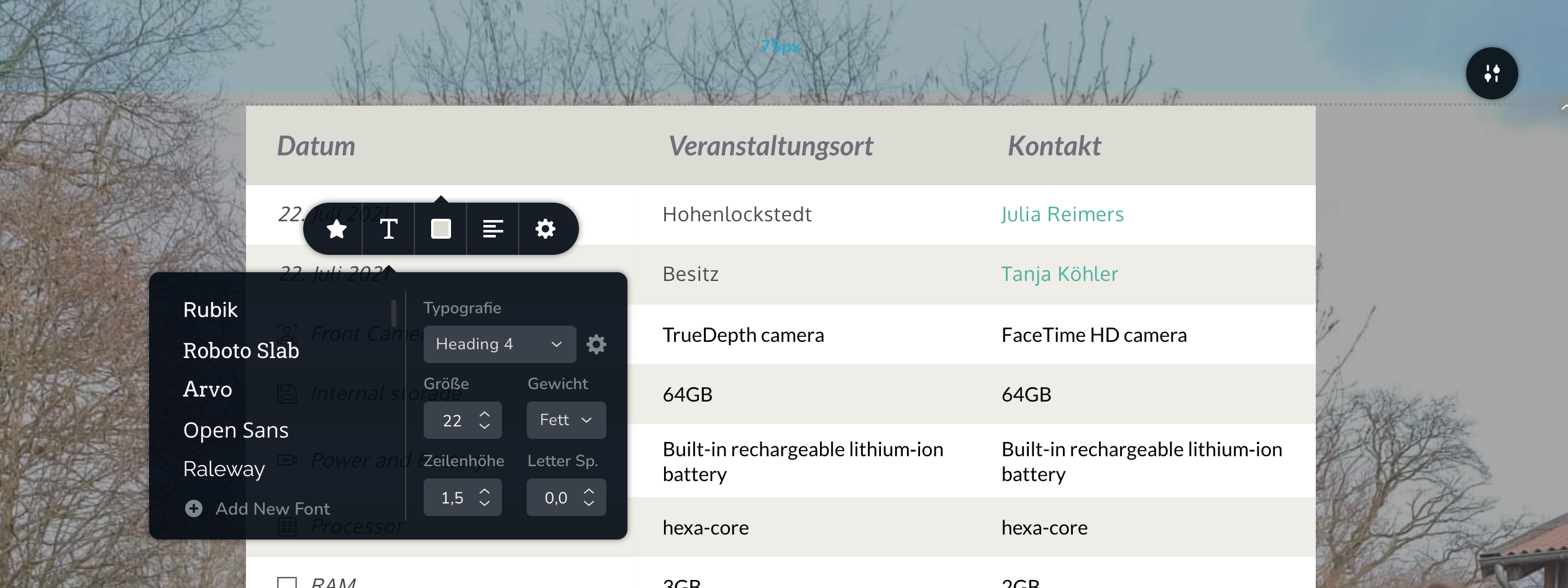
In the picture you can see that the top/head of the table displays in italic font. And also the left/first section displays in italic.
Thank you an regards, Leslie
-

Hello Leslie,
Thank you for your message and sorry for the late response! On the weekends, Support is limited.
Regarding what you said, I tried to reproduce your problem and couldn't. It seems that the problem is on your end. What I would like you to do is to tell me what theme you use and if you can pleased change it to a default one and see what happens. Hope to hear from you soon! Till then, if you have any additional questions or problems, please feel free to ask!
Kind regards,
Doina
0 -

Hi Doina, no problem, thank you for your hint. I tried myself on another Website we made with Brizy without a theme and ther is no such problem. So now I have an idea that the problem could be the avada theme. I cannot disable it now, because the website ist running with avada right now and we will shut that one down, once I have finished the Brizy version. So I will just leave the table as ist is an finalize it after the switch. :-) Thanks for your help! Leslie Denkner
0 -
Hello Leslie,
Thank you for your message and letting me know how things turned out in the end!
If you ever encounter any other problems or you have some questions, please feel free to ask! We will be happy to help as soon as possible!
Have a nice day and best regards,
Doina
0
Please sign in to leave a comment.
Comments
3 comments