Woocommerce Add to Cart button connected with Stock

Hello,
if I add the "Add to Cart" button its automatically connected with Stock feature.
Is there any possibility to only show the "Add to Cart" button? Because I sell individual "Product" where there is only 1 in stock.
In this example I have added these features:
Left: Gallery
Middle: Stock
Righ: Add to Cart
Thanks in advance for any help.
-

Hello Philipp,
Thank you for your message!
Regarding the question you have, please check this video: https://www.youtube.com/watch?v=GbbPwRvW5Gs It might help! Hope this was useful! If you have any other questions or encounter some difficulties, please feel free to ask! We are happy to help!
Have a nice day and kind regard,
Doina
1 -
Stock Dispplay Format is already set to "Never show stock amount".
The odd thing is, that "in stock" (vorrätig) is also shown if Brizy Product Template is deactivated. But only once and on top of the Add to Cart button with a line as spacer.0 -
Hello Philipp,
Thank you for your message!
Regarding the issue that you encounter, if you already set the Stock Display Format to "Never show stock amount" and it did not work then you should do it through Custom CSS : .product-template-default .entry-summary .in-stock { display:none; }
Hope this helps! If you have any other questions or problems that you encounter, please feel free to ask! We will be happy to help!
Have a nice day and kind regards,
Doina
1 -
Hello Doina,
thanks for your reply.
I entered menu Design - Customizer - Custom CSS and added your code.
Sadly it only works with standard template. If Brizy template is active for products the same issue pops up.0 -
Hi Philipp,
Thanks for letting me know!
I would suggest you to try this code then .brz-section__content .in-stock { display: none; }
Hope this helps!
Kind regards,
Doina
1 -
Thanks so much, Doina. Now it is working. :)
Kind regards
Phil0 -
Hey Philipp,
You are welcome and I am happy that it works! Again, if you have any other questions or encounter some problems, feel free to ask! We will be happy to help!
Enjoy your day,
Doina
0 -

Hello,
This does not solve the issue for me. I do use stock, but do not want to display it next to the add to cart button.
If I apply your solution, stock does not appear either when I use the stock widget on the product template.
It also defeat the general purpose of Brizy of using no code for design.
There is an add to cart widget AND a stock widget. Why would stock value be included in the add to cart widget with no possibility of easy styling?
Additionally, it wasn't there in previous versions, can't remember which, but I'm pretty positive it wasn't there last year, because my template uses the stock widget, and I would definitely had noted available stock displaying twice on my products.
What would you suggest?
Thanks,
Vincent.
0 -

Hi Vincent
You are right. When stock management at product level is enabled in Woocommerce, Brizy automatically displays the stock details along with Add To Cart element. If you want to display stock and yet not show it along with Add To Card element, I can suggest a work around.
Take a look at this test page: https://homi.kctest.online/product/coffee-table. Here I am displaying Items in Stock and the Add To Cart button does not have stock details. This can be done by adding a custom filed.
I can make a video with the procedure to setup this work around. Please let me know if you are interested.
0 -
I am interested, definitely. Thanks
0 -
Hi Vincent
I am discussing a 4 steps work around to display stock details in your Woocommerce products and at the same time not show it in the Add To Card element. The four steps are
1. Under Woocommerce - Products - Inventory tab for each product ensure that "Enable stock management at product level" option is unchecked (disabled)
2. Install the plugin "Advanced Custom Fields" and add a custom filed and call it "Custom stock"
3. Enter the stock details for each product under Woocommerce -Products- Custom stock
4. Under Brizy- Templates - Single Product Template add the stock details using the custom field Custom stock
Please watch the video here https://www.loom.com/share/c3f1f173032f4c8dabb035ab88084c88
0 -
That will not allow me to use my stock management plugin
0 -
It won't also not be automatically depleted when products are ordered
0 -
Hi Vincent
This work around will work only if stock management is not critical for you. If you are making use of the stock management feature in Woocommerce, this work around is not for you.
I do not have an alternate work around for you at the moment. Will get back to you if I can find an alternate solution for you.
0 -
Hi Vincent
When stock management at product level under Woocommerce - Products - Inventory is enabled, to stop displaying the stock information along with the Add To Cart button, please try adding this CSS under Appearance - Customize - Additional CSS
p.stock.in-stock{
display:none;
}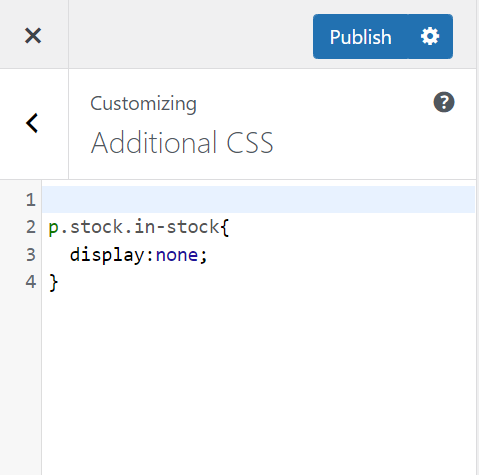 0
0 -
doesn't work either, remove both with the add to cart an stock widgets.
I need a solution that removes stock from the add to cart widget, but still allow it using the stock widget. This is how it worked before updates.
0 -

Hi,
try using the following code:
.brz-woo-add-to-cart .stock {
display: none;
}If doesn't work, add !important.
1 -

That last piece of CSS worked for me. Thank you Alex!
0
Please sign in to leave a comment.
Comments
18 comments