Website Resources Causing Fault/Broken Images

Very small website - only 1 brizy page. When working on that page, it sporadically causes an I/O spike, which causes the webhost to throttle the bandwidth, and the site goes down with a 503 error for 5 minutes or more. I am using the newest versions of brizy and brizy pro.
Further, the placeholder images are continually "broken" in the editor, though they appear when previewing the page. I have deleted and replaced the images in question, to no avail.
Please let me know what to do. I have contacted the webhost, and they have no help for me. I have optimized the site, deleted all non-essential plugins, and have updated the Wordpress version and PHP version. (WP 5.7.2, PHP 7.3, brizy 2.2.19, brizy pro 2.2.11.
-

Hi,
Thank you for your message.
Could you please update to the latest Brizy Free 2.3.4 and Brizy Pro 2.3.2 version? How did you add the images? Did you add them through WP Media Library? At the moment, it is mandatory to have uploaded images in the WP Media Library because Brizy builder takes them from here for adding them to the Brizy pages. Could you please temporarily deactivate all external plugins (except Brizy Free and Brizy Pro) and activate a WordPress default theme? Do you receive the same problem?
Best regards,
Nelea.
0 -
When I go to the plugins page on my Wordpress, it does not show those versions as being available. Why?
Yes, all the images were added through the WP Media Library.
No, it is not possible to deactivate all other plugins, as the site currently uses the Salient theme, and the client does not want the site offline. A default theme will lose all her galleries, etc. The Salient theme will continue to power any pages not remade with brizy. I am obviously using the brizy default for the page template.
I will look on the brizy site for these versions. Thank you.
0 -
Hi,
In case, if you do not see update notification, please, go Dashboard > Updates, click "Check again" and then you should be able to update Brizy Free to 2.3.5 version and Pro to 2.3.3 version. Please see here.
Best regards, Nelea
0 -
I am up-to-date on the plugin versions. It is still happening, and making editing in brizy impossible.
Here is what it looks like:
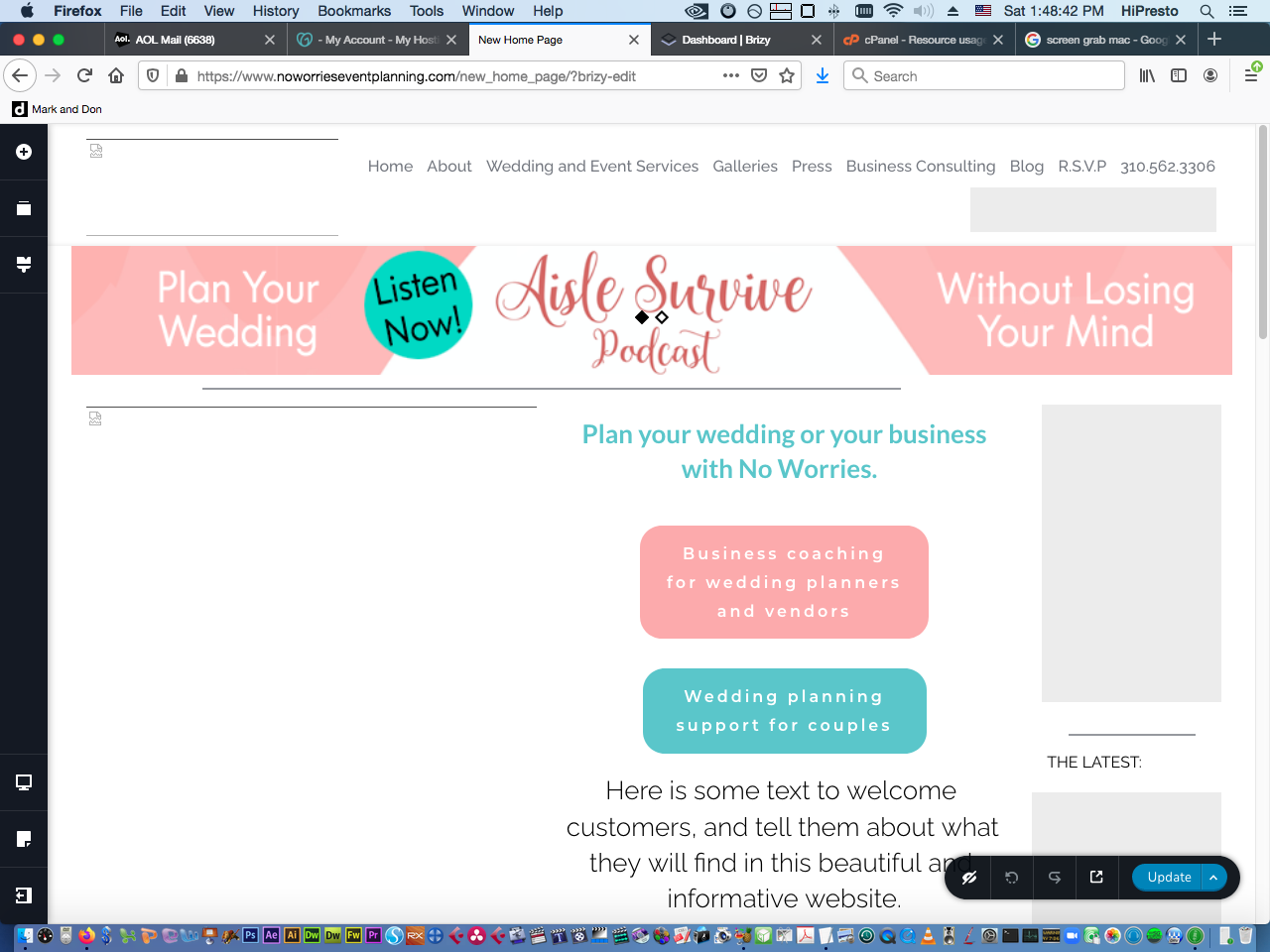
Those broken image boxes actually do have content, and they show fine when the page is viewed in a browser. I have tried re-placing the images and the slider, but the next time I open the page for editing in brizy, this is what I get.
(Edit) The gray boxes have brizy sidebar components, and they also work in browser, but do not show up after I reopen the page for editing in brizy either. :(
What do I do?
Thanks.
0 -
Hi Shaun,
Thank you for all these details! We would like to check this problem from your dashboard. Could you please send us the WP credentials to this site? We have created a private ticket for this request. You had to receive a notification regarding this by email. Could you send us in that private message the WP credentials to this site?
Best regards, Nelea.
0
Please sign in to leave a comment.
Comments
5 comments