Can't see Sync button in Saved blocks section?

I have Personal account in brizy cloud. Why I can't see the connect button in my saved blocks section? Screenshot attached:
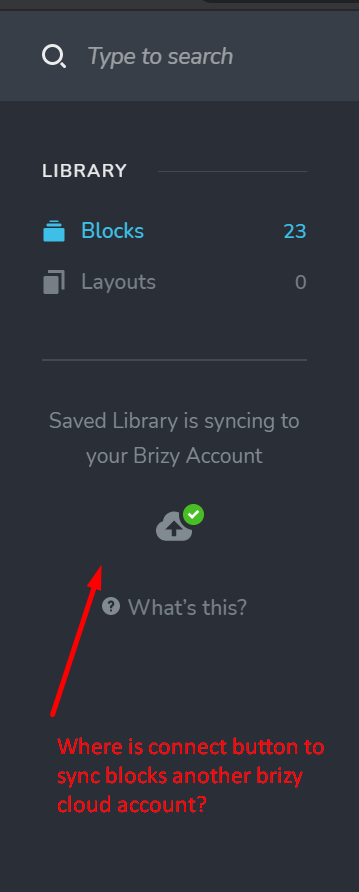
-

Hello Mukesh,
Thank you for your message,
Regarding the problem you encounter, I suggest you to do this steps:
1.Check if you have the latest versions of Brizy. ( Brizy FREE 2.3.3 and Brizy PRO 2.3.1).
2.Check out if your license is activated. See this video on how to do that: https://www.youtube.com/watch?v=cNknGr8JH6Y
3.See if you do not have the white label option activated. About white label you can see here: https://www.youtube.com/watch?v=cwgtzhZG6E0&t=53s
I hope this helps! If you have any other problems or questions, please feel free to ask!
Have a nice day and best regards,
Doina
0 -
Hi, I am using brizy cloud. I don't think these instructions apply to Brizy cloud. If you are not aware, it is a hosted brizy service provided by you. Can you pls confirm?
0 -
The videos that you posted is for the self hosted wordpress where we use brizy builder. If you are from Brizy support, it is a strange thing to explain you what is brizy cloud. I need solution for the Brizy "Cloud"
0 -
Hello Mukesh,
Yes, I am from Brizy Support.
Regarding the question you have, I think we misunderstood each other. Brizy means syncing the WordPress to Cloud, and vice-versa, Cloud to WordPress. You can not sync Brizy Cloud accounts to each other. If you want to connect the accounts, you have to use the "team memebers" option. If you have any other questions, feel free to ask!
Hope this helps!
Doina
0 -
Ok thanks for you response. Like you said "Brizy means syncing the WordPress to Cloud, and vice-versa, Cloud to WordPress." Lets suppose I want to connect Cloud to Wordpress, just curious to know how would I do it? Also, can you pls refer me any video that explains how I can sync two accounts using team member option? Thank you
0 -
Hello Mukesh,
Thank you for writing to us and sorry for the late response, support is limited on the weekends.
Regarding the question you have, please check this:
1.https://www.youtube.com/watch?v=FbhOQm-9wIg
2.https://www.youtube.com/watch?v=MolZYEg4Q_Y
At the same time, please make sure you have the latest versions of Brizy:
Brizy FREE 2.3.4
Brizy PRO 2.3.2
You can move the Cloud project into the WP site but in this case, you have to install on the WP dashboard the Brizy Free and Brizy Pro plugins. After this to connect your Brizy account into the WP environment too. After this, you can add in the saved layouts all pages from the Brizy Cloud and after this using them in the WP Site. In this video, you will find step by step how you can do this.
Hope this helps you! Best regards,
Doina
0
Please sign in to leave a comment.
Comments
6 comments