Brizy Post Template and Page Builder Framework (PBF): Sidebar not working, either "{{editor_sidebar id=”sidebar-1″}}" or missing sidebar

Hi Brizylians,
trying to get the sidebar working on a site based on PBF.
- Went to Brizy->Templates->New Template.
- Selected Single Post and a matching filter rule based on categories, published.
- Edited w/ Brizy and switched to Standard Template.
This works all fine. What I wonder is the following:
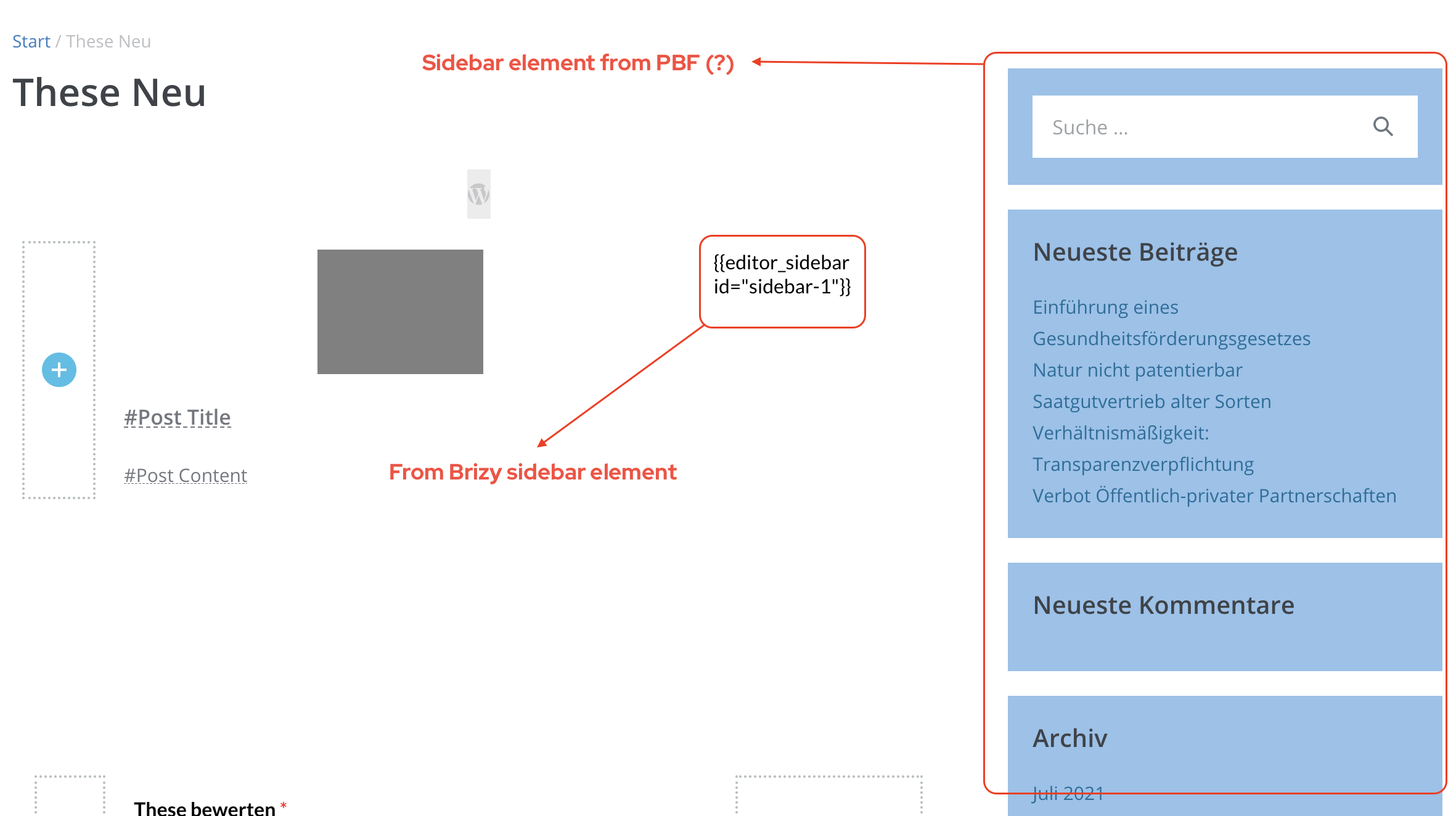
In Brizy Builder, the sidebar shows up at the right hand side. The layout seems to come from PBF.
When I add the sidebar element to a column, I see the string "{{editor_sidebar id=”sidebar-1″}}", but no sidebar (see screenshot).
How can I get a sidebar working on blog posts?
Thanks and best wishes,
Karsten
-
Any news on this - for us major - issue?
1 -

Hi Karsten,
I'm not sure I understood because initially you're talking about Brizy Templates (which is intended for dynamic content) and then you're talking about page Templates (and switched to Standard Template) that have nothing to do with Brizy Templates. Looks like you created a template for a post and then edited that post with Brizy. If you have created a template for a page or post, you no longer need to edit that page with Brizy.
In any case, the problem is that the sidebar element added in the editor appears in the form of code. Right? Can you please confirm you have this issue with the latest Brizy versions - Free 2.3.1. and PRO 2.3.1? Also, do you have the same problem if you disable all your external plugins? Does it happen on any page edited with Brizy?
0 -
Hi Alex,
thanks for your reply.
Looks like you created a template for a post and then edited that post with Brizy. If you have created a template for a page or post, you no longer need to edit that page with Brizy.
Why do you think so? I tried to explain my workflow step-by-step and did not mention I edited a post itself (the posts are edited w/ Gutenberg, of course).
So, here again:
- Brizy->Templates->Add New
- Published it.
- Entered Title and Display Condition: Template Type "Single" and category-matching include rule.
- Published again.
- Now entered "Edit with Brizy"
- In the Brizy editor, I changed under "Page Template" the value from "Brizy Template" to "Standard".
- Now created the template layout (with e.g. #-references to post title etc. as clearly displayed in the screenshot.
- Saved this template.
- Started creating posts (content) with Gutenberg. Everything works as expected (Brizy layout showing up as per the template except of the sidebar).
Is this the wrong approach? I guess not???
In any case, the problem is that the sidebar element added in the editor appears in the form of code. Right?
Wrong. It's not the sidebar code but a weird placeholder (double curly braces) with a wrong reference ("-1" points to nothing as I tried to explain with the screenshot.
Can you please confirm you have this issue with the latest Brizy versions - Free 2.3.1. and PRO 2.3.1? Also, do you have the same problem if you disable all your external plugins?
I have Brizy Free v. 2.3.2 and PRO v. 2.3.0 because of another issue that prevents PRO 2.3.1 from running (not sure if you can see it: https://support.brizy.io/hc/en-us/community/posts/4404339074193--BRIZY-PRO-IS-NOT-RUNNING-Please-update-Brizy-PRO-2-3-0-or-newer-After-update-to-2-3-1-).
Also, do you have the same problem if you disable all your external plugins?
I have disabled all plugins, except of the PBF Pro plugin as I need this for the Standard template. Brizy claims to work with PBF.
Does it happen on any page edited with Brizy?
This is my first adventure with Brizy and my only page.
1 -
Any news on this?
1 -
I have tested this with Brizy 2.3.3 and PRO 2.3.1 and the behavior is just the same.
Rather unhappy about this :-|
1 -
Hi,
Thanks for the detailed answers. The step with changing the page template in the first comment made me think that you edited the posts with Brizy. Now I understand the whole process. It will be a bit difficult to guess a cause based on screenshots so it will be faster if we check this directly on your site. In addition, it seems your patience has been a little touched ))).
I have created a private ticket for you so please send your login details there and we will look into it. Thanks.
0 -

hi guys,
i have the same problem when i update the plugins.
Will there be a fix a.s.a.p?
0 -

Hi Jeroen,
Thank you for your message.
Today were released updates for both Brizy FREE and Brizy PRO. Please, update them and check if problem is still present. After update you should have:
- Brizy FREE - 2.3.4
- Brizy PRO - 2.3.2
Best regards,
Denis.0
Please sign in to leave a comment.
Comments
8 comments