Post content element disappeared from the Elements menu

For some reason, the Post Content Element is no longer showing in my elements menu. Did anything change? This happened in 2 websites I'm building, and oddly one already has an archive template where I used the Post Content element without any trouble, still I don't see the element in the menu.
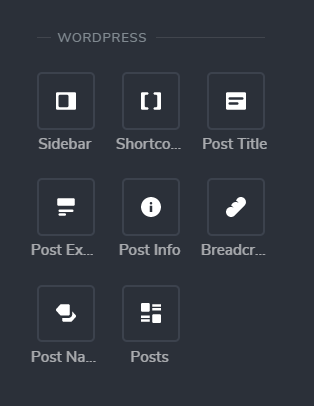
-

Hi Pablo,
Thank you for your message.
These elements are on the Brizy page; for the Archive element please check the Brizy template.
Please let us know if you have any further questions.
Best regards,
Nelea.
0 -
As I said, I'm working on a template, not a page, and I'm talking about the post content element, not the archive. Please help.
0 -
Hi Pablo,
I created a private ticket on this request. You had to receive a notification regarding this on email. Could you send to us in that private message the WP credentials to this site? We will check this problem from the dashboard. Could you please check if you have the latest Brizy Free 2.2.20 and Brizy Pro 2.2.13 version?
Best regards,
Nelea.
0 -

Hi,
Has this issue been resolved? I can find the post content element in the elements. I am using the Brizy pro 2.3.13
I hope there is a fix you can share
Thanks
0 -

Hello!
May You specify, which template are you building?
In the Archie template, we don’t have a Post Content widget, like in Single templates.
If you need to use, you can use the old version for post content, drag text elements in the template and add #, you will have the entire list of dynamic content elements, including post content.Kind regards,
Mihail
0
Please sign in to leave a comment.
Comments
5 comments