Woo Commerce Product archive

Hi there,
I have created the Woo Commerce product template in the templates section in Brizy.

I don't know why I only see 8 of the 27 published products. I have tried to convert the block into a carousel, but nothing has changed. The same products are repeated all the time.
Thank you very much for your help and regards.
-

Hi David,
Thank you for your message.
If you want to have many products on your page, please go to the Block Settings-Products - set the number of the column and rows, see here. Also, you can set up pagination for your product page, see here.
If you will have any other questions, please, let us know.
Nelea.
0 -
Hi Nelea,
Thank you for your message.
I have changed the settings in the products archive template, but haven't seen any changes. I can't see the categories either, as seen in the template
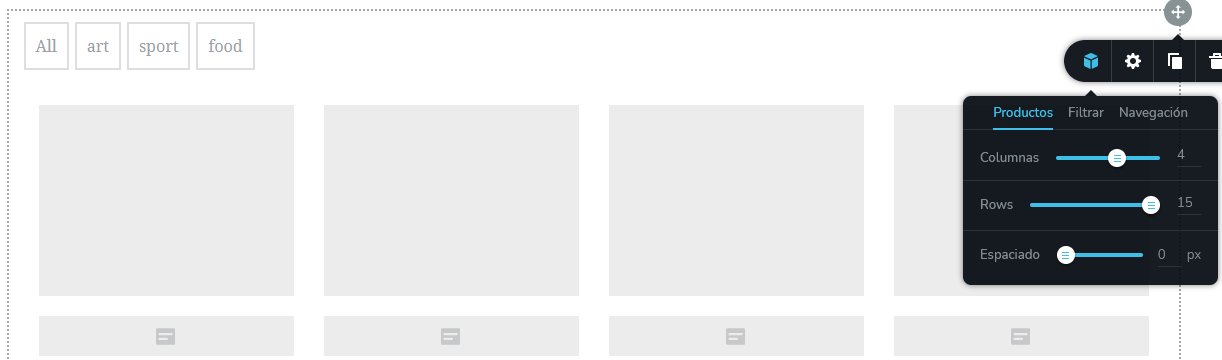
Regards
0 -

Hi,
Could you please give us more details about how did you create and set up the Shop page? Did you indicate in the WooCommerce which page will be the Shop one? Did you edit the page with Brizy before creating a template for the Shop page?
It is very important to “announce” WooCommerce what page will be the Shop one. See here for more details about this (chapter 3) https://docs.woocommerce.com/document/woocommerce-pages/. Also, in “WP dashboard -> Pages”, this page should be edited with Brizy. It should be an empty WP page.
Checking your screenshot, I found that you are using the Products element. We are recommending using the Archive element. This element will help you to display all products from all products categories. When using the Products element, you must select a category to display. Therefore, in the preview, you will see only products from that certain category.
Best regards,
Sandra0 -
Hi,
First I have created the product listing template in the Brizy section. Then I created a page with Brizy in which I inserted the Woo Commerce product block and other blocks. In the Woo Commerce settings, I have indicated that the page I have created is the landing page.
"Did you edit the page with Brizy before creating a template for the Shop page?" I think not. Could it be the cause of it not showing well? Would it be fixed by adding the block again?
I have changed the template settings in the Brizy editor.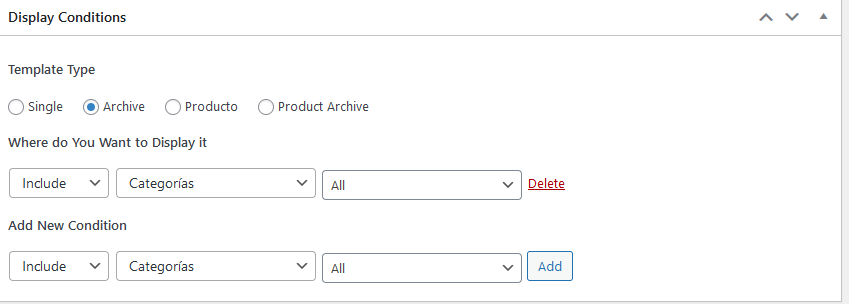
Best regards.
0 -
Hi David,
I have created a private ticket for you and soon one of my colleagues will contact you for more information.
Best regards,
Nelea
0 -
Ok, thank you very much.
0
Please sign in to leave a comment.
Comments
6 comments